
Receive the feed once. Check its health. Decide where it goes.
INGESTCONTROLDELIVER
AWS or self-hostedAV Mixer
PreviewCUT / FADEProgram
Build scenes, switch cameras and mix audio in a browser-based Video Mixer. Monitor your sources, record the programme and deliver it to your destinations from the same Callaba workspace.
Runs in your AWS account. AWS infrastructure charges apply.
SRT, RTMP or NDI
Receive the feed once. Check its health. Decide where it goes.
Watch the feed on a browser-based operator wall.
Capture the live feed for review, archive, or reuse.
Keep social outputs supplied from one controlled source.
Publish a viewer link or embed from the same workflow.
The same source can be monitored, recorded, restreamed, and published for browser playback without rebuilding ingest.
Start with the source. Check it in Multiview, record it, send it to social platforms or partners, and publish browser playback. The UI keeps each job visible; the API automates repeatable work later. Add Mixing when you need to assemble the programme in Callaba; a finished feed can start at Ingest.
When a scene must be created, prepare Preview and take it to Program with CUT or FADE. A finished programme can enter at Ingest instead.
Bring SRT, RTMP, or NDI feeds from venues, encoders, OBS, vMix, cameras, or remote production teams into Callaba.
Use browser multiview, live stream stats, and playback proof before trouble reaches viewers.
Configure main and backup SRT feeds. Switch between them manually or automatically at the transport level while preserving downstream receiver and puller connections.
Send the same controlled source to YouTube, Facebook, Twitch, SRT or RTMP destinations, browser playback, NDI workflows, or downstream production tools.
Capture live assets and move them toward archive or VOD workflows without creating a separate operations stack.
Build scenes in Preview, adjust audio, then take the next scene to Program with CUT or FADE. Add a publishing destination while Program continues running.
Explore the Video MixerReceive a finished feed, check the exact stream in Multiview, record it and route it to your destinations. Mixing is there when you need it, not an extra step for every stream.
See your sources in MultiviewUse Callaba as an SRT or RTMP server, Multiview, recorder, restreamer, Web Player, multilingual delivery solution, Video API, or private cloud file manager. The modules share one workflow and can be combined. AV Mixer adds scenes, Preview/Program switching and audio mixing to this workflow.
Build scenes, switch Preview to Program and mix audio in your browser.
Bring SRT, RTMP, or NDI feeds from venues, encoders, OBS, vMix, cameras, or remote production teams into Callaba.
Configure main and backup SRT feeds. Switch between them manually or automatically at the transport level while preserving downstream receiver and puller connections.
Capture live assets and move them toward archive or VOD workflows without creating a separate operations stack.
Engineering teams can extend the same ingest, routing, recording, playback, and storage model over API for internal panels and event automation.
SEE THE WORKSPACES
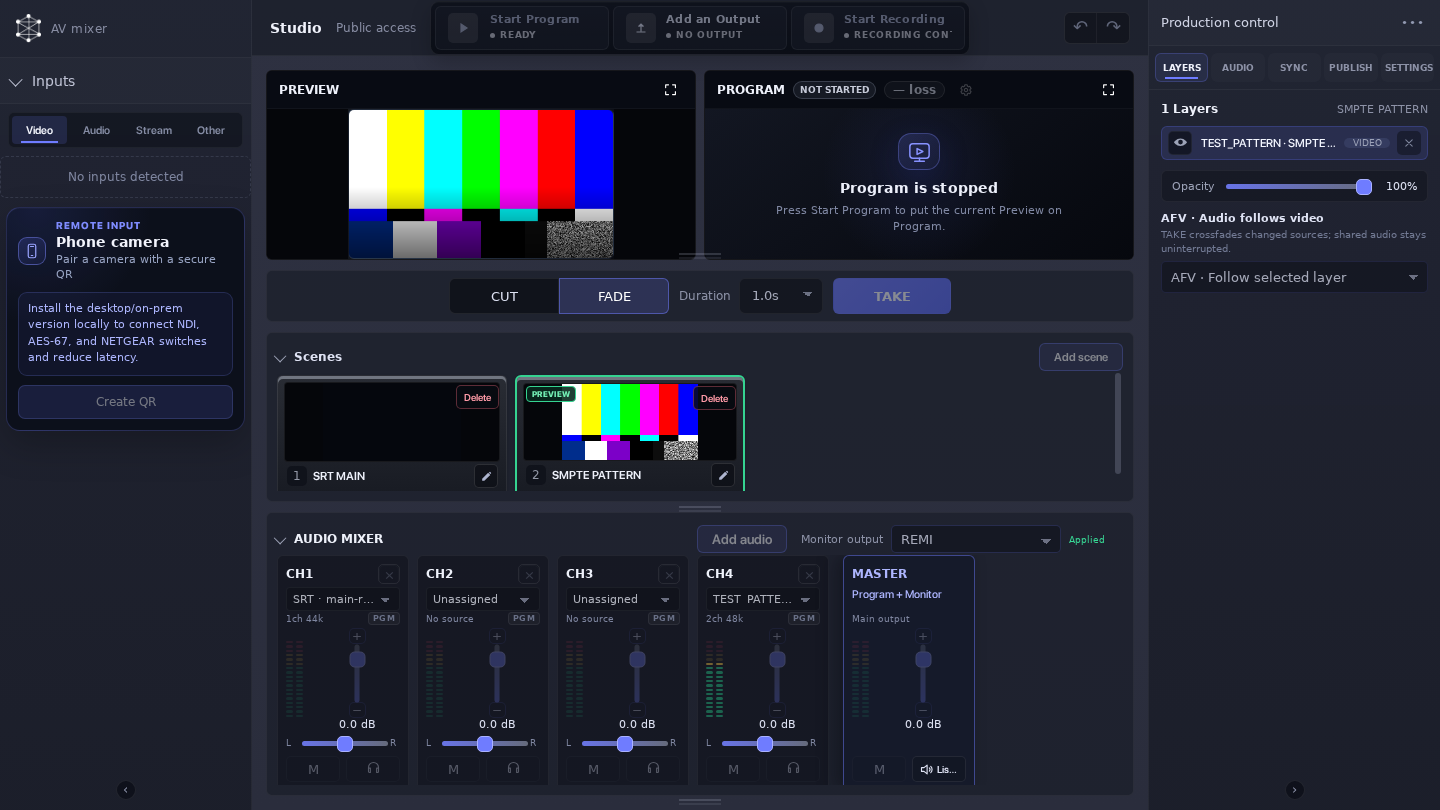
Build scenes, check them in Preview, and take them to Program. Mix audio, then record or stream your programme.
Open Mixer demo


 MULTIVIEW
Watch incoming feeds side by side, check stream health and audio levels, and find the source that needs attention.
Open Multiview demoAWS Marketplace is the shortest path to a cloud launch; self-hosted keeps infrastructure and data under your control. Confirm the installed release and its available modules before moving a production workflow between the two models.
AWS Marketplace is the shortest path to a cloud launch; self-hosted keeps infrastructure and data under your control. Confirm the installed release and its available modules before moving a production workflow between the two models.
Runs in your AWS account. AWS infrastructure charges apply.Deploy Callaba on AWS, install it on Linux, or open the Multiview demo and inspect the operator workflow before you choose.
Callaba supports teams that need clear visibility, prepared recovery paths, and repeatable live operations.
Monitor field feeds, review configured recovery paths, record the program, and route outputs to partners.
Manage contribution, playback proof, archive, API automation, and private deployment from one model.
Launch live video workflows again and again without rebuilding the stack for every project.
The strongest proof is not that one feature worked. It is that the live workflow became easier to operate end to end.
4.7/5 on AWS Marketplace15 customer ratingsThe customer reported 33% lower latency, 22% greater reach, 55% faster time to market, 44% higher engagement, and 30-40% lower infrastructure and operational costs.
We use Callaba web player to monitor SRT streams we send from the field to the studio. So far so good and it is cool that they allow us to remove the branding.
I can watch my SRT streams in the browser with an unlimited number of viewers.
Choose a product overview, an SRT architecture guide, or the operator manual. Each path keeps the next implementation step clear.
Recent field guides, integration notes, and practical live video workflows.
Explore Callaba 8.8.4: browser-based production, Multiview monitoring, SRT diagnostics, domain setup and installation.
Build a three-camera REMI production in Callaba with scenes, Preview and Program switching, audio, monitoring, recording, and delivery.
An NDI source can be discoverable while its video ports are blocked, and a healthy sender can remain invisible when discovery never reaches the receiver. Troubleshooting works faster when…
The same module boundaries your operators use are available to engineering teams for provisioning, monitoring, routing, recording, and internal control panels.
Engineering teams can extend the same ingest, routing, recording, playback, and storage model over API for internal panels and event automation.
Deploy Callaba on AWS, install it on Linux, or open the Multiview demo and inspect the operator workflow before you choose.