
Pick the environment that matches your compliance, latency, and networking requirements, then attach internal nodes with explicit roles and token handshakes when the deployment needs to scale.
Self-hosted deployment path
Keep the same live workflow on infrastructure you control.
Use Callaba as the controlled transport, playback, recording, and monitoring layer on your own cloud account, private infrastructure, or dedicated servers. Keep SRT ingest, browser playback, multi-destination delivery, and storage integration in one operating model without giving up ownership of the environment.
Built for teams that care about fixed-cost planning, compliance boundaries, custom networking, and predictable operations once the workflow moves beyond a quick managed launch.
See the vMix workflow pathStart with the SRT server deployment guideReview the Callaba Engine API overviewManage domains and SSL certificatesRun clusters, health checks, ports, backup, and migration
Infrastructure controlKeep networking, storage, and deployment boundaries in your hands
Run the same SRT, playback, restreaming, and recording workflow without depending on a managed runtime.
Economic shapeMove toward fixed-cost planning when usage becomes predictable
Choose your own compute, CDN, and storage providers instead of treating every workload as pure pay-as-you-go.
Operational fitOperate clusters and system health from one control surface
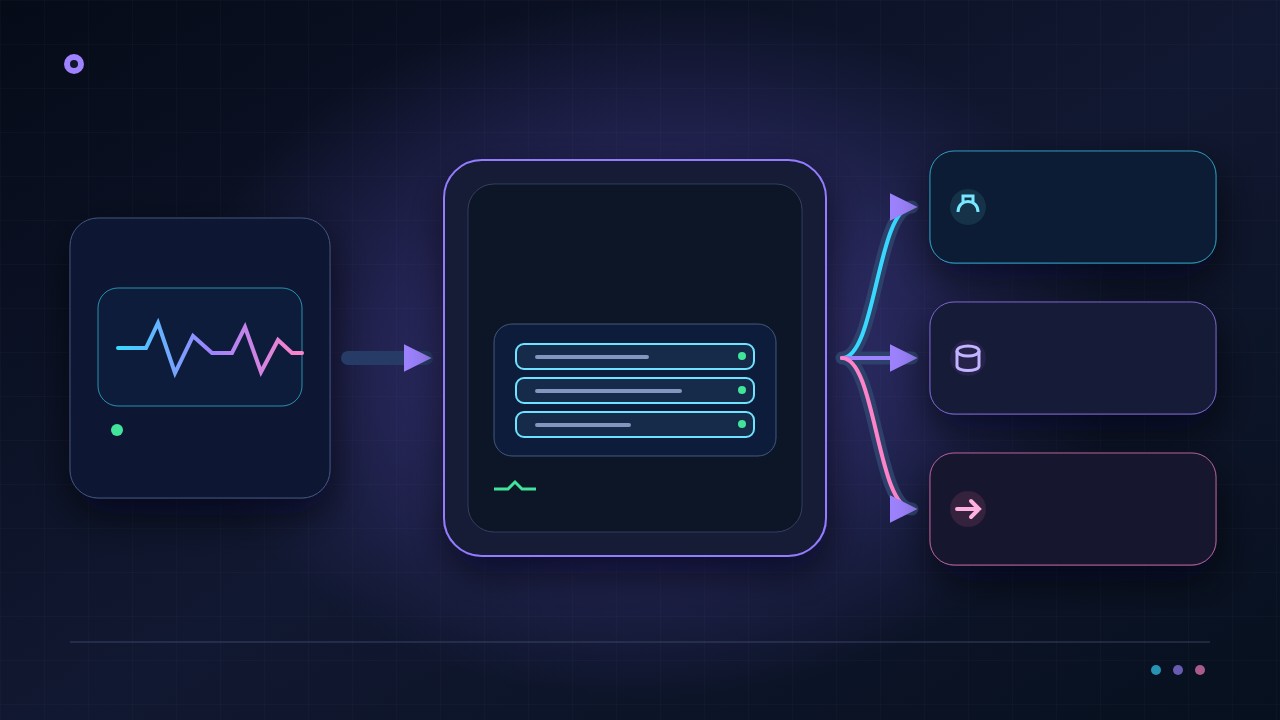
Attach trusted cluster nodes and inspect CPU, RAM, disk, stream errors, and active ports in the UI while engineering teams retain infrastructure control.
Secure setupIssue and renew free SSL from the UI
Set dashboard and streaming domains, use free Let's Encrypt with automatic renewal, or provide a reviewed custom certificate without a terminal-first certificate runbook.
“Good embed SRT player and useful control over who can watch.”
What self-hosted changesOps-first control
Callaba keeps the workflow layer while you choose the infrastructure layer.
You are not rebuilding the video product from scratch. You are choosing where the same ingest, monitoring, delivery, and archive workflow runs: your own cloud account, bare metal, or another controlled environment.
Inspect system state beside SRT ingest, playback, restreaming, and recording instead of splitting routine operations across terminal-first tools.
Choose delivery and storage providers based on cost shape, region coverage, and retention strategy, then export or import selected application and module settings for backup or migration.
Keep dashboard, streaming, WebRTC, and TURN domain settings beside self-signed, custom, or free Let's Encrypt certificate controls.
Fixed-cost leaningCompliance-friendlyCloud or on-premUI-managed healthPortable configuration
Callaba Self-Hosted is a self-hosted streaming platform for teams that want the media stack inside their own infrastructure. The value is straightforward: you control where the system runs, how it connects, how it is secured, when it is upgraded, and how it is integrated into your product or broadcast workflow. The trade-off is just as clear: your team owns the Linux environment and the operational work around it.
That makes self-hosted the right choice for engineering-led teams, broadcasters, OTT operators, and systems integrators that need control over routing, storage, deployment timing, data boundaries, or customer-specific delivery models. If your priority is the fastest path to evaluation with less infrastructure work, start with Callaba Cloud on AWS. If infrastructure ownership matters now, self-hosted is the right place to evaluate.
Callaba Self-Hosted starts from $5/month, and the license can be shaped around functional units and modules instead of forcing you into one oversized package.
What this self-hosted solution is
Callaba Self-Hosted is self-hosted streaming server software that you install on your own Linux server or virtual infrastructure. It is not a fixed appliance and it is not a managed black box. You choose the host, network boundaries, storage model, and the functions your workflow needs.
In practical terms, that means you can place the streaming layer inside your own data center, private cloud, customer environment, or controlled hosting setup. You can align it with your own firewall rules, retention policies, observability stack, release windows, and internal services. For teams building a real media product rather than testing a single stream, that control is often the main reason to self-host.
When teams choose it
Teams usually choose self-hosted when streaming is becoming part of the product or operating model rather than a simple publishing utility. Broadcasters and OTT operators use it when routing, egress policy, asset retention, and uptime procedures need to stay inside their environment. Product teams choose it when the media layer must connect cleanly to their own APIs, identity systems, billing logic, or customer-specific provisioning. Systems integrators choose it when the deployment has to live in customer-owned infrastructure instead of a shared managed environment.
It is also a sensible choice when you expect the system shape to vary by project. One customer may only need ingest and delivery. Another may need recording, VOD, API control, or conferencing. A self-hosted platform that is assembled from modules is easier to adapt than a single fixed package.
What you can assemble with it
Callaba Self-Hosted can be assembled around the workflows you actually need to run. A deployment may start with Multi-Streaming for ingest, routing, protocol conversion, and delivery to multiple destinations. If your application needs to create and control workflows programmatically, add Video API and review the Callaba Engine documentation to validate the control surface early.
For retained assets and playback workflows, add Video on Demand. For always-on channels and scheduled output, use Continuous Streaming. If your product includes real-time sessions, add Video Conferencing. If you run paid live events, Pay-Per-View Streaming can be added without moving to a different platform.
The key point for buyers is that this is not one narrow SKU. You can license a smaller deployment for one job, then expand as the workflow grows. That is especially useful when the roadmap is still evolving or when different business units need different media capabilities.
Is this a platform or only a media server?
A self-hosted media server can solve one transport or processing job. A self-hosted video platform must also give the team a coherent path across live ingest, routing, recording, retained assets, playback, access control, automation and day-two operations. The deployment boundary belongs to your team, but the product should keep those workflow layers connected.
Evaluate Callaba against the outcome you need first. Use Multi-Streaming for ingest, routing and destination fan-out; Video on Demand for assets and playback; Pay-Per-View Streaming for paid access; and Video Conferencing for interactive sessions. Add the Video API only when your own application needs programmatic control. The API is an implementation layer, not the product story by itself.
- Choose self-hosted when infrastructure ownership, private networking, data boundaries or release control are real requirements.
- Start in cloud when the immediate goal is to prove a workflow with less operational work.
- Model the full cost across infrastructure, monitoring, updates, backups, incident response and engineering time instead of comparing license prices alone.
How deployment works
A good self-hosted evaluation starts with the workflow, not with the server. Define what must be ingested, what must be transcoded or transformed, what outputs are required, what needs to be recorded, what APIs or backend systems need to control the platform, and what security boundaries must be respected. That gives you a practical deployment design instead of a generic platform discussion.
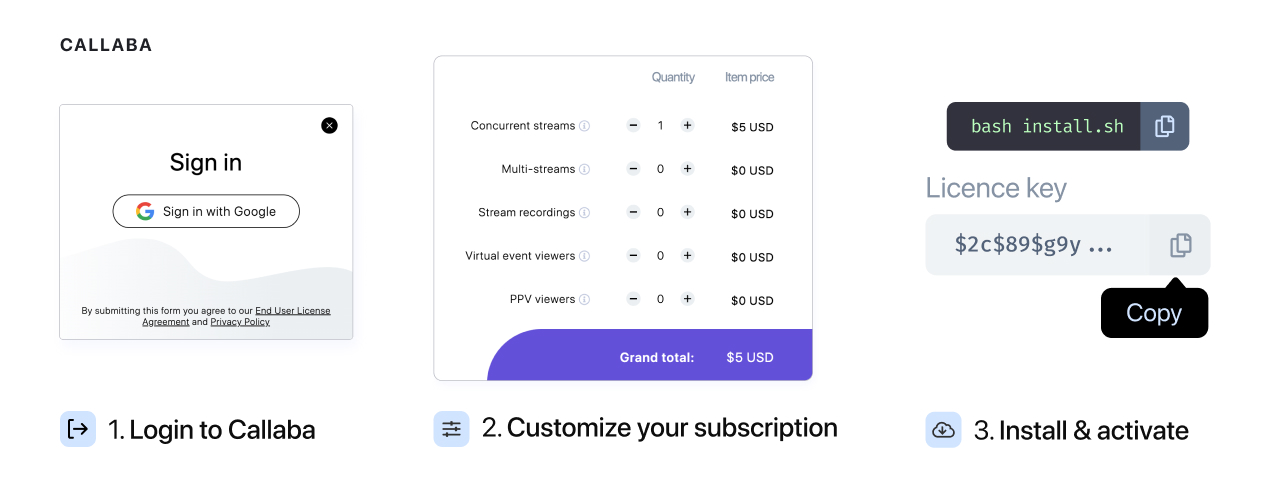
- Choose the modules and functional units that match the workflow you need to run.
- Provision the Linux host or hosts with the network, storage, and access model you expect in production.
- Install and activate the software, then validate with real streams, expected concurrency, and your actual monitoring and backup approach.
For technical evaluators, the best comparison is to use the same ingest formats, destinations, codecs, and traffic assumptions in both cloud and self-hosted tests. That exposes the real trade-off between operational simplicity and infrastructure control before you commit.
Installation paths
The main Linux deployment path is the self-hosted solution installation guide. Use it when you want the standard path for bringing Callaba up on your own server and validating the core system.
If your deployment depends on newer packaging or on specific media features such as HDR, HEVC, AV1, VP9, or conferencing workflows, use the Callaba 8.2 installation guide for encoding profiles and video conferencing. That path is the right one when codec support and version-specific capabilities are part of the buying decision, not an afterthought.
If your application will control workflows directly, review the API documentation alongside the install guide. That lets engineering teams evaluate deployment and integration effort together instead of treating them as separate decisions.
How pricing works
Pricing starts from $5/month. The license can be shaped around functional units and modules, which makes the pricing model easier to understand than a large fixed bundle. In plain terms, you pay for the capabilities your workflow needs rather than buying every feature up front.
That matters because not every deployment has the same job. A simple routing and delivery node should not be priced like a full OTT stack with API control, VOD, conferencing, and monetization features. As the number of units increases, the price per unit decreases, so larger deployments benefit from volume-based pricing.

The practical way to scope price is to map the workflow first: ingest, processing, delivery, storage, playback, API control, and any special modules. That produces a clearer cost model than trying to estimate from a generic platform label.
Self-hosted vs cloud
The decision is mostly about control versus operational load. Self-hosted gives you more control over infrastructure, security boundaries, storage, upgrade timing, and deep integration. Cloud gives you a faster starting point with less operational ownership. Neither is universally better; the right option depends on whether your team values speed or infrastructure control more at this stage.
| Decision factor | Self-hosted | Cloud first |
|---|---|---|
| Launch speed | Slower to start because you provision and operate the environment. | Faster to evaluate because infrastructure is already managed. |
| Infrastructure control | High control over network boundaries, storage, release timing, and integration. | Less infrastructure control, but less setup work. |
| Operational burden | Your team owns updates, monitoring, backups, scaling, and incident response. | Lower operational responsibility during evaluation and early rollout. |
| Best fit | Long-term platform ownership, customer-specific deployments, stricter security or compliance boundaries. | Proof of concept, early product validation, smaller ops footprint, faster experimentation. |
If you are unsure, the practical path is often sequential: validate the workflow in Callaba Cloud on AWS, then move to self-hosted once the product shape is clear and infrastructure ownership becomes the bigger requirement.
What your team must own operationally
In self-hosted mode, your team owns the Linux hosts, package lifecycle, network and firewall policy, TLS and secrets handling, storage layout, backup strategy, observability, alerting, rollback discipline, capacity planning, and incident response. You also need a plan for how updates are tested and introduced without disrupting live traffic.
This is not a drawback hidden in small print. It is the operating model. For teams that already run production infrastructure, it is normal and often preferable. For teams without Linux operations or on-call capacity, cloud is usually the better place to start.
Self-hosted video platform FAQ
What is a self-hosted video platform?
It is a video platform that runs inside infrastructure your organization controls. Your team owns the Linux environment, networking and operations, while the product supplies connected live, playback, storage and automation workflows.
Is a self-hosted video platform the same as a media server?
No. A media server may cover only ingest, transport or processing. A platform also needs clear paths for playback, retained assets, access, automation, observability and ongoing operations.
When is self-hosted better than a managed cloud service?
It is usually the better fit when infrastructure control, private networking, compliance boundaries, customer-owned deployment or release timing justify the added operational responsibility.
Can we evaluate Callaba in cloud before installing it on Linux?
Yes. Start with the cloud workflow to validate the product shape, then use the Linux installation guide when your team is ready to own the infrastructure.
How can operators preview the workflow before deployment?
Open the Callaba Multiview demo to see the browser monitoring experience. Treat it as a product demonstration; production capacity and supported workflow details still need to be validated against your deployment plan.
Practical next steps
- Launch the workflow in Callaba Cloud for the fastest product evaluation.
- Install Callaba on Linux when infrastructure ownership is required.
- Open the Multiview demo to inspect the operator monitoring experience.
If you are ready to deploy on your own infrastructure, start with the Linux self-hosted installation guide. If advanced codecs or conferencing are part of the requirement, go directly to the 8.2 installation path.
Then review the modules that match your actual use case: Multi-Streaming, Video API, Video on Demand, Continuous Streaming, Video Conferencing, and Pay-Per-View Streaming. If you still need to compare operating models before committing to Linux ownership, use Callaba Cloud on AWS as the faster evaluation baseline.
If you need help mapping modules to a deployment or estimating the right functional-unit mix, contact [email protected].
Product decision guide
Choose self-hosted streaming when control has an owner
The Callaba self-hosted product places the streaming control plane and media workflows on your Linux infrastructure. It is designed for teams that need private-network placement, infrastructure policy or predictable ownership and are prepared to operate capacity, upgrades and recovery.
An on-premise streaming readiness test
- Infrastructure owner: Name the team responsible for Linux, storage, network, TLS, monitoring, backups and upgrade windows before production traffic arrives.
- Workload envelope: Size simultaneous inputs, outputs, recordings and transcodes with peak-event headroom and a documented capacity alarm.
- Recovery proof: Rebuild or restore a test instance, rotate credentials and rehearse a failed-node response instead of treating installation success as resilience.
Automation comes second. Install and validate the product workflow before automating infrastructure or media resources. API access is useful after ownership, monitoring and rollback are established.
Self-hosted streaming platform questions
Is self-hosted video streaming the same as running one media server?
Not necessarily. A production platform combines ingest, routing, playback or VOD, access, observability and operations. The required Callaba modules depend on the workflow you deploy.
Can Callaba run on-premise without a managed media service?
Yes. Install Callaba on supported Linux infrastructure and operate the host, network and capacity within your environment. Validate licensing and hardware against the planned workload.
Should we test in cloud before a Linux installation?
A cloud evaluation can validate the media workflow quickly. Repeat the acceptance test after self-hosted installation because network placement, storage and capacity responsibilities change.
Continue with the owned workflow
Validate the workflow before sizing production Linux
Evaluate Callaba in cloud or install it on your host, then use Multiview to run the same operator acceptance test.
Launch Callaba in the cloud · Install Callaba on Linux · Open the live Multiview demo
Self-hosted delivery needs explicit network ownership
A self-hosted streaming deployment needs a resolvable domain, correctly scoped certificates, restricted network access, and a tested media path. TCP provides ordered reliable delivery for applications that require it, while live-media transports can use other protocols according to their latency and recovery requirements. Confirm the exact deployment and port contract before exposing an ingest or player endpoint.