

Related vendor hub
Browse all Panasonic SRT gateway workflows
Use the Panasonic hub to compare PTZ camera, camcorder, SRT, and RTMPS gateway setup paths.
The Panasonic HC-X20 RTMPS setup is a camera-to-cloud ingest workflow: set the camera streaming protocol to RTMP(S), paste the Callaba RTMPS receiver URL, start streaming, and verify preview, bitrate, and audio in Callaba. Use this setup when the HC-X20 is at the venue and Callaba is the cloud receiver for monitoring, recording, routing, multiview, or restreaming. Panasonic documents RTSP/RTP/RTMP/RTMPS live streaming with H.264/AAC for this model; it does not list SRT, NDI, or ST 2110.
Quick answer
To use Panasonic HC-X20 with RTMPS, create an RTMPS ingest in Callaba Gateway, set the camera streaming protocol to RTMP(S), paste the Callaba receiver URL, and start the stream. Use RTMP only as a fallback when secure ingest is not possible. If an SRT leg is required, generate it after ingest in Callaba or use an external encoder; the HC-X20 itself is not documented with SRT Stream ID, passphrase, caller/listener, NDI, or ST 2110 settings.
The Panasonic HC-X20 sends one RTMPS contribution feed into Callaba Gateway. After ingest, preview, recording, routing, multiview, playback, and restreaming are parallel downstream uses, not mandatory sequential steps.
- Panasonic HC-X20RTMP(S) sender
- Callaba GatewayRTMPS receiver
- Preview
- Record
- Route
- Restream
What this setup does
In this workflow, the HC-X20 acts as the camera encoder and Callaba acts as the RTMPS gateway, receiver, monitor, recorder, and routing layer. The camera pushes one H.264/AAC live stream to Callaba. From there, the same source can be used for web preview, multiview, recording, restreaming, or onward routing without asking the camera to send several separate contribution feeds.
What this model can and cannot do in this workflow
For the exact HC-X20, Panasonic lists live IP streaming protocols as RTSP, RTP, RTMP, and RTMPS. The documented live streaming codec is H.264/MPEG-4 AVC Main Profile or High Profile with AAC-LC audio at 48 kHz, 16-bit, two channels. The operating-instructions specification lists live streaming up to 1920x1080 and up to 24 Mb/s.
Important limits change the workflow decision. HEVC/H.265 is documented for internal MOV/MP4 recording, not for live IP streaming from this camera. The HC-X20 has HDMI Type A output, including 4:2:2 10-bit up to 2160/59.94p or 2160/50.00p, but the exact-model sources reviewed do not list SDI output, NDI, ST 2110, or SRT fields. The camera has built-in audio and two XLR 3-pin audio inputs with line, mic, and phantom-power options.
Public Panasonic sources are inconsistent on the physical LAN detail: the operating instructions and regional specifications point to wired networking through a USB Ethernet adapter, while one North America support table lists RJ-45. Before an event, I would confirm the actual body, adapter, firmware, and visible network menu on the unit you will use.
The shared HC-X2/HC-X20 documentation is useful, but Panasonic firmware notes mark some additions as X2-only. Do not copy HC-X2-only behavior to an HC-X20 unless your camera menu clearly exposes it.
Recommended workflow
For an HC-X20 RTMPS gateway workflow, use direct RTMPS from the camera to Callaba. RTMP is the fallback when the production network or endpoint cannot use TLS. Treat RTSP/RTP as a LAN pull option for a local bridge, not as the normal cloud push path. If the production requires SRT downstream, receive the HC-X20 over RTMPS first and then create the SRT output from Callaba or use an external HDMI encoder that is documented for SRT.
When not to use this setup
If the camera and switcher are in the same room, HDMI capture may be simpler and may preserve a higher local video format than the documented IP streaming path. If the only destination is a public platform and you do not need cloud monitoring, routing, recording, or multiview, the camera may be sent directly to that platform with RTMPS. Do not plan the HC-X20 as an NDI source; NDI is not listed for this exact model in the reviewed Panasonic documentation.
Before you start
- Update and note the HC-X20 firmware version, then check that the streaming menu exposes RTMP(S).
- Decide whether the camera will use Wi-Fi or wired networking through the supported USB Ethernet adapter path described in the operating instructions.
- Prepare the Callaba RTMPS URL and stream name/key before the camera is on a live schedule.
- Test the uplink with the bitrate you intend to use, not only with a low test stream.
- Check XLR input mode, phantom power, and audio meters before starting the stream.
Create the Callaba ingest
In Callaba, create an RTMP/RTMPS ingest endpoint and copy the secure RTMPS receiver URL for the HC-X20. Keep the full URL together with the stream name or key exactly as Callaba provides it. If your deployment exposes both RTMPS and RTMP, start with RTMPS and keep RTMP only as a controlled fallback.
Configure the HC-X20
On the camera, open the network streaming area, set STREAMING PROTOCOL to RTMP(S), and enter the Callaba receiver URL in the RTMP(S) destination configuration. Panasonic also documents RTSP operation where the receiver pulls from a camera URL such as rtsp://camera-ip:port/stream; that is a different LAN workflow and should not be confused with the RTMPS push setup.
Settings table
| Where | What to do / field to fill | First-test value | Why / check |
|---|---|---|---|
| Callaba ingest | Create an RTMP/RTMPS receiver | RTMPS endpoint | Use secure ingest when available. |
| Callaba ingest | Copy the complete receiver URL | Full RTMPS URL with stream name/key | A missing path or stream key is a common cause of no connection. |
| HC-X20 NETWORK menu | Set STREAMING PROTOCOL | RTMP(S) | This is the documented push protocol family for cloud ingest. |
| HC-X20 RTMP(S) destination | Paste the Callaba receiver URL | Use the exact copied RTMPS URL | Watch for copied spaces or truncated keys. |
| HC-X20 live stream format | Select a documented H.264 streaming format | 1080p30 or local project frame rate | Panasonic lists live streaming up to 1920x1080. |
| HC-X20 streaming bitrate | Set a practical contribution bitrate | 4-6 Mb/s for 1080p30, 6-8 Mb/s for 1080p60 | Stay below the real venue uplink; the documented ceiling is higher than many field networks can sustain. |
| HC-X20 audio inputs | Confirm XLR or internal mic source and levels | AAC-LC two-channel stream | Check camera meters and Callaba meters together. |
| Callaba monitoring | Open preview and connection statistics | Stable bitrate, video preview, moving audio meters | Do this before routing, recording, or restreaming. |
Monitoring
After starting the HC-X20 stream, open the Callaba receiver view and check incoming bitrate, connection uptime, preview, and audio meters. Leave the test running long enough to expose Wi-Fi fades, weak uplink, or a bitrate that is too high for the venue. If the preview is stable but audio is missing, check the camera audio source and XLR input mode before changing the ingest URL.
Failover and local ingest options
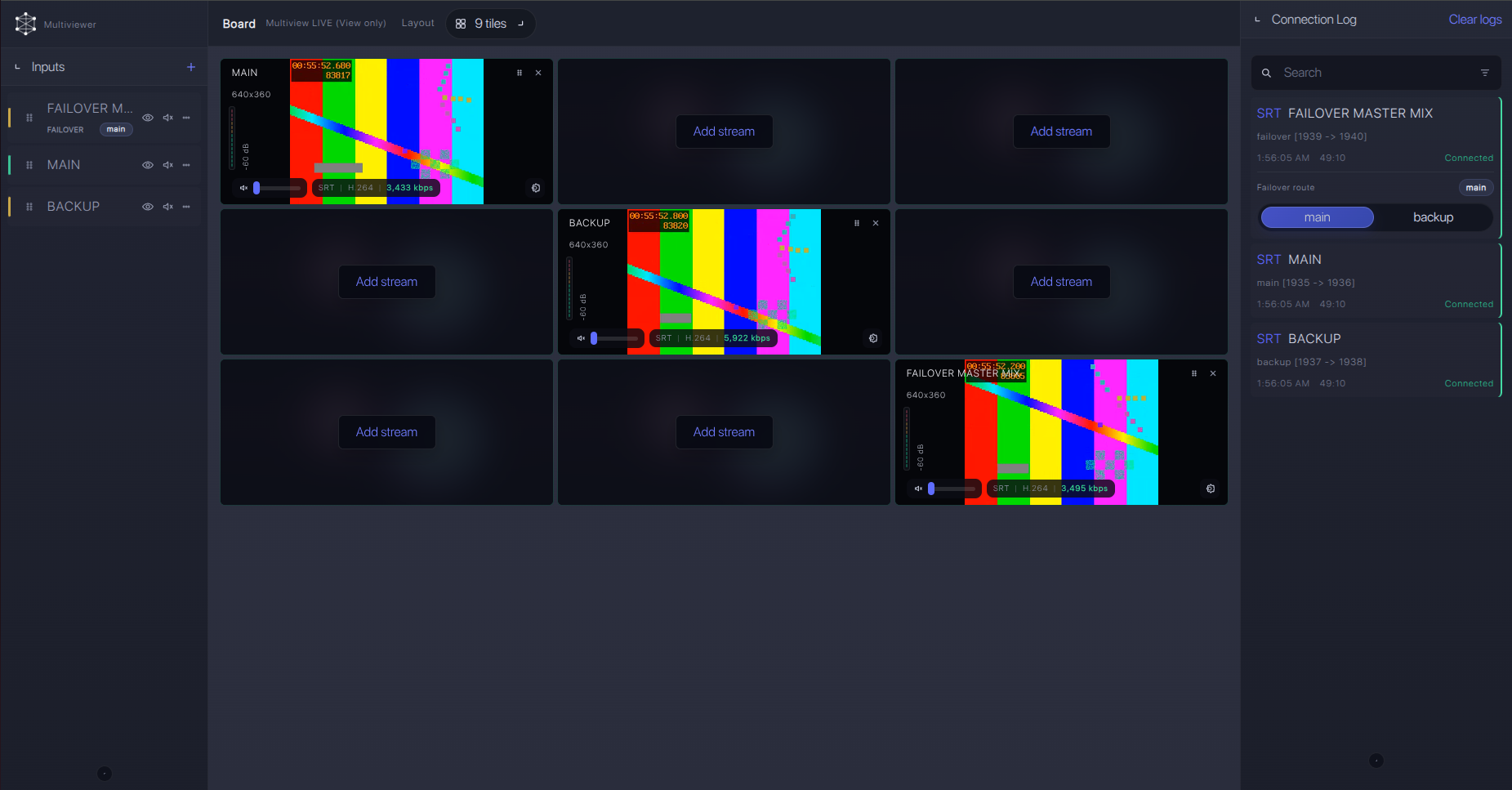
For production events, plan what happens if the main encoder, venue uplink, or primary contribution path fails. Callaba can be part of that continuity plan without changing the basic Panasonic HC-X20 ingest workflow.
Recording and playback
Once ingest is stable, recording and playback are downstream Callaba choices. You can record the received RTMPS feed, preview it in a browser, restream it, or route it to other outputs in parallel. The camera does not need to run a separate stream for each downstream use.
Troubleshooting
| Symptom | Check in Callaba | Check on HC-X20 | Likely fix |
|---|---|---|---|
| No incoming stream | Receiver is active; RTMPS URL and stream key are correct. | STREAMING PROTOCOL is RTMP(S); URL was pasted completely. | Re-copy the full URL, remove trailing spaces, then restart streaming. |
| Connects, then drops | Connection uptime and incoming bitrate reset repeatedly. | Wi-Fi strength or USB Ethernet adapter path; bitrate setting. | Use wired networking when possible and lower bitrate for the first production test. |
| Video but no audio | Preview works but audio meters are flat. | XLR line/mic mode, phantom power, channel assignment, camera meters. | Fix the camera audio input path before changing Callaba routing. |
| Stutter or unstable recording | Incoming bitrate spikes or drops during the problem. | Streaming bitrate and frame-rate setting. | Reduce bitrate, avoid congested Wi-Fi, and retest for 10-15 minutes. |
| RTSP bridge cannot pull | Bridge host has network reachability to the camera IP. | RTSP mode and camera IP/port. | Keep RTSP on the same LAN, open firewall rules, or use RTMPS push instead. |
| Need SRT after ingest | Check the downstream SRT output statistics, including RTT, loss, retransmits, and uptime. | No SRT fields are documented on the HC-X20. | Receive HC-X20 over RTMPS, then create the SRT leg from Callaba or from a separate encoder. |
Official references
These are the most useful official resources for confirming the HC-X20 workflow before a show.
Vendor references
- Panasonic HC-X20 specifications
- HC-X2/HC-X20 operating instructions: network menu
- HC-X2/HC-X20 operating instructions: streaming function
- HC-X2/HC-X20 operating instructions: specifications
- Panasonic HC-X2/X20 firmware update service
Callaba resources
FAQ
Can Panasonic HC-X20 send RTMPS to Callaba?
Yes. Panasonic documents RTMP and RTMPS live streaming for the HC-X20. In Callaba, create an RTMP/RTMPS ingest and paste the RTMPS receiver URL into the camera RTMP(S) destination settings.
What is the Panasonic HC-X20 RTMPS server URL?
Use the full RTMPS receiver URL from Callaba, including the path and stream name or key. Do not shorten it to only a hostname and port.
Does the HC-X20 send SRT directly?
The exact-model Panasonic sources reviewed do not list SRT settings, Stream ID, passphrase, or caller/listener modes for HC-X20. Use RTMPS/RTMP, or create an SRT leg after ingest in Callaba.
Can I use RTSP instead of RTMPS?
Yes, but it is a different workflow. RTSP is receiver-pulled from the camera, typically on a LAN, using a camera URL such as rtsp://camera-ip:port/stream. For cloud contribution, RTMPS push is usually simpler.
Does HC-X20 live stream HEVC/H.265?
Panasonic documents H.265/HEVC for internal recording on this model. The documented live IP streaming format is H.264 video with AAC-LC audio.
Is HC-X20 an NDI camera?
NDI is not listed for this exact model in the reviewed Panasonic HC-X20 sources. Plan HDMI capture or confirmed RTMPS/RTMP/RTSP workflows instead.
Next steps
Build the workflow in this order: confirm the camera firmware and network adapter path, create the Callaba RTMPS ingest, run a private bitrate and audio test, then enable recording, multiview, restreaming, or routing only after the incoming feed is stable.
Try Callaba Gateway with Panasonic HC-X20 RTMPS
Create an RTMP/RTMPS ingest in Callaba, send the HC-X20 feed to the gateway, and check the received stream. After ingest is stable, use Callaba outputs for preview, recording, restreaming, multiview, playback, routing, or API workflows as parallel downstream options.
