

Related vendor hub
Browse all Panasonic SRT gateway workflows
Use the Panasonic hub to compare PTZ camera, camcorder, SRT, and RTMPS gateway setup paths.
Panasonic AW-UE40 SRT setup is a direct camera-to-cloud contribution workflow: the AW-UE40 sends an SRT feed and Callaba Gateway receives it. Use this setup when AW-UE40 is at the venue and Callaba is the cloud SRT receiver for monitoring, recording, routing, multiview, or restreaming. In most WAN jobs, the camera should initiate the connection as SRT Client(Caller), while Callaba listens on a public UDP port and gives you preview, audio, bitrate, loss, RTT, retransmit, and uptime checks.
Quick answer
To use Panasonic AW-UE40 with SRT, set AW-UE40 as the SRT Caller and send the stream to a cloud SRT Listener. In this guide, Callaba works as the SRT gateway, receiver, monitor, recorder, and routing layer. The main path is direct SRT; before the event, confirm that the installed firmware exposes the expected SRT Client(Caller), Listener, Stream ID, passphrase, encryption, and latency settings.
The Panasonic AW-UE40 sends one SRT contribution feed into Callaba. After ingest, Callaba can preview, record, route, restream, and provide multiview in parallel; these are not mandatory sequential setup steps.
- AW-UE40SRT Client(Caller)
- Callaba GatewaySRT Listener
- Preview
- Record
- Route
- Restream
- Multiview
What this setup does
This workflow treats the AW-UE40 as the camera and encoder. Callaba is not controlling the lens or pan-tilt head here; it is receiving the live IP contribution feed and making that source available for downstream work. In practice, make Callaba the receiver/server side in the cloud and let the AW-UE40 call out from the venue.
That direction usually avoids venue firewall problems. The reverse design, AW-UE40 as SRT Listener, is documented but should be considered advanced for internet use because the camera side may need public addressing, UDP port forwarding, and firewall rules.
What this model can and cannot do in this workflow
For this exact model, Panasonic documentation confirms SRT, RTMP, RTMPS, RTSP/RTP, NDI HX2, H.264/AVC, H.265/HEVC, MJPEG/JPEG, and AAC-LC audio for IP workflows. The AW-UE40 operating instructions document SRT Client(Caller) and Listener modes, Stream ID, latency, AES-128/AES-256 encryption, and passphrase. Rendezvous mode is not listed in the AW-UE40 material I found, so I would not design the event around SRT Rendezvous.
There are important limits. Official specifications list the AW-UE40 with HDMI output, LAN/IP streaming, USB Type-C UVC/UAC, PoE+, and a 3.5 mm mic/line input. They mark 3G-SDI as an AW-UE50 feature, not an AW-UE40 feature. Do not plan this model as a native SDI camera. Do not plan it as SMPTE ST 2110 or bonded cellular hardware either, because those capabilities are not listed for AW-UE40.
For codec planning, SRT is documented with H.264 or H.265. RTMP/RTMPS is documented with H.264. NDI HX2 is listed as H.264. Panasonic also lists AAC-LC audio at 48 kHz, 16-bit, 2-channel for IP/NDI workflows. Public NDI wording varies between upgrade language and a firmware note saying optional NDI functionality became standard for AW-UE40/AW-UE50, so confirm the installed firmware and visible NDI menu if you plan to use NDI HX2.
Recommended workflow
Use direct SRT first: AW-UE40 in SRT Client(Caller) mode to a Callaba SRT Listener. Start with H.264 for the first test because it is the safest codec for preview, recording, web playback, and downstream decoders. Use H.265 only after confirming every downstream tool can decode it.
If direct SRT is unavailable on the installed unit, update firmware first. If you still cannot use SRT, the first confirmed direct fallback is RTMPS or RTMP from the AW-UE40 to a suitable ingest. Use RTSP or NDI HX2 through a local bridge only when your LAN production design needs that bridge.
When not to use this setup
If the camera and switcher are on the same LAN, local HDMI or NDI HX2 may be simpler than sending SRT to the cloud. If the only destination is a public platform and you do not need monitoring, recording, routing, multiview, or controlled restreaming, RTMPS may be enough. If you need UHD from this camera, use the documented HDMI path unless your installed firmware and menu explicitly provide the required IP output mode. Official AW-UE40 IP and NDI listings are Full HD-class, not a replacement for HDMI UHD output.
Before you start
- Update the AW-UE40 to current production firmware. Panasonic firmware v2.35 notes improved SRT H.264/H.265 streaming stability.
- Confirm the camera shows SRT Client(Caller), Listener, Stream ID, latency, encryption, and passphrase settings.
- Confirm a public hostname or IP and an open UDP port for the Callaba SRT Listener.
- Prepare exact Stream ID and passphrase text. Both are case-sensitive and whitespace-sensitive; a trailing space or copied newline can break the handshake.
- If handshake failures are hard to diagnose, check firmware notes or vendor support for the device-side SRT library information and confirm Callaba server compatibility through release or support information.
Create the Callaba ingest
In Callaba, create an SRT server and choose a UDP port that can be reached from the venue. If your workflow uses Stream ID or encryption, configure the same values you will type into the AW-UE40. When the server is ready, it should wait for the camera connection and then show incoming bitrate, preview, audio activity, packet loss, RTT, retransmits, and connection uptime.
Configure the AW-UE40
Open the AW-UE40 web interface or camera streaming configuration area. Select SRT streaming, choose Client(Caller), enter the Callaba host or IP address, and enter the UDP port from the Callaba SRT server. Use H.264 for the first test. For a first internet test, set SRT latency around 250-500 ms in the camera SRT latency setting, then lower it only after RTT, packet loss, and retransmits are stable. For 1080p30, 4-6 Mb/s is a reasonable starting point; for 1080p60, start around 6-8 Mb/s and adjust to the uplink and production needs. If the camera exposes GOP or keyframe controls, a 2-second keyframe interval is a practical first test.
Settings table
| Where | What to do / field to fill | First-test value | Why / check |
|---|---|---|---|
| Callaba | Create SRT server and choose UDP port | Use a dedicated open UDP port | The AW-UE40 caller must be able to reach this listener. |
| Callaba | Stream ID requirement | Use a short exact ID if your ingest requires it | Must match the AW-UE40 Stream ID byte-for-byte. |
| Callaba | Passphrase | Set only if encryption is required | Must match the camera passphrase exactly. |
| AW-UE40 | SRT connection mode | Client(Caller) | Best default for AW-UE40 SRT to cloud contribution. |
| AW-UE40 | Destination URI | Callaba public DNS name or IP | Do not use a private LAN address unless Callaba is on that LAN. |
| AW-UE40 | Destination port | Callaba SRT server UDP port | Wrong port usually gives no connection in Callaba. |
| AW-UE40 | Stream ID | Exact Callaba value | Case, spaces, and pasted newlines matter. |
| AW-UE40 | Encryption and passphrase | Match Callaba AES/passphrase settings | AES-128 or AES-256 settings must match both sides. |
Monitoring
After starting the stream, check Callaba first. A healthy AW-UE40 SRT gateway session should show stable incoming bitrate, connection uptime, preview video, and audio meters. Watch RTT, packet loss, and retransmits before lowering latency. On the camera side, confirm that streaming status remains active and that the selected codec, resolution, and audio settings match the receiver expectation.
Failover and local ingest options
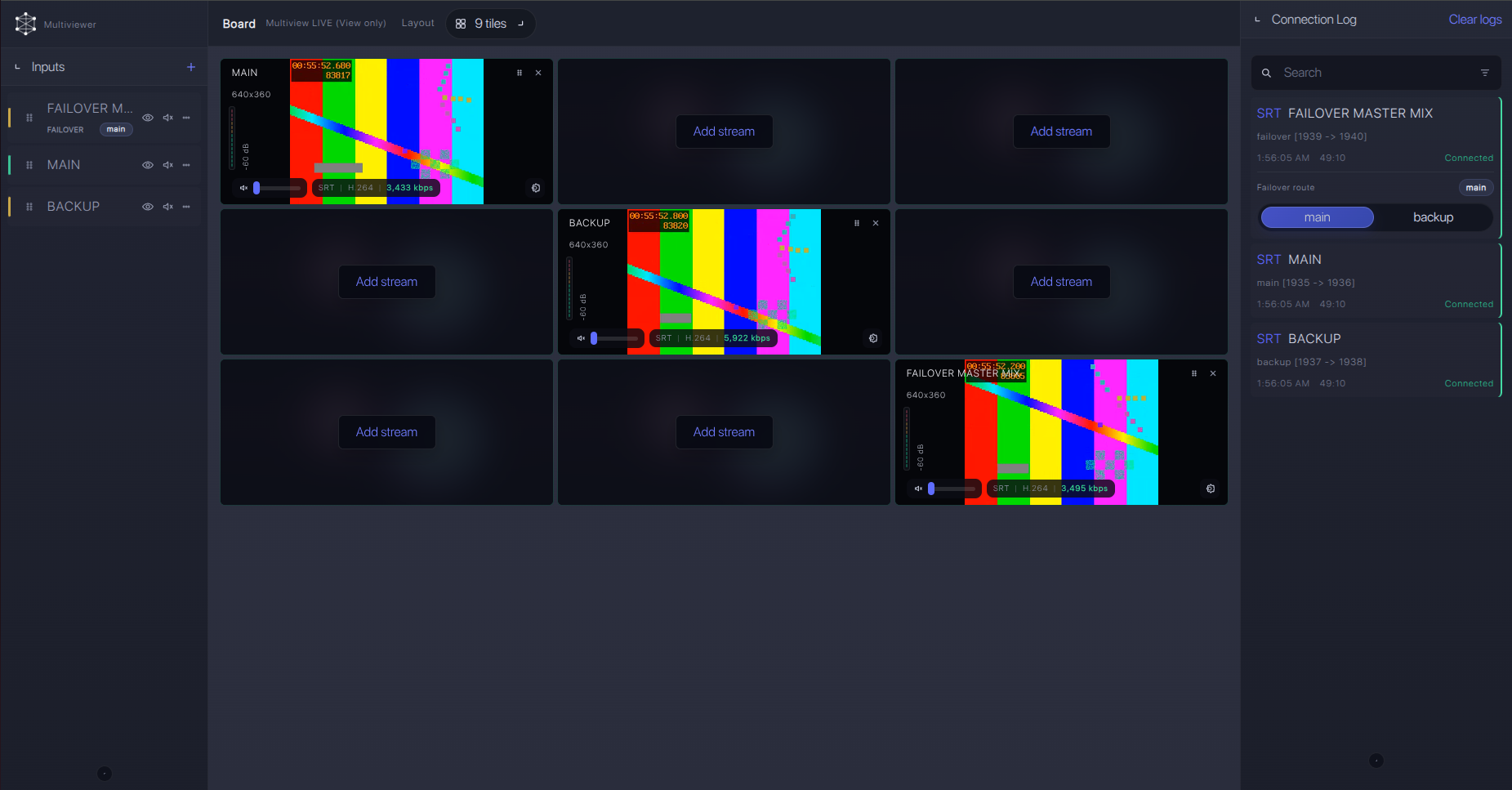
For production events, plan what happens if the main encoder, venue uplink, or primary contribution path fails. Callaba can be part of that continuity plan without changing the basic Panasonic AW-UE40 ingest workflow.
Recording and playback
In this workflow, the AW-UE40 is the live source and Callaba handles recording, playback preparation, restreaming, routing, and multiview as parallel downstream uses after ingest. If you record H.265, confirm that editors, players, and decoders in the rest of the chain support HEVC. If the audience path is browser playback or a mixed decoder fleet, H.264 is usually the safer first production choice.
Troubleshooting
| Symptom | Check in Callaba | Check on AW-UE40 | Likely fix |
|---|---|---|---|
| No connection | SRT server is listening on the expected UDP port | Client(Caller), destination URI, and destination port | Open firewall/NAT for UDP, correct host and port, then restart stream. |
| Connects then drops | RTT, packet loss, retransmits, uptime | SRT latency and uplink capacity | Raise latency to 500 ms, reduce bitrate, or improve venue uplink. |
| Handshake fails with encryption | Passphrase and encryption requirement | AES-128/AES-256 and passphrase text | Retype passphrase manually; remove trailing spaces or copied newlines. |
| Stream ID rejected | Expected Stream ID | AW-UE40 Stream ID field | Match capitalization and punctuation exactly. |
| Video appears but no audio | Audio meters and stream metadata | AAC-LC audio enabled and input level from mic/line source | Enable the intended audio source and confirm levels before ingest. |
| NDI bridge does not behave as expected | Bridge output into Callaba | NDI HX2 menu and firmware | Confirm this unit exposes NDI HX2; do not assume full-bandwidth NDI. |
Official references
These are useful resources for confirming model behavior and planning the event.
Vendor references
- Panasonic Global AW-UE50/UE40/UE30 specifications
- Panasonic AW-UE50/AW-UE40 operating instructions
- Panasonic AW-UE40/AW-UE50 firmware v2.35 release note
- Panasonic AW-UE40/AW-UE50 firmware v2.17 release note
- Panasonic Connect AW-UE40 product page
Protocol references
Callaba resources
FAQ
Does the Panasonic AW-UE40 support SRT?
Yes. Panasonic documentation for AW-UE40 lists SRT, and the operating instructions document SRT Client(Caller), Listener, Stream ID, latency, encryption, and passphrase. I still recommend checking installed firmware and the visible streaming menu before the event.
Should I use AW-UE40 SRT Caller or AW-UE40 SRT Listener mode?
Use Caller for most cloud jobs. Listener mode on the camera is useful only when the network design deliberately allows inbound UDP to the camera side.
What if the SRT menu is missing?
Confirm the exact model, update firmware, and check the menu again. If SRT still is not available, use confirmed RTMPS/RTMP or a deliberate RTSP/NDI HX2 bridge workflow.
Can AW-UE40 send RTMP or RTMPS instead of SRT?
Yes. Panasonic documents RTMP and RTMPS with H.264. Use it when the destination is simple platform ingest, but use SRT when you need better contribution monitoring and routing control.
Is AW-UE40 a full-bandwidth NDI camera?
No. The confirmed mode is NDI HX2. Public Panasonic wording around NDI availability varies by firmware and purchase timing, so confirm the installed firmware and visible NDI menu.
Can I send UHD over SRT from AW-UE40?
Do not assume that. Official IP and NDI streaming listings are Full HD-class. For UHD, plan on HDMI unless your exact firmware menu and Panasonic documentation confirm the required IP mode.
Next steps
Run a 20-30 minute test before the production call time. Confirm the AW-UE40 connects as SRT Caller, verify audio meters, watch packet loss and retransmits, record a short sample in Callaba, and play it back through the same downstream tools you will use on the event.
