

Related vendor hub
Browse all YoloLiv SRT gateway workflows
Use the YoloLiv hub to compare YoloBox Extreme, Pro, and Ultra SRT or RTMPS workflows.
For a YoloLiv YoloBox Pro SRT setup, the important detail is direction. Public YoloLiv material confirms SRT as an input or video-source feature on firmware v5.7.0, while RTMP(S) is the confirmed output path for sending the program feed to a third-party ingest server. Use this setup when YoloBox Pro is at the venue and Callaba is the cloud receiver for monitoring, recording, routing, multiview, or SRT restreaming.
Quick answer
To use YoloLiv YoloBox Pro with SRT in a Callaba workflow, send the confirmed RTMPS or RTMP output from YoloBox Pro into Callaba first, then use Callaba as the gateway, monitor, recorder, router, and SRT restreaming layer. If your installed unit exposes a direct SRT output destination, test it as a firmware-specific option before the event; public exact-model docs do not clearly confirm SRT output fields such as Caller, Listener, Stream ID, or passphrase.
YoloBox Pro sends one RTMP or RTMPS contribution feed into Callaba. After ingest, Callaba can preview, record, route, restream, and create SRT outputs in parallel.
- YoloBox ProRTMPS or RTMP output
- Callaba GatewayCloud ingest and routing
- Preview
- Record
- Route
- SRT restream
What this setup does
YoloBox Pro is the venue-side switcher and encoder. Callaba is the cloud-side receiver and workflow layer. In the verified path, YoloBox Pro publishes its program output by Custom RTMP(S) to Callaba. From there, Callaba can show preview, build a multiview, record, restream to platforms, route to another destination, or create SRT outputs for downstream receivers.
This is different from assuming that the YoloBox Pro itself is an SRT Caller to Callaba. YoloLiv announced SRT input support for YoloBox Pro on firmware v5.7.0, but I would not plan direct SRT output from this exact model unless the unit in your hands exposes that destination menu and you have tested it end to end.
What this model can and cannot do in this workflow
- Confirmed output for cloud contribution: RTMP and RTMPS.
- Confirmed encoding in official specifications: H.264 video and AAC audio at 44.1 kHz.
- Confirmed local recording format in official specifications: MP4 to SD card.
- Confirmed physical inputs include three HDMI inputs, USB video input, USB-C input/output, SD card media, line input, mic input, and audio input.
- Confirmed outputs include HDMI output, USB webcam output, RTMP(S) live streaming, SD recording, and audio/headphone output.
- Firmware v5.7.0 adds SRT and RTMP as video sources and adds NDI OUT.
- Firmware v5.3.0 adds one NDI signal input, with YoloLiv listing paid activation and limits of 1080p for NDI-H264 or 720p for NDI-SHQ.
- RTSP input or output is not listed for this exact model in the official sources I used, so do not design a YoloBox Pro RTSP bridge unless the device menu clearly shows it.
- I did not find exact-model official proof for direct SRT output, SRT Stream ID, SRT passphrase, SRT encryption, or Caller/Listener/Rendezvous behavior on YoloBox Pro.
- Network Bonding is optional and subscription-based in YoloLiv material; test the final RTMP(S) destination after bonding is enabled.
YoloBox Ultra and other YoloLiv models may have different SRT positioning. This page is for YoloBox Pro only; do not copy settings from a higher-end model without confirming the exact menu on the Pro.
Recommended workflow
For production, I would use RTMPS from YoloBox Pro to Callaba whenever possible. RTMPS gives you the confirmed YoloBox Pro contribution path and keeps the cloud gateway available for SRT delivery after ingest. If RTMPS is not available in a specific deployment, use RTMP and protect the contribution path with the network controls appropriate for the event.
If a YoloBox Pro firmware build exposes a direct SRT output destination, keep the device at the venue as the SRT Caller and make Callaba the cloud SRT Listener. Before relying on that path, confirm Caller/Listener direction, UDP port reachability, Stream ID, passphrase, latency, codec settings, and SRT version compatibility with vendor support or firmware release notes.
When not to use this setup
If YoloBox Pro and the production switcher are on the same LAN, HDMI output or a confirmed local NDI workflow may be simpler than a cloud gateway. Remember that NDI input requires activation and NDI OUT is tied to firmware v5.7.0.
If the only destination is YouTube or another platform and you do not need cloud monitoring, recording, routing, or SRT handoff, YoloBox Pro can stream directly by RTMP(S). Use Callaba when the feed needs to become a managed cloud source for operators, clients, downstream encoders, SRT receivers, or API-controlled workflows.
Before you start
- Update YoloBox Pro and confirm the installed firmware version.
- Check whether your unit shows Custom RTMP(S) destination settings under the Platform workflow.
- If you plan to test SRT, confirm that the visible menu is an SRT output destination, not only an SRT input/source.
- Prepare stable upstream bandwidth. For first tests, try about 4-6 Mb/s for 1080p30 H.264, then adjust to the venue uplink and production target.
- Use wired Ethernet when possible. Wi-Fi, SIM, USB dongle, or YoloLiv bonding can work, but they should be tested with the final destination.
Create the Callaba ingest
In Callaba, create an RTMP or RTMPS ingest endpoint for the YoloBox Pro contribution feed. Copy the server URL and stream key exactly. If you will send SRT to another receiver after ingest, create that Callaba SRT output or route only after the incoming stream is stable.
Success looks simple: Callaba should show an incoming connection, non-zero bitrate, video preview, audio meters, and stable connection time.
Configure YoloBox Pro
On YoloBox Pro, use the Platform tab and add a Custom RTMP(S) destination. Paste the Callaba Server URL and Stream Key or ID. Use H.264 video and AAC audio, which match the official YoloBox Pro codec listing. Start with moderate bitrate, verify audio, then raise quality only after the connection is stable.
If you use SRT later in the Callaba side of the workflow, treat Stream ID and passphrase as case-sensitive and whitespace-sensitive. A trailing space, copied newline, or changed capitalization can break an SRT handshake.
Settings table
| Where | What to do / field to fill | First-test value | Why / check |
|---|---|---|---|
| Callaba ingest | Create RTMP or RTMPS input | Prefer RTMPS when available | Matches the confirmed YoloBox Pro output workflow. |
| Callaba ingest | Copy Server URL | Use the exact generated URL | Paste into the YoloBox Pro Custom RTMP(S) destination. |
| Callaba ingest | Copy Stream Key / ID | Use a unique event key | Wrong key usually means no incoming stream. |
| YoloBox Pro Platform tab | Custom RTMP(S) Server URL | Paste Callaba URL | Do not add spaces or line breaks. |
| YoloBox Pro Platform tab | Custom RTMP(S) Stream Key / ID | Paste Callaba key | Check capitalization and hidden whitespace. |
| YoloBox Pro encoding settings | Video bitrate | 4-6 Mb/s for 1080p30 | Raise or lower based on uplink headroom and Callaba bitrate graph. |
| YoloBox Pro audio | AAC audio enabled | 44.1 kHz per official specs | Confirm meters on the device and in Callaba preview. |
| Callaba routing | Create SRT output only if needed | 250-500 ms latency for first internet test | Use after ingest is stable; tune latency after RTT, packet loss, and retransmits are known. |
Monitoring
Watch the stream in Callaba before you send it anywhere else. Check incoming bitrate, connection uptime, preview, audio meters, dropped frames, and any downstream SRT statistics such as RTT, packet loss, and retransmits. If the stream is stable in Callaba but unstable at a final platform, troubleshoot the output route separately from the YoloBox Pro ingest.
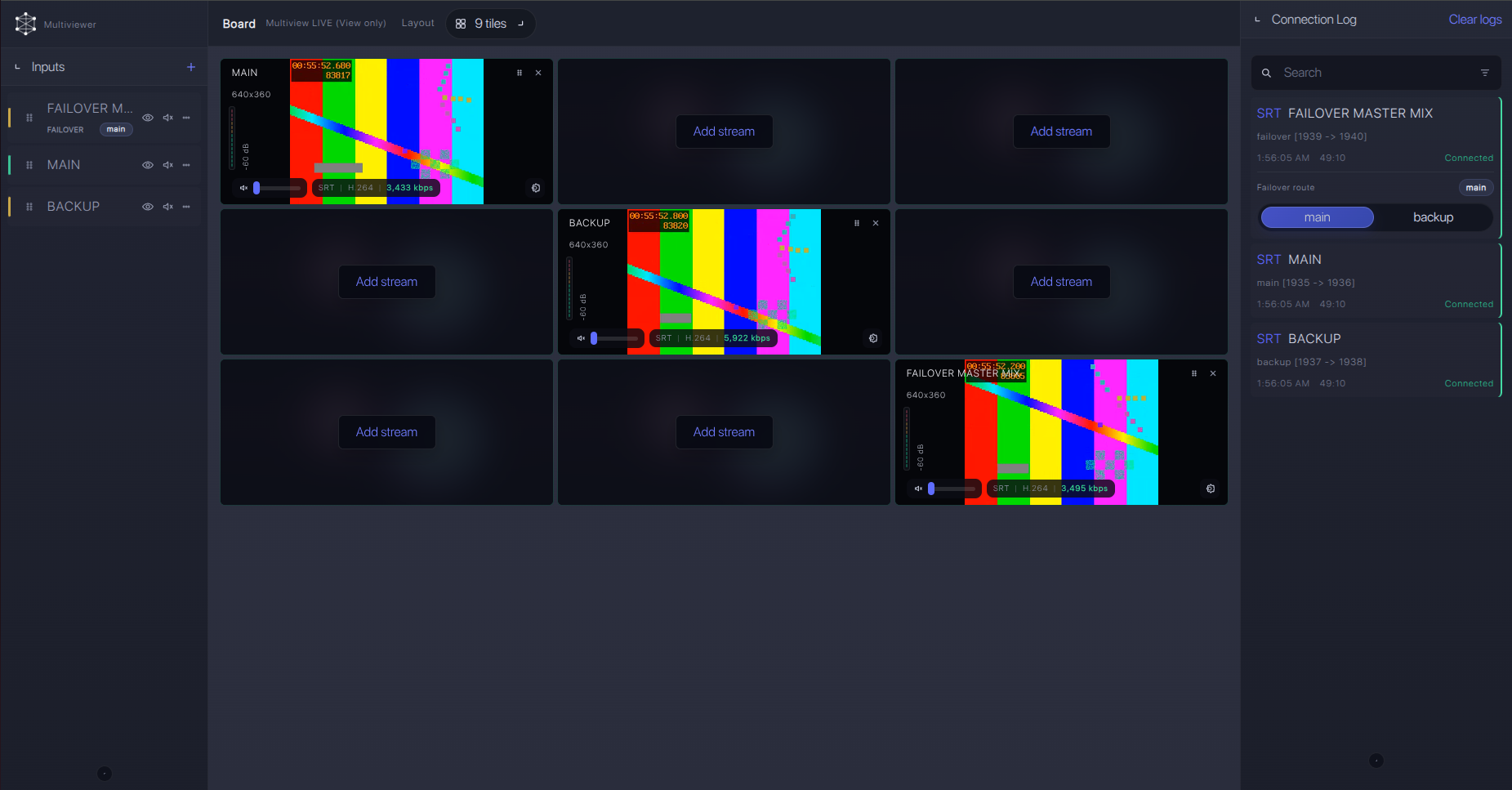
Failover and local ingest options
For production events, plan what happens if the main encoder, venue uplink, or primary contribution path fails. Callaba can be part of that continuity plan without changing the basic YoloLiv YoloBox Pro ingest workflow.
Recording and playback
YoloBox Pro can record locally to MP4 on SD card. Callaba can also record the cloud ingest, which is useful when the venue device is busy switching or when a producer needs remote access to the program feed. Treat local recording and cloud recording as parallel safety options, not as replacements for monitoring the live contribution path.
Troubleshooting
| Symptom | Check in Callaba | Check on YoloBox Pro | Likely fix |
|---|---|---|---|
| No incoming stream | Endpoint status and stream key | Custom RTMP(S) URL and key | Re-paste both fields and remove hidden spaces. |
| Connects, then drops | Bitrate graph and connection uptime | Network type and bitrate | Lower bitrate, use Ethernet, or test bonding with the final destination. |
| Video but no audio | Preview audio meters | Mic, line, HDMI audio selection | Confirm audio source and AAC output. |
| SRT receiver cannot connect downstream | SRT output mode, port, Stream ID, passphrase | Not applicable unless direct SRT output menu exists | Match mode and credentials exactly; check UDP firewall and latency. |
| NDI source missing | Bridge host network visibility | Firmware, activation, NDI input/output menu | Confirm v5.3.0 for NDI input activation and v5.7.0 for NDI OUT. |
| SRT handshake fails in a direct-output test | Listener port, logs, SRT version information | Firmware notes or vendor support for SRT version | Confirm compatible SRT versions and simplify credentials during testing. |
Official references
Vendor references
- YoloBox Pro official specifications
- YoloLiv guide for Custom RTMP(S) on YoloBox and YoloBox Pro
- YoloBox Pro v5.7.0 update notes
- YoloBox Pro v5.3.0 NDI update notes
- YoloLiv network bonding FAQ
Protocol references
Callaba resources
FAQ
Can YoloBox Pro send SRT directly to Callaba?
Do not assume that. YoloLiv confirms SRT input or video-source support on firmware v5.7.0, but I did not find exact-model public proof of direct SRT output settings. Use RTMPS or RTMP to Callaba unless your unit clearly exposes an SRT output destination and passes a full test.
What if my YoloBox Pro shows SRT Caller or Listener settings?
Then treat it as a firmware-specific workflow. For internet contribution, the usual direction is device Caller to Callaba Listener. Confirm UDP reachability, Stream ID, passphrase, latency, codec, and firmware before the event.
Does YoloBox Pro support RTMPS?
Yes. YoloLiv documents Custom RTMP(S) streaming for YoloBox Pro using a Server URL and Stream Key or ID.
Does YoloBox Pro support RTSP?
I did not find exact-model official RTSP input or output support. Do not plan an RTSP bridge from this model unless the installed unit clearly shows RTSP settings.
Can I use NDI with YoloBox Pro and Callaba?
YoloLiv added one NDI input in v5.3.0 with paid activation, and NDI OUT in v5.7.0. Use NDI mainly for LAN workflows or with a deliberate bridge design, not as the default cloud contribution path.
Are YoloBox Pro SRT Stream ID and passphrase fields documented?
I did not find public exact-model fields for direct SRT output. If SRT is used elsewhere in the workflow, treat Stream ID and passphrase as exact strings: capitalization, spaces, and copied newlines matter.
Next steps
Start with one RTMPS ingest from YoloBox Pro to Callaba. Confirm preview and audio. Add recording. Then add restreaming, SRT output, multiview, or routing as separate downstream tasks. If you want to test direct SRT from a newer firmware build, do it before the event and keep RTMPS ready as the confirmed fallback.
Try Callaba Gateway with YoloBox Pro RTMP(S) ingest and SRT routing
Create an RTMP or RTMPS ingest in Callaba, send the YoloBox Pro feed to the gateway, and check the received stream. After ingest is stable, use Callaba outputs for preview, recording, restreaming, multiview, playback, routing, SRT handoff, or API workflows as parallel downstream options.
