

Related vendor hub
Browse all YoloLiv SRT gateway workflows
Use the YoloLiv hub to compare YoloBox Extreme, Pro, and Ultra SRT or RTMPS workflows.
YoloLiv YoloBox Extreme SRT setup is a direct contribution workflow: the YoloBox Extreme switches and encodes at the venue, then sends SRT to a cloud listener. Use this setup when YoloBox Extreme is at the venue and Callaba is the cloud SRT receiver for monitoring, recording, routing, multiview, or restreaming. YoloLiv lists SRT as an output streaming protocol for this exact model, with RTMP and RTMPS available as fallback outputs.
Quick answer
To use YoloLiv YoloBox Extreme with SRT, set YoloBox Extreme as the SRT Caller and send the stream to a cloud SRT Listener. In this guide, Callaba works as the SRT gateway, receiver, monitor, recorder, and routing layer.
YoloBox Extreme sends one SRT contribution feed to Callaba Gateway. Preview, recording, routing, multiview, and restreaming are parallel downstream uses after ingest, not mandatory sequential setup steps.
- YoloBox ExtremeSRT caller
- Callaba GatewaySRT listener
- Preview
- Record
- Route
- Multiview
- Restream
What this setup does
In this workflow, YoloBox Extreme is the field encoder and Callaba is the cloud SRT server. Operators often search for a YoloBox Extreme SRT receiver, SRT gateway, or SRT to cloud setup; for the venue-to-cloud path, that receiver role belongs to Callaba. The YoloBox Extreme sends one program feed out by SRT, and Callaba makes that feed available for monitoring, recording, routing, restreaming, multiview, and playback as parallel uses.
What this model can and cannot do in this workflow
For YoloBox Extreme, the useful point is that SRT is not only an input technology. YoloLiv specifications list output streaming protocols as RTMP, RTMPS, MJPEG, and SRT, and list Video Over Ethernet support for RTMP, RTMPS, SRT, NDI, and RTSP.
- Confirmed for this setup: direct SRT output, RTMP/RTMPS output, H.264 and H.265/HEVC encoded video, AAC audio, MP4 recording, eight HDMI inputs, two HDMI outputs assignable to program, multiview, or preview, USB-C/UVC output, and IP inputs over RJ-45.
- NDI nuance: YoloLiv store material says YoloBox Extreme includes NDI HX support and up to six NDI inputs. A YoloLiv blog also mentions NDI output. I treat NDI as a LAN or bridge option, not the default WAN contribution path.
- Confirmed limitations: RTSP is listed as Video Over Ethernet/input-class support, but not as an output streaming protocol. SDI and ST 2110 are not listed for this model.
- Fields to confirm in firmware: public exact-model material does not clearly confirm Stream ID, passphrase/encryption controls, or SRT rendezvous mode in the device UI.
- Service caveat: YoloLiv Network Bonding is a separate YoloLiv service. It is not required for direct SRT output from YoloBox Extreme to Callaba.
This page is for YoloBox Extreme. YoloLiv has other YoloBox models, but I would not copy protocol limits or menu assumptions from Mini or Pro workflows without checking that model's own firmware.
Recommended workflow
Use YoloBox Extreme as the SRT caller and Callaba as the SRT listener. This is usually easier than reversing the direction because the venue device only needs outbound UDP access to the Callaba host and port. If you reverse the roles, the venue side may need a public IP address, UDP port forwarding, firewall rules, and a tested NAT plan.
For the first test, use H.264 rather than HEVC unless the full downstream chain is already known to decode HEVC. Start with conservative latency and bitrate, confirm the incoming stream in Callaba, then tune for the event.
When not to use this setup
- If the switcher, operators, and delivery system are all on the same LAN, the two HDMI outputs or a local NDI workflow may be simpler.
- If the only destination is a public platform and you do not need cloud monitoring, recording, routing, or low-latency contribution, RTMP or RTMPS from YoloBox Extreme may be enough.
- If the job requires RTSP output, SDI, or ST 2110 from this box, do not plan this model for that role.
- If outbound UDP is blocked at the venue, test RTMPS as a fallback before the event.
Before you start
Prepare a Callaba public address, an open UDP port, the YoloBox Extreme power and network plan, and a known-good camera/audio source. Confirm firmware, SRT caller/listener direction, Stream ID, passphrase/encryption, codec, bitrate, and latency in the installed firmware. If an SRT handshake fails for no obvious reason, confirm compatible SRT major versions through YoloLiv firmware notes or support and Callaba server build or support information.
Create Callaba ingest
In Callaba, create an SRT server and set it to listen on a UDP port reachable from the venue. For the first connection, keep access control simple: no Stream ID or passphrase unless your production policy requires it. When the YoloBox connects, Callaba should show connection state, incoming bitrate, uptime, and stream preview. See the Callaba SRT server guide if you need the full server setup flow.
Configure YoloBox Extreme
On YoloBox Extreme, open the streaming destination or output configuration for SRT. Menu labels can change by firmware, so use the installed manual or on-device help for the exact path. Enter the Callaba public hostname or IP address and UDP port. If the firmware presents caller/listener selection, choose caller for this venue-to-cloud workflow. If Stream ID or passphrase fields are available, paste the exact values from Callaba. They are case-sensitive and whitespace-sensitive; a trailing space, copied newline, or changed capitalization can break the SRT handshake.
Settings table
| Where | What to do / field to fill | First-test value | Why / check |
|---|---|---|---|
| Callaba SRT server | UDP port | Use an open port, for example 10000 | Forward or allow this UDP port to Callaba. |
| Callaba SRT server | Passphrase/encryption, if used | Off for first handshake, then enable if required | Match the device exactly after the basic link works. |
| YoloBox Extreme SRT output area | Destination host or server address | Callaba public hostname or IP | Callaba should move from waiting to connected. |
| YoloBox Extreme SRT output area | Destination port | Same UDP port as Callaba | A wrong port usually gives no connection. |
| YoloBox Extreme SRT output area, if present | Stream ID | Paste from Callaba only if enabled | Keep capitalization and whitespace unchanged. |
| YoloBox Extreme SRT output area, if present | Passphrase | Same text as Callaba | One extra character can prevent the handshake. |
| YoloBox Extreme SRT latency or buffer area | Latency in milliseconds | 250-500 ms | Lower only after RTT, packet loss, and retransmits are stable. |
| YoloBox Extreme encoder settings | Video bitrate | 1080p30: 4-6 Mb/s; 1080p60: 6-8 Mb/s | Adjust to uplink headroom and production quality. |
Monitoring
In Callaba, check incoming bitrate, preview, audio meters, RTT, packet loss, retransmits, and connection uptime. On YoloBox Extreme, confirm that the program output is active, the correct audio source is assigned, and network upload is stable. If the device exposes GOP or keyframe interval, two seconds is a practical first test for platform compatibility.
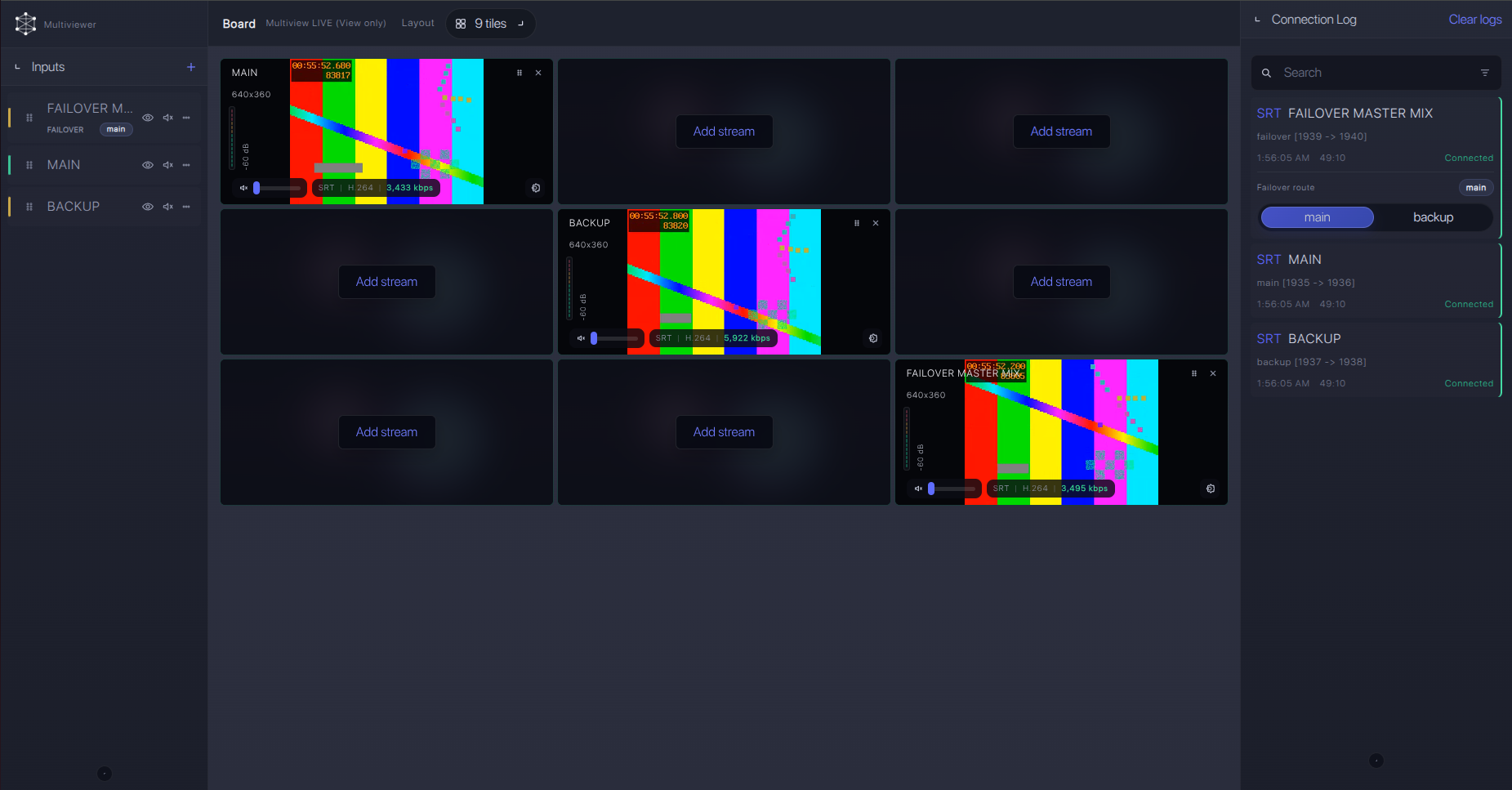
Failover and local ingest options
For production events, plan what happens if the main encoder, venue uplink, or primary contribution path fails. Callaba can be part of that continuity plan without changing the basic YoloLiv YoloBox Extreme ingest workflow.
Recording and playback
After ingest is stable, start recording in Callaba if you need a cloud copy. You can also create web playback or route the same source to another destination. Treat these as parallel downstream actions: the SRT ingest does not require preview, recording, restreaming, or routing to be chained in a fixed order.
Troubleshooting
| Symptom | Check in Callaba | Check on device | Likely fix |
|---|---|---|---|
| No connection | Server listening state and UDP port | Destination host, port, caller mode | Correct address/port and allow outbound UDP. |
| Handshake fails after enabling security | Passphrase and Stream ID rules | Copied text in SRT fields | Remove trailing spaces/newlines and match capitalization. |
| Connected but unstable | RTT, packet loss, retransmits | Uplink quality and encoder bitrate | Raise SRT latency or reduce bitrate. |
| Preview but no audio | Audio meters and stream info | Audio source assignment and AAC output | Select the correct input and test with bars/tone if possible. |
| Black video | Codec and preview state | Program output, camera input, encoder format | Start with H.264; use HEVC only when downstream decoding is confirmed. |
| Odd SRT errors | Server build/support information | Firmware notes or vendor support | Confirm SRT version compatibility and MPEG-TS/codec settings. |
Official references
Vendor references
- YoloBox Extreme specifications
- YoloBox Extreme product page
- YoloLiv official store page for YoloBox Extreme
- YoloLiv blog article on YoloBox Extreme
- YoloLiv Network Bonding
Protocol references
Callaba resources
FAQ
Does YoloBox Extreme support SRT output to Callaba?
Yes. YoloLiv specifications list SRT as an output streaming protocol for YoloBox Extreme. Use Callaba as the cloud SRT listener for the receiver side.
Is YoloBox Extreme the SRT caller or listener?
For this setup, use YoloBox Extreme as the SRT caller. YoloLiv material also mentions SRT listener input, but reverse-direction internet workflows require more network planning.
Where do I put the YoloBox Extreme SRT Stream ID?
Use the Stream ID only if your installed firmware exposes that field and Callaba is configured to require it. Paste it exactly; case and whitespace matter.
Should I use H.264 or H.265/HEVC?
YoloLiv lists both encoded formats. Start with H.264 for compatibility. Use HEVC only after confirming that every decoder, player, and downstream route supports it.
Can I use RTMP or RTMPS instead of SRT?
Yes. YoloBox Extreme lists RTMP and RTMPS output. They are useful fallbacks, especially when a network blocks outbound UDP.
Can I send RTSP output from YoloBox Extreme to Callaba?
Do not plan that without separate testing. RTSP is listed in the Video Over Ethernet/input area, while SRT, RTMP, RTMPS, and MJPEG are listed as output streaming protocols.
Next steps
Run a rehearsal with the exact venue network. Save the working Callaba server, YoloBox Extreme destination, latency, bitrate, and audio settings. If you later need main and backup contribution paths, review Callaba SRT failover options after the single-feed path is stable.
