

Related vendor hub
Browse all LiveU SRT gateway workflows
Use the LiveU hub to compare Solo, Solo Pro, and LiveU Studio bonded SRT output workflows.
LiveU Studio SRT output bonded SRT setup starts at the Studio program output, not at an SDI or HDMI port on a box. Use this setup when the venue or remote production sends its Studio SRT output and Callaba is the cloud SRT receiver for monitoring, recording, routing, multiview, or restreaming. The upstream LiveU contribution may still be bonded through LiveU services; the handoff covered here is Studio program output over SRT to Callaba Gateway.
Quick answer
To use LiveU Studio SRT output with SRT, publish the Studio program output as the SRT Caller and send the stream to a cloud SRT Listener. In this guide, Callaba works as the SRT gateway, receiver, monitor, recorder, and routing layer. Confirm the visible Studio SRT fields before the event, especially Stream ID and passphrase.
The LiveU Studio program output sends one SRT contribution feed into Callaba. After ingest, Callaba can preview, record, route, restream, and feed multiview in parallel, not as required serial steps.
- LiveU StudioSRT output caller
- Callaba GatewaySRT listener
- Preview
- Record
- Route
- Restream
- Multiview
What this setup does
This workflow receives the LiveU Studio program output in Callaba over SRT. Callaba listens on a public UDP port, and Studio connects out to that address. Once Callaba receives the stream, the same source can be used for preview, multiview, recording, routing, restreaming, or playback in parallel.
The important distinction is that LiveU Studio is a cloud production and publishing service. It is not a physical encoder with local SDI or HDMI inputs. If a LiveU field unit is used at the venue, it contributes into the LiveU environment first; Studio then publishes the selected program output to Callaba.
What this model can and cannot do in this workflow
- LiveU documents a Studio SRT Output workflow with hostname or IP address, port, optional Stream ID, optional passphrase, latency, audio bus assignment, and a Start Publishing & Record action.
- Studio also documents Custom RTMP and RTMPS publishing, which is the practical fallback if SRT cannot be used for a specific event.
- Studio can pull RTSP as a live source, but I did not find a confirmed direct RTSP output publishing point from Studio to Callaba.
- NDI, SDI, and ST 2110 references are tied to LiveU Matrix, receiver, decoder, or rights-holder workflows, not a direct Studio-to-Callaba NDI output.
- LiveU product material describes live distribution as H.264 video with AAC audio. H.265 is listed for ingest contexts, so do not assume H.265 on Studio SRT output unless the current Studio UI exposes it.
- Public LiveU sources are inconsistent on SRT passphrase behavior: current English Studio SRT Output guidance includes a passphrase field, while an older Japanese SRT Output page says passphrase-based encryption is not supported. I recommend testing encrypted SRT before relying on it.
Recommended workflow
For a LiveU Studio SRT output SRT receiver workflow, keep Studio as the side that initiates the SRT connection and let Callaba listen in the cloud. This avoids inbound firewall rules on the venue side and fits the way Studio asks for a destination hostname or IP address and port.
Use RTMPS or RTMP only when SRT is unavailable, blocked by network policy, or not needed for the production. Use an NDI or SDI path only through the proper LiveU receiver, decoder, Matrix, or local production workflow; do not plan on a direct Studio NDI publishing point to Callaba.
When not to use this setup
- If the whole production is local and the switcher needs baseband video, a LiveU receiver or decoder path into SDI may be simpler than sending Studio output to a cloud gateway.
- If the only destination is YouTube or another public platform and you do not need cloud monitoring, recording, routing, or multiview, Studio custom RTMP or RTMPS may be enough.
- If you need RTSP from Studio to another system, check the design again. Studio RTSP is documented as a pull-source ingest format, not as a confirmed direct output.
- If the job needs NDI, use a workflow that officially exposes NDI through the LiveU ecosystem or a local bridge. Do not treat Studio SRT output as a direct NDI source.
Before you start
Prepare the Callaba public hostname or IP address, UDP port, Stream ID if you require one, passphrase if you use encrypted SRT, and the Studio audio bus you want to send. Stream ID and passphrase values are case-sensitive and whitespace-sensitive; a copied newline, trailing space, or changed capitalization can break the handshake.
For the first internet test, use conservative video settings if Studio exposes them: H.264/AAC, 1080p30 around 4-6 Mb/s or 720p around 2.5-4 Mb/s, and 250-500 ms of SRT latency. Lower latency only after RTT, packet loss, retransmits, and audio stability look clean. If handshake failures remain difficult to diagnose, ask LiveU support for the Studio-side SRT version and compare it with the Callaba server build information.
Create the Callaba ingest
In Callaba, create an SRT server and choose a UDP port that is reachable from the internet. Keep Callaba in listener/server behavior for this workflow. If you require a Stream ID or passphrase, enter the exact values you plan to use in Studio. Open the UDP port in the cloud firewall or security group before starting Studio publishing.
After saving the server, leave the Callaba stream page open. The first signs of success are connection uptime, incoming bitrate, video preview, and moving audio meters.
Configure LiveU Studio SRT output
In LiveU Studio, open the publishing area for SRT Output. Enter the Callaba hostname or public IP address, the Callaba UDP port, and the optional Stream ID and passphrase if your event uses them. Set the latency field to a safe first-test value, assign the correct output audio bus, and start publishing.
Be careful with the Studio control named Start Publishing & Record. Treat that as the Studio-side action label. Callaba recording is configured separately after the stream is received.
Settings table
| Where | What to do / field to fill | First-test value | Why / check |
|---|---|---|---|
| Callaba | Create SRT server and choose UDP port | Public UDP port such as 5000 | Studio must be able to reach this listener from the LiveU cloud side. |
| Callaba | Set Stream ID if required by your routing rule | Exact event Stream ID | Must match Studio exactly, including case and whitespace. |
| Callaba | Set passphrase if encrypted SRT is required | Test value first, then production secret | Current Studio docs show this field, but public docs conflict, so test encryption. |
| LiveU Studio SRT Output | Hostname or IP address | Callaba public DNS name or IP | This is the destination Studio connects to. |
| LiveU Studio SRT Output | Port | Same UDP port as Callaba | A wrong port usually gives no connection in Callaba. |
| LiveU Studio SRT Output | Stream ID | Same value as Callaba, or blank if unused | Trailing spaces and copied line breaks are common failure points. |
| LiveU Studio SRT Output | Latency | 250-500 ms | Increase if packet loss or retransmits appear on the public internet. |
| LiveU Studio SRT Output | Audio bus assignment | Program mix bus | Wrong bus selection can produce clean video with missing or wrong audio. |
Monitoring
Use both sides during the first test. In Callaba, watch incoming bitrate, connection uptime, RTT, packet loss, retransmits, preview, and audio meters. In Studio, watch the publishing status and confirm that the selected program and audio bus are actually on air to the SRT output.
If the stream is stable for several minutes, then add downstream actions. Do not troubleshoot recording or restreaming until the ingest itself is clean.
Failover and local ingest options
For production events, plan what happens if the main encoder, venue uplink, or primary contribution path fails. Callaba can be part of that continuity plan without changing the basic LiveU Studio SRT output ingest workflow.
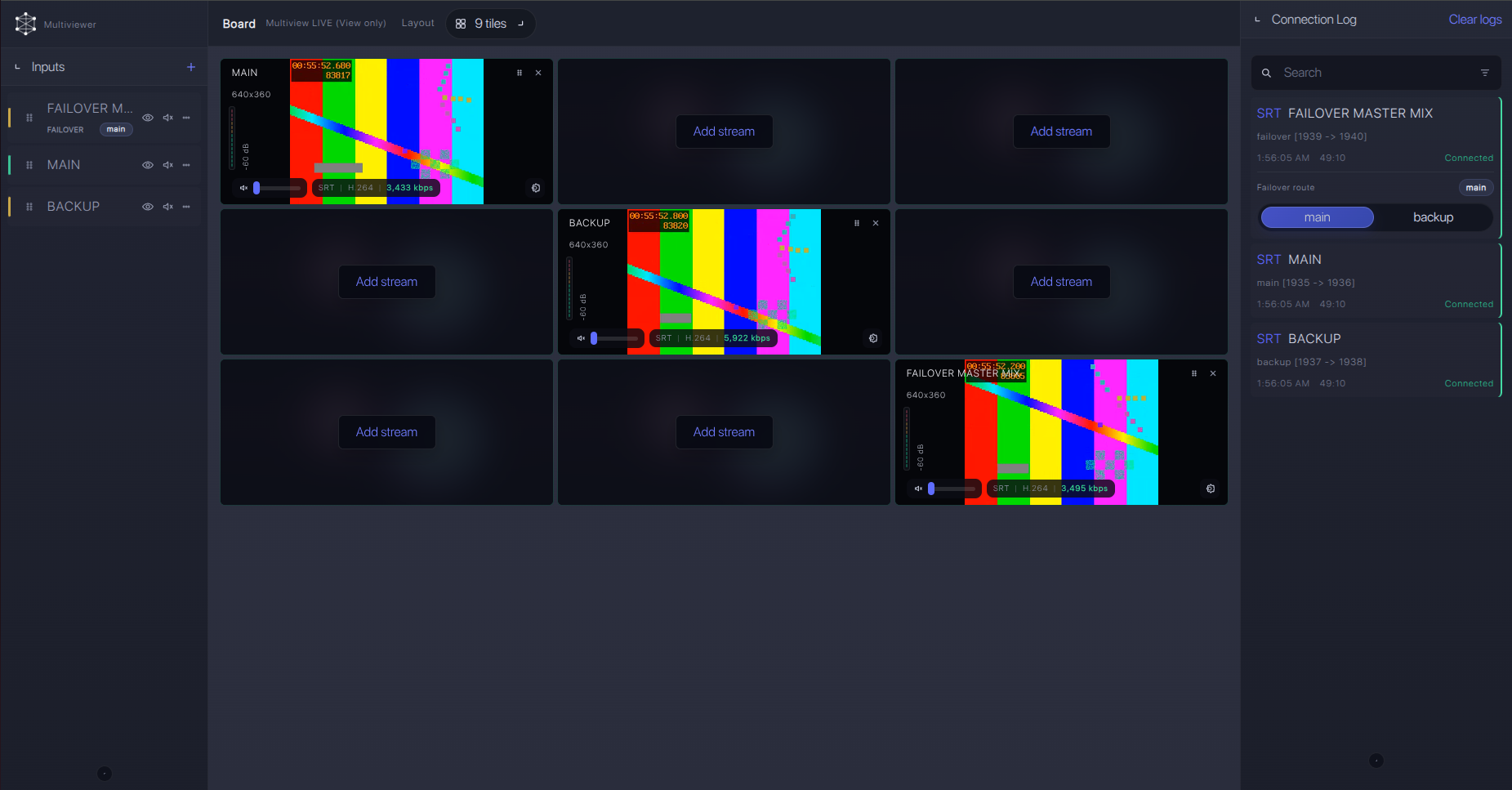
Recording and playback
After Callaba receives the Studio SRT output, recording and playback are downstream options. You can record the incoming feed in Callaba, create a web player for internal review, send the stream to another SRT destination, restream to RTMP services, or place the source into multiview. These are parallel uses of the same received program feed, not mandatory steps in a chain.
Troubleshooting
| Symptom | Check in Callaba | Check in LiveU Studio | Likely fix |
|---|---|---|---|
| No connection | Server running, UDP port open, no incoming uptime | Hostname/IP and port in SRT Output | Fix public IP/DNS, firewall, security group, or port mismatch. |
| Handshake fails with encryption | Passphrase and Stream ID values | Visible passphrase field and exact copied text | Remove trailing spaces, test without encryption, then retest encrypted SRT. |
| Connects but video is unstable | RTT, packet loss, retransmits, incoming bitrate | Latency and output bitrate if exposed | Raise SRT latency, reduce bitrate, or use a better route/network. |
| Video is present but audio is wrong | Audio meters and channel layout | Output audio bus assignment | Select the correct Studio program bus and retest with tone or known speech. |
| Need NDI or RTSP output | Confirm whether Callaba should receive SRT or RTMP instead | Do not use Studio SRT Output as an NDI or RTSP output | Use RTMPS/RTMP fallback, or a proper LiveU receiver/Matrix/local bridge workflow. |
Official references
Useful reader resources for this exact workflow:
Vendor references
- LiveU Studio: SRT Output
- LiveU Studio: Custom RTMP
- LiveU Studio: Pull live source
- LiveU Studio product page
- LiveU Studio brochure
- LiveU Studio Japanese SRT Output page
Protocol references
Callaba resources
FAQ
Is LiveU Studio SRT output a direct SRT source for Callaba?
Yes, Studio documents an SRT Output publishing workflow. In this setup, Studio connects out to a Callaba SRT listener. The field unit or contribution path into LiveU Studio is a separate upstream layer.
Does this replace a LiveU receiver?
Not always. If you need SDI, local decoding, or a receiver-based production chain, keep the LiveU receiver or decoder workflow. This page is for sending the Studio program output to Callaba over SRT.
Can I use encrypted SRT with a passphrase?
Current English Studio SRT Output guidance includes a passphrase field, but older public Japanese guidance says passphrase encryption is not supported. Use the current Studio UI as the deciding point and run an encrypted test before the event.
Can LiveU Studio send RTSP output to Callaba?
I would not plan that. Studio documentation confirms RTSP as a pull input source format. A direct RTSP output publishing point from Studio to Callaba was not confirmed.
Can I send NDI directly from Studio to Callaba?
Do not plan Studio SRT output as a direct NDI source. Public NDI references are tied to LiveU Matrix, receiver, decoder, or rights-holder workflows rather than a simple Studio-to-Callaba NDI output.
What codec should I use for the first test?
Use H.264 video with AAC audio for the first Studio output test. H.265 is listed in LiveU material for ingest contexts, but I would not assume it for Studio SRT output unless the active Studio output settings expose it.
Next steps
Create the Callaba SRT listener, run a short Studio SRT output test, verify preview and audio meters, and then add recording, multiview, restreaming, or routing only after the ingest is stable. If SRT is blocked or unavailable for the event, use the confirmed Studio RTMPS or RTMP publishing path instead.
Try Callaba Gateway with LiveU Studio SRT output
Create an SRT server in Callaba, send the Studio program feed to the gateway, and check the received stream. After ingest is stable, use Callaba outputs for preview, recording, restreaming, multiview, playback, routing, or API workflows as parallel downstream options.
