

Related vendor hub
Browse all JVC SRT gateway workflows
Use the JVC hub to compare GY-HC production cameras and KY-PZ PTZ SRT workflows.
For a JVC KY-PZ200 SRT setup, the clean production path is direct SRT from the PTZ camera to a cloud SRT listener. Use this setup when KY-PZ200 is at the venue and Callaba is the cloud SRT receiver for monitoring, recording, routing, multiview, or restreaming. The practical default is KY-PZ200 as SRT Caller and Callaba Gateway as SRT Listener.
Quick answer
To use JVC KY-PZ200 with SRT, set KY-PZ200 as the SRT Caller and send the stream to a cloud SRT Listener. In this guide, Callaba works as the SRT gateway, receiver, monitor, recorder, and routing layer. Before the event, confirm that the installed firmware exposes the expected SRT fields.
The JVC KY-PZ200 sends one SRT contribution feed into Callaba. After ingest, Callaba can preview, record, route, multiview, and restream the same source in parallel.
- JVC KY-PZ200SRT Caller at venue
- Callaba GatewaySRT Listener in cloud
- Preview
- Record
- Route
- Multiview
- Restream
What this setup does
The KY-PZ200 contributes the program camera feed over SRT. Callaba receives that feed as a cloud SRT server, then gives operators the usual downstream options: preview for confidence monitoring, recording, restreaming, multiview, routing to other systems, and playback endpoints. Those are parallel uses after ingest; you do not need to record before you route, or preview before you restream.
This page focuses on SRT because JVC lists SRT for the KY-PZ200 and the official instructions document SRT Caller and Listener modes, Stream ID, password, latency, FEC, and AES encryption options.
What this model can and cannot do in this workflow
- Confirmed direct path: KY-PZ200 can stream by SRT, RTMP, RTMPS, RTSP/RTP, and RTP multicast according to JVC materials for the model family.
- SRT roles: the manual confirms Caller and Listener. For internet contribution, I recommend Caller on the camera and Listener on Callaba.
- SRT fields: SRT Server and StreamId are available when SRT Mode is set to Caller. Password, latency, FEC, and AES-128/192/256 encryption settings are documented.
- Video and audio: the camera is an HD PTZ model with H.264, H.265/HEVC, MJPEG, and AAC audio support listed in JVC materials. Confirm downstream HEVC support before choosing H.265.
- Physical outputs: KY-PZ200 also has 3G-SDI, HDMI, USB 3.0 UVC, LAN, line audio input/output, RS-232, and RS-485 control connections.
- No vendor receiver required: for this workflow, the camera sends directly to Callaba; there is no mandatory vendor cloud receiver layer.
- NDI distinction: do not plan the base KY-PZ200 as a native NDI source. JVC separates the KY-PZ200N as the NDI model, while the base KY-PZ200 materials list SRT, RTMP/RTMPS, RTSP/RTP, and multicast.
Recommended workflow
Keep the camera behind the venue firewall as the SRT Caller. Create an SRT server in Callaba, open the selected UDP port, and put the Callaba hostname or IP address into the KY-PZ200 SRT Server field. This avoids asking the venue network to accept inbound UDP to the camera.
Use KY-PZ200 Listener mode only when there is a specific reason to reverse the direction. In that case the camera side must accept inbound UDP, which usually means a public IP, port forwarding, firewall rules, and a tested NAT plan.
When not to use this setup
If the camera and switcher are on the same LAN or in the same room, SDI or HDMI may be simpler and lower latency. If the only target is a public platform and you do not need cloud monitoring, recording, routing, or multiview, RTMPS or RTMP from the camera may be enough. If SRT is unavailable on the installed firmware, use the confirmed RTMPS/RTMP path first; use RTSP through a local bridge only when your production design needs it.
Before you start
- Confirm the exact camera label: KY-PZ200 versus KY-PZ200N matters for NDI planning.
- Confirm the installed firmware and that the web menu exposes SRT settings.
- Decide whether the event will use H.264 or H.265/HEVC. H.264 is the safer first test for broad monitoring and playback compatibility.
- Prepare the SRT port, Stream ID, passphrase, and latency value before the camera operator starts configuring.
- If a hard-to-diagnose handshake failure appears, check firmware notes or vendor support for SRT library compatibility on the camera side and Callaba release/build information on the server side.
Create the Callaba ingest
In Callaba, create an SRT server for the KY-PZ200 feed. Choose a UDP port, set authentication details if your workflow uses Stream ID or passphrase, and copy the listener address. Confirm that the cloud firewall or hosting security group allows inbound UDP on that port.
For the first test, keep the ingest simple: one camera, one SRT listener, H.264 video, AAC audio, and a moderate bitrate. After the stream is stable, add recording, routing, multiview, or restreaming outputs.
Configure the KY-PZ200
Open the KY-PZ200 web configuration interface and go to the network streaming area described in the JVC instructions. Enable SRT, set SRT Mode to Caller, enter the Callaba SRT Server address and port, then match StreamId, password, encryption, and latency with the Callaba ingest.
Stream ID and passphrase are case-sensitive and whitespace-sensitive. A trailing space, copied newline, or changed capitalization can break the SRT handshake even when the IP address and port are correct.
Settings table
| Where | What to do / field to fill | First-test value | Why / check |
|---|---|---|---|
| Callaba SRT server | Create server and choose UDP port | Use a dedicated port, for example 5000 | Port must be reachable from the venue over UDP. |
| KY-PZ200 SRT settings | SRT Enable | On | Confirms the camera is using its direct SRT output path. |
| KY-PZ200 SRT settings | SRT Mode | Caller | Camera initiates the outbound connection to Callaba. |
| KY-PZ200 SRT settings | SRT Server | Callaba hostname or public IP | Use the listener address shown in Callaba. |
| KY-PZ200 SRT settings | SRT Server Port | Same UDP port as Callaba | Mismatch gives no connection or repeated reconnects. |
| KY-PZ200 SRT settings | SRT StreamId | Exact value from Callaba, if used | Match capitalization and remove copied whitespace. |
| KY-PZ200 SRT settings | SRT Password | Exact passphrase from Callaba, if encryption is used | Must match the encryption setup on both sides. |
| KY-PZ200 SRT settings | Latency | 250-500 ms for first internet test | Lower only after RTT, loss, and retransmits are stable. |
For video bitrate, start around 4-6 Mb/s for 1080p30 or 6-8 Mb/s for 1080p60, then adjust for the real uplink. If the camera exposes GOP/keyframe settings, a 2-second keyframe interval is a practical first test.
Monitoring
When the KY-PZ200 connects, check Callaba for incoming bitrate, connection uptime, preview, audio meters, RTT, packet loss, and retransmits. A stable preview with audio is not enough by itself; also confirm that the SRT statistics are not hiding a network problem that will appear later in the event.
Failover and local ingest options
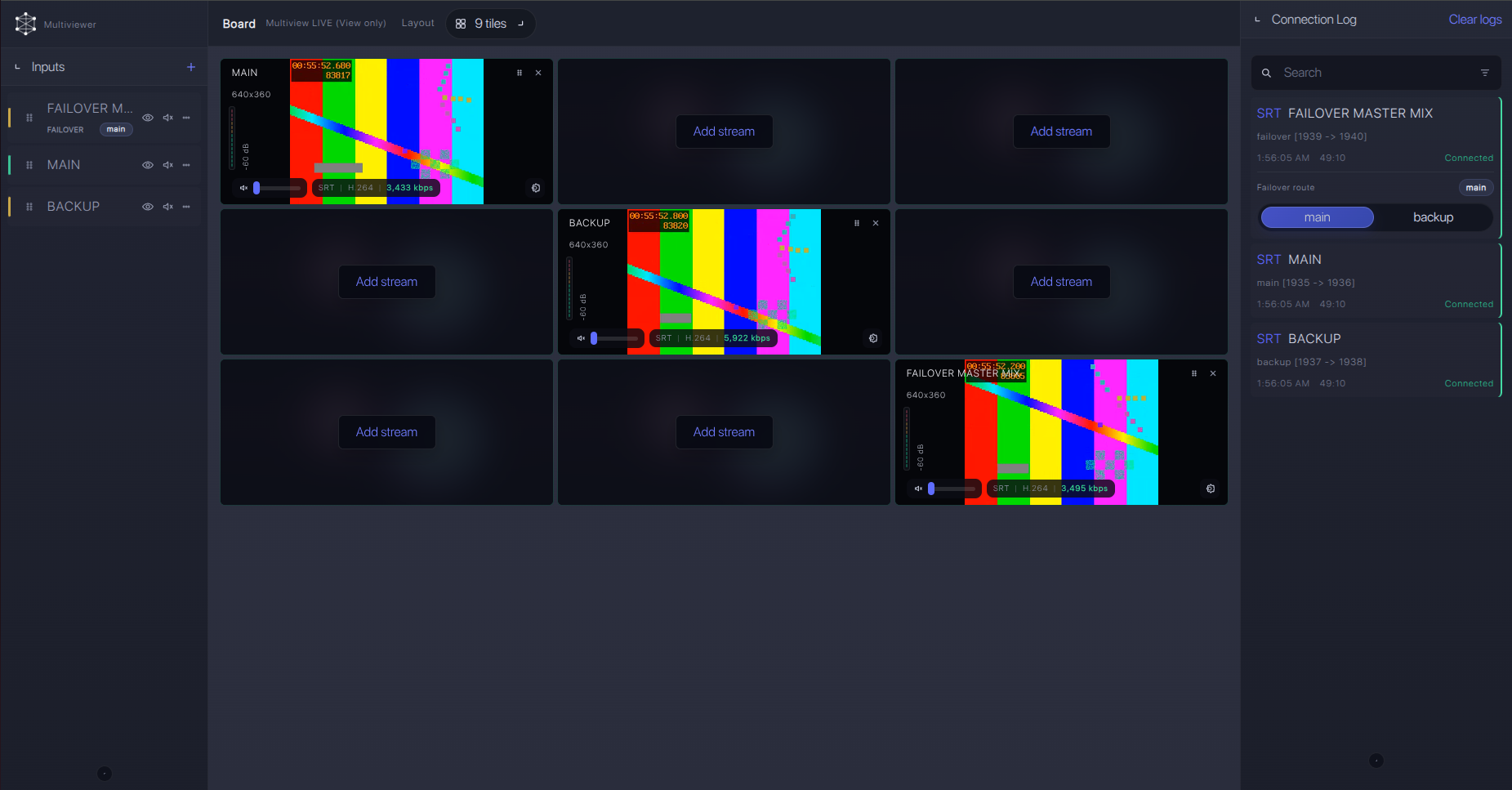
For production events, plan what happens if the main encoder, venue uplink, or primary contribution path fails. Callaba can be part of that continuity plan without changing the basic JVC KY-PZ200 ingest workflow.
Recording and playback
After ingest is stable, record the received SRT feed in Callaba and create playback or web preview outputs as needed. Treat recording, preview, multiview, routing, and restreaming as parallel downstream choices from the same source. If you choose HEVC from the camera, confirm that every downstream decoder, browser workflow, or player in the chain supports it.
Troubleshooting
| Symptom | Check in Callaba | Check on device | Likely fix |
|---|---|---|---|
| No connection | Listener is running; UDP port is open | SRT Mode is Caller; SRT Server and port are correct | Fix address/port or cloud firewall rules. |
| Connects then drops | RTT, packet loss, retransmits, uptime | Latency value and uplink stability | Raise SRT latency and reduce bitrate. |
| Authentication failure | Expected Stream ID and passphrase | StreamId and SRT Password spelling | Remove trailing spaces and match capitalization. |
| Video but no audio | Audio meters and recording audio track | AAC audio and camera audio input settings | Enable the correct audio input and codec. |
| NDI workflow not available | Use SRT/RTMP ingest instead | Exact model label and NDI Config menu | Base KY-PZ200 is not the NDI model; use KY-PZ200N for native NDI planning. |
Official references
Useful references for confirming menus, protocol behavior, and model distinctions:
Vendor references
- JVC KY-PZ200BU product page
- JVC KY-PZ200WU product page
- JVC KY-PZ400 series / KY-PZ200 series instructions
- JVC KY-PZ200N / KY-PZ200 model comparison page
- JVC KY-PZ200N / KY-PZ200 firmware update sheet
Protocol references
Callaba resources
FAQ
Can the JVC KY-PZ200 send SRT directly to Callaba?
Yes. JVC materials for the KY-PZ200 list SRT, and the instructions document SRT Caller and Listener modes. Use Caller on the camera and Listener in Callaba for the normal cloud setup.
Should I use KY-PZ200 SRT Caller or KY-PZ200 SRT Listener?
Use Caller for most venue-to-cloud jobs. Listener mode can work only when the camera side can accept inbound UDP, which is usually harder on event networks.
Does KY-PZ200 support SRT Stream ID and passphrase?
The JVC instructions document SRT StreamId and SRT Password fields, with encryption options. Match values exactly on both sides.
Can I use NDI from the base KY-PZ200?
Do not plan the base KY-PZ200 as a native NDI source. JVC positions KY-PZ200N as the NDI variant. Check the exact model label before copying settings between units.
What if the SRT menu is missing?
Confirm firmware and the exact model. If SRT is not available on the installed firmware, update according to JVC guidance or use the confirmed RTMPS/RTMP fallback.
Should I choose H.264 or H.265 for Callaba ingest?
Start with H.264 for compatibility. Use H.265/HEVC only after confirming the downstream monitoring, playback, and decoding chain supports it.
Next steps
- Create the SRT server in Callaba and open the UDP port.
- Configure the KY-PZ200 as SRT Caller with the Callaba listener address.
- Confirm preview, audio, bitrate, RTT, packet loss, and retransmits.
- Add recording, multiview, routing, or restreaming only after the ingest is stable.
