

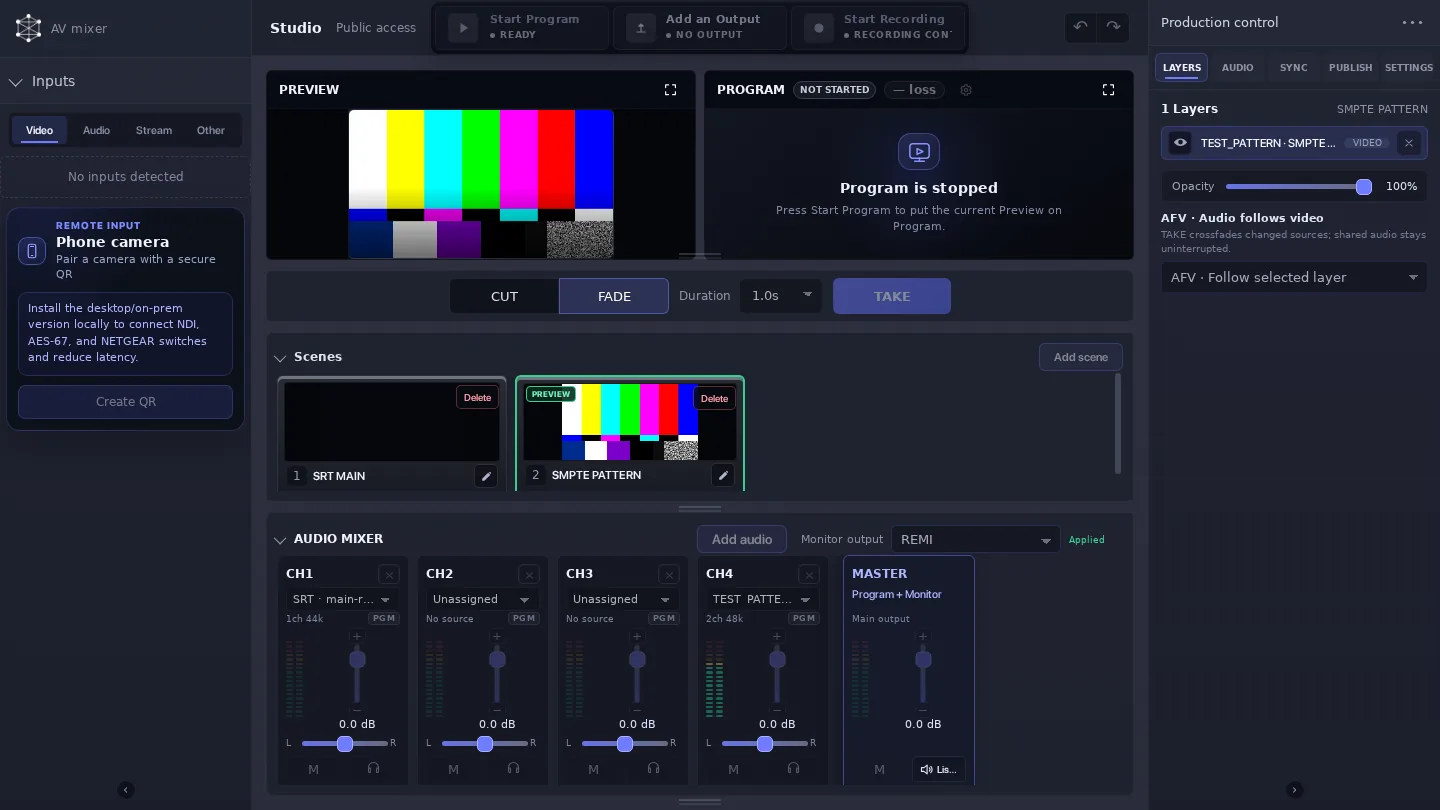
Video Mixer / REMI Control brings a live show’s source selection, scene switching, audio, output, and recording work into Callaba. For a three-camera production with a remote guest, the operator can prepare the next composition in Preview, keep the current composition on Program, and take the show without moving between separate mixer and delivery applications.
Start by creating the sources that will be used on air. Add each camera, add the remote guest from the Callaba video call, then make the scenes the director needs: a wide shot, individual camera close-ups, and a guest-and-host two-up. Give scenes names that make sense in a live call sheet; the operator should be able to find the next shot at a glance.
Start with a production the operator can actually call
Put the wide scene on Program and load camera one into Preview. When the presenter moves to a close-up, take it with CUT; when the program moves from the panel to the guest, use FADE if the transition should be visible and paced. Then load the next scene into Preview before making the next take. This simple loop—prepare, check, take—is much easier to follow than choosing a source at the instant it is needed.
You can build this production directly in Callaba, without running OBS Studio or vMix as a separate mixer.
Check the remote guest’s track and framing during rehearsal, then make the same scene calls you expect to make in the show. The prepared scenes stay useful when the production changes pace: the camera operator can concentrate on the shot while the REMI operator decides when it reaches Program.
Use Preview and Program to make the switch intentional
Preview is where the next scene is checked; Program is the output the audience receives. CUT is useful for an immediate editorial change. FADE gives the production a visible transition. The controls make the state of the show legible: a director can call the next scene while the operator sees both the pending and live compositions.
Set the intended audio mapping before the show, especially where camera sound and a video-call guest meet. Once Program is ready, configure the supported SRT, RTMP, or NDI output for the destination. Record Program or a selected output.
A clearer handoff for REMI work
REMI work becomes practical when the people at the venue and the person calling the show can focus on different parts of it. The local crew stays with cameras, talent, and the room. The remote operator watches sources, manages scenes, checks Preview and Program, takes the show, and monitors the output and recording path.
Run every scene once before going live. Confirm the guest framing, make a CUT and a FADE, and check the planned output and recording. During the program, keep the scene list stable enough that a second operator can understand it immediately.
Choose the production path around the team’s workflow
Start with the practical decisions: where sources arrive, who controls the show, where the mixer runs, and how the program reaches its destination. A team that wants its live production control and delivery plan in Callaba can build and operate the scene flow here; a team with an established production workflow can choose the route that fits its crew and deployment.