

Related vendor hub
Browse all Dejero SRT gateway workflows
Use the Dejero hub when WayPoint or managed contribution needs a clean SRT handoff into Callaba.
If you are trying to build a Dejero WayPoint SRT decoder setup, the important correction is that public WayPoint documentation does not confirm WayPoint as a direct SRT receiver or SRT output device for Callaba. Use this setup when WayPoint is the Dejero receiver at the facility and Callaba is the cloud or self-hosted gateway for monitoring, recording, routing, multiview, or restreaming after the WayPoint feed is handed off by MPEG-TS over IP, SDI capture, or a separate SRT bridge.
Quick answer
To use Dejero WayPoint with Callaba, receive the field transmitter in WayPoint, then send WayPoint output to Callaba through confirmed MPEG-TS UDP/RTP, SDI capture, or a separate SRT encoder/bridge. Do not configure WayPoint itself as an SRT Caller, Listener, RTMP output, RTSP output, or native NDI source unless Dejero supplies exact-model documentation for your unit.
A Dejero transmitter contributes to WayPoint. WayPoint outputs SDI or MPEG-TS UDP/RTP. A local ingest, capture device, or SRT bridge sends the feed into Callaba. Preview, recording, routing, multiview, and restreaming are parallel downstream uses after ingest.
- Dejero transmitterfield contribution
- WayPointreceiver / decoder
- SDI or MPEG-TSconfirmed handoff
- Callaba Gatewaycloud or LAN ingest
- Preview
- Record
- Route
- Restream
What this setup does
WayPoint is a receiver layer for Dejero field transmitters. In practical Callaba workflows, it is not the SRT endpoint. The usual path is: assign the Dejero transmitter to a WayPoint output in Dejero Control, take WayPoint program output as SDI or MPEG-TS over IP where your model supports it, and then ingest or bridge that feed into Callaba.
After Callaba receives the feed, monitoring, recording, routing, web playback, multiview, and platform restreaming are parallel downstream choices. They do not have to be configured as one serial chain.
What this model can and cannot do in this workflow
Because the input model is generic WayPoint, confirm the exact generation before the event. The public Dejero material separates the family clearly:
- WayPoint 3 is documented with HEVC/H.265 and AVC/H.264 decode, four 12G-SDI outputs, MPEG-TS streams over IP using UDP/RTP, and up to four HD or two 4K UHD feeds.
- WayPoint 50 is documented as a one-output receiver with 3G-SDI and MPEG-TS over IP using UDP/RTP.
- WayPoint 204 is a different ST 2110 receiver model, with four ST 2110 IP streams and SMPTE ST 2022-7 redundancy over dual 25 GbE SFP28 interfaces.
- Public WayPoint hardware documentation I found does not confirm direct SRT, RTMP, RTMPS, RTSP, or native NDI output for physical WayPoint 3, 50, or 204 hardware.
- Dejero documents RTMP/RTMPS publishing in a Cloud Server workflow, not as a WayPoint hardware output.
- Dejero NDI material points to cloud or Virtual WayPoint output and a separate roadmap item, not native NDI output on physical WayPoint 3/50/204 hardware.
Recommended workflow
If Callaba is deployed on the same LAN as WayPoint and your WayPoint model exposes MPEG-TS over IP, use the UDP/RTP output as the cleanest IP handoff. If Callaba is in the cloud, place a small encoder, repacker, or capture host next to WayPoint and send SRT from that bridge to a Callaba SRT Listener.
For SDI workflows, take the WayPoint SDI output into a capture card or hardware encoder, then send SRT or RTMP/RTMPS from that encoder to Callaba. The SRT Caller/Listener role, Stream ID, passphrase, and latency settings belong to the bridge encoder and Callaba, not to WayPoint, unless Dejero gives you exact WayPoint documentation showing otherwise.
When not to use this setup
- If you need Callaba to send SRT to a box that directly decodes to SDI or HDMI, choose a decoder with documented SRT input. Public WayPoint docs do not confirm a WayPoint SRT receiver or HDMI program output.
- If the whole production already stays inside Dejero receiver/cloud workflows, keep WayPoint as the Dejero receiver and use Callaba only when you need its recording, monitoring, routing, API, or restreaming layer.
- If the only destination is a public platform, a Dejero Cloud Server RTMP/RTMPS workflow may be enough. For WayPoint hardware, plan RTMP/RTMPS from Callaba after ingest or from the documented Dejero cloud layer, not from WayPoint itself.
- Do not plan physical WayPoint 3/50/204 as a native NDI source. Use a confirmed NDI-capable cloud workflow or a separate bridge if NDI is required.
Before you start
- Confirm the exact WayPoint model: WayPoint 3, WayPoint 50, WayPoint 204, or an older unit.
- Confirm your active Dejero service and Dejero Control access. Dejero states that solutions using its network blending technology require a cloud-hosted service/subscription for orchestration and management.
- Decide whether Callaba will run in the cloud or self-hosted on the receiver LAN.
- For bridge-based SRT, confirm the bridge encoder supports compatible SRT versions, Caller mode, optional Stream ID, optional passphrase, and the latency you plan to use.
- Open the firewall for the Callaba SRT Listener port when using SRT from a bridge.
Create the Callaba ingest
For a cloud Callaba deployment, create an SRT server in Callaba and note the public address, UDP port, Stream ID if used, and passphrase if used. Paste those values into the bridge encoder exactly; Stream ID and passphrase are case-sensitive and whitespace-sensitive, so a copied newline or trailing space can break the handshake.
For a self-hosted Callaba deployment on the same LAN as WayPoint, you can also test local MPEG-TS UDP/RTP ingest where your Callaba deployment and network design support it. If that is not part of your deployment, repack the WayPoint MPEG-TS or SDI feed to SRT first.
Configure WayPoint
In Dejero Control, assign the field transmitter to the intended WayPoint receiver output. On WayPoint 3 or WayPoint 50, choose the SDI or MPEG-TS over IP handoff that matches your downstream equipment. On WayPoint 204, plan an ST 2110 facility workflow instead of copying MPEG-TS or SDI steps from WayPoint 3/50.
Before connecting Callaba, verify that the WayPoint output is good locally: SDI monitor or capture preview for SDI, and a packet/stream check on the MPEG-TS receiver address for IP output.
Settings table
| Where | What to do / field to fill | First-test value | Why / check |
|---|---|---|---|
| Dejero Control | Assign transmitter to the required WayPoint receiver output. | Use one known test transmitter. | WayPoint will not output the program until the receiver assignment is correct. |
| WayPoint output configuration | Select MPEG-TS over IP output where available on WayPoint 3/50. | UDP/RTP to the local ingest or bridge host. | Matches the documented IP handoff for WayPoint 3/50. |
| WayPoint SDI output | Connect SDI to a capture card, encoder, or router. | Start with one known-good output. | Useful when MPEG-TS ingest is not available or the Callaba bridge is SDI-based. |
| Bridge encoder | Set SRT destination to the Callaba Listener address and UDP port. | SRT Caller from bridge to Callaba. | This creates the SRT path without claiming WayPoint has SRT. |
| Bridge encoder | Enter Stream ID and passphrase only if enabled in Callaba. | Copy exactly, no extra spaces. | Handshake failures are often caused by invisible whitespace or capitalization changes. |
| Bridge encoder | Set SRT latency. | 250-500 ms for a first internet test. | Lower only after RTT, packet loss, and retransmits are stable. |
| Audio path | Preserve embedded SDI audio or the documented MPEG-TS audio path. | AAC-LC for MPEG-TS where listed. | Confirm audio meters before recording or restreaming. |
| Callaba stream page | Check incoming bitrate, preview, audio meters, and connection uptime. | Stable bitrate and visible preview. | Confirms that the feed reached Callaba after the WayPoint handoff. |
Monitoring
Use Dejero Control to confirm transmitter and receiver health, then use Callaba to confirm the downstream ingest: incoming bitrate, preview, audio meters, SRT connection uptime, RTT, packet loss, and retransmits when the bridge uses SRT. If the local WayPoint output is clean but Callaba is unstable, troubleshoot the bridge or WAN path first.
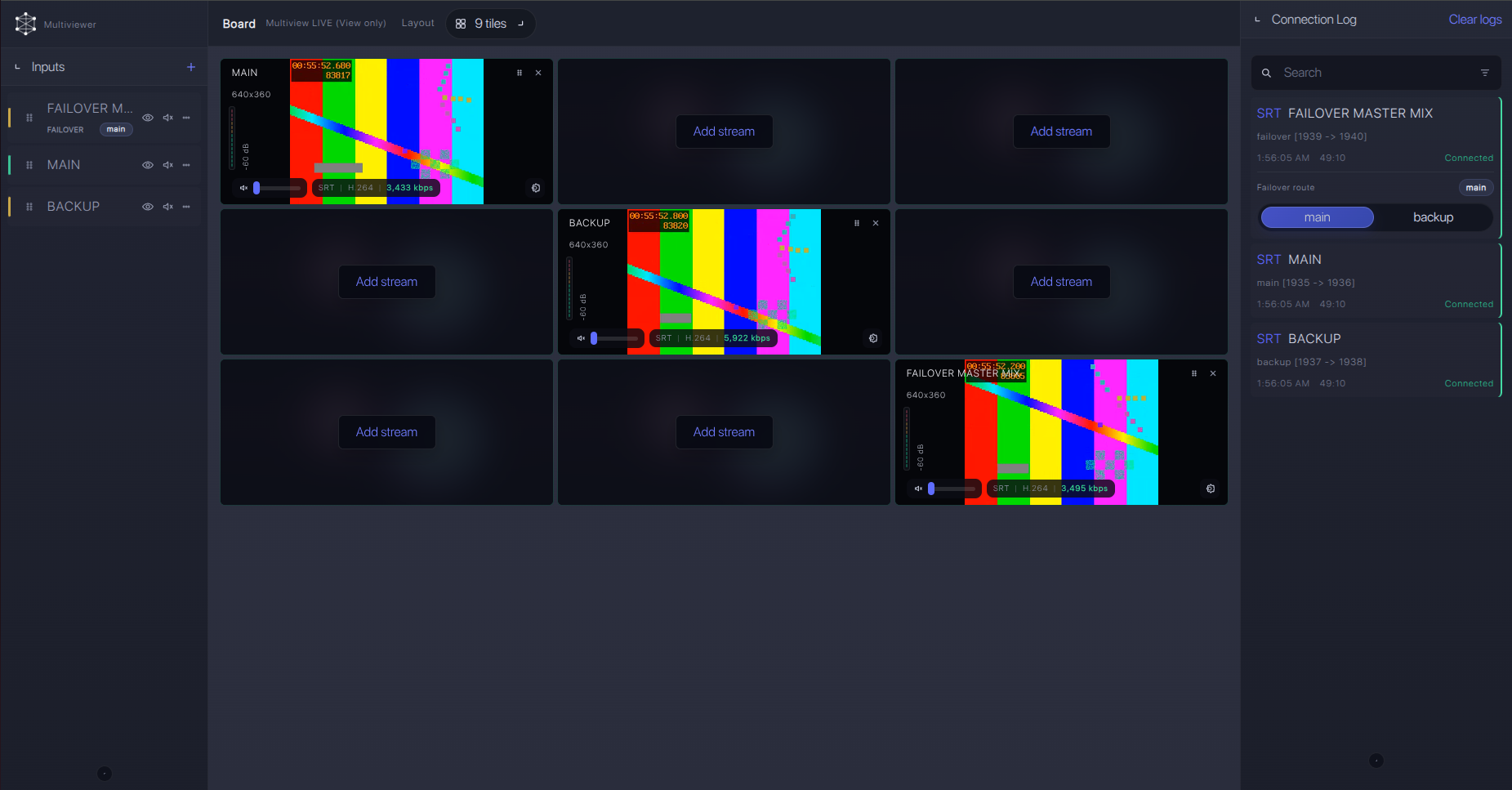
Failover and local ingest options
For production events, plan what happens if the main encoder, venue uplink, or primary contribution path fails. Callaba can be part of that continuity plan without changing the basic Dejero WayPoint ingest workflow.
Recording and playback
Once the feed is stable in Callaba, enable recording on the received stream and check file playback before the event starts. For web review or confidence monitoring, use Callaba playback and web player outputs as downstream outputs from the same ingest rather than creating another device-side stream.
Troubleshooting
| Symptom | Check in Callaba | Check around WayPoint | Likely fix |
|---|---|---|---|
| No feed in Callaba | No incoming bitrate or SRT connection. | WayPoint output active, transmitter assigned, bridge encoder running. | Fix Dejero Control assignment first, then bridge destination address, UDP port, firewall, Stream ID, and passphrase. |
| WayPoint has video but bridge fails SRT | SRT server logs, connection attempts, rejected handshakes. | Bridge encoder SRT version and Caller settings. | Confirm compatible SRT versions on bridge and Callaba; WayPoint has no public SRT library setting for this workflow. |
| Video appears with no audio | Audio meters and recording playback. | Embedded SDI audio or MPEG-TS audio configuration. | Verify the selected audio pair/channel and preserve AAC-LC or embedded audio through the bridge. |
| Stutter or drops | RTT, packet loss, retransmits, bitrate graph. | Bridge uplink, local LAN congestion, Dejero receiver health. | Raise SRT latency, lower bitrate on the bridge encoder, or improve the WAN path. |
| Operator expects NDI or RTMP from WayPoint | No matching Callaba input receives traffic. | Exact WayPoint model documentation. | Use documented SDI/MPEG-TS handoff, Dejero Cloud Server for RTMP/RTMPS workflows, or a separate NDI/RTMP bridge. |
Official references
Use these resources to confirm the exact unit and output mode before a production event.
Vendor references
- Dejero WayPoint product page
- Dejero WayPoint 3 product brief
- Dejero WayPoint 3 quick start guide
- Dejero WayPoint 50 product brief
- Dejero WayPoint 204 product brief
- Dejero NDI information
- Dejero service requirement FAQ
Callaba resources
FAQ
Can Dejero WayPoint receive SRT from Callaba?
Public WayPoint hardware documentation does not confirm direct SRT receiver behavior. If you need Callaba SRT output to SDI or HDMI, use a decoder with documented SRT input.
Does WayPoint have SRT output?
I would not plan a WayPoint SRT output workflow from public docs. WayPoint 3 and 50 document SDI and MPEG-TS over IP using UDP/RTP; use a bridge encoder if the next hop must be SRT.
Can I use Dejero WayPoint SRT to SDI or SRT to HDMI?
Not as a documented direct SRT decoder. WayPoint can provide SDI output from a Dejero transmitter feed on supported models. Public docs do not confirm HDMI as a program output.
What about RTMP or RTMPS?
Dejero documents RTMP/RTMPS publishing for Cloud Server workflows. For WayPoint hardware, send SDI or MPEG-TS into Callaba first, then restream from Callaba if needed.
Is WayPoint a native NDI source?
Do not plan physical WayPoint 3/50/204 as a native NDI source. Dejero NDI material refers to cloud or Virtual WayPoint output rather than native output on those physical receivers.
Which WayPoint model changes the setup most?
WayPoint 3 and 50 fit SDI or MPEG-TS handoff workflows. WayPoint 204 is an ST 2110 receiver model and should be planned as an ST 2110 facility integration.
Next steps
For a first test, make WayPoint output a known transmitter feed locally, bridge that output to a Callaba SRT Listener, and verify preview, audio meters, recording, and connection statistics before adding restreaming or routing.
Try Callaba Gateway with a Dejero WayPoint bridge workflow
Create an SRT server in Callaba, send the bridged WayPoint feed to the gateway, and check the received stream. After ingest is stable, use Callaba outputs for preview, recording, restreaming, multiview, playback, routing, or API workflows as parallel downstream options.
