

Related vendor hub
Browse all AJA SRT gateway workflows
Use the AJA hub to compare BRIDGE LIVE, HELO Plus, and HELO RTMPS gateway paths before choosing the exact setup.
AJA HELO RTMPS setup is a practical way to send an SDI or HDMI program feed from the venue to Callaba Gateway for cloud ingest. Use this setup when HELO is at the venue and Callaba is the cloud RTMPS or RTMP receiver for monitoring, recording, routing, multiview, playback, or restreaming. It is for live engineers who want a secured push workflow from the original AJA HELO, not an SRT or NDI workflow.
Quick answer
To use AJA HELO with RTMPS, update HELO to firmware v3.0 or newer, create an RTMP/RTMPS ingest in Callaba Gateway, set HELO Stream Type to RTMP, and paste the Callaba RTMPS server URL plus stream key/name. Use RTMP only when secure ingest is unavailable or deliberately not required.
AJA HELO sends one RTMPS contribution feed into Callaba. After ingest, preview, recording, routing, playback, and restreaming are parallel downstream uses, not mandatory sequential steps.
- AJA HELOH.264 RTMPS or RTMP push
- Callaba GatewayCloud ingest and monitoring
- Preview
- Record
- Route
- Restream
- Playback
What this setup does
The original AJA HELO acts as an H.264 hardware encoder. It takes SDI or HDMI video, embeds or selects audio, and pushes an RTMPS or RTMP stream to a server. In this workflow, Callaba Gateway is that cloud ingest point. Once Callaba receives the stream, the same source can be monitored, recorded, routed, restreamed, or played back in parallel.
This is not a decoder-return workflow. AJA describes the HELO SDI output as an SDI input loop and the HDMI output as monitor/proxy output, so do not treat those connectors as program returns from Callaba.
What this model can and cannot do in this workflow
For the original HELO, AJA documentation lists RTMP, RTMPS, RTSP, RTP/UDP transport stream, and HLS streaming choices. The Callaba cloud push path should normally be RTMPS, with RTMP as a fallback when appropriate.
- Confirmed encoder role: H.264/MPEG-4 video up to 1080p60, with AAC-LC stereo audio.
- Confirmed inputs: 3G-SDI, HDMI, embedded SDI/HDMI audio, and analog stereo audio.
- Confirmed network: 10/100/1000 Ethernet for control, streaming, and related network workflows.
- RTMPS is firmware-dependent: AJA added it in HELO firmware v3.0. I recommend current maintenance firmware before an event.
- RTSP is a pull workflow and AJA documents a 10-client limit. Use it for LAN viewing or a bridge, not as the preferred cloud push.
- AJA does not list SRT fields for original HELO: no documented Stream ID, passphrase, caller/listener, or rendezvous settings.
- Do not plan original HELO as a native NDI or SMPTE ST 2110 source. Exact HELO docs list baseband SDI/HDMI and conventional streaming protocols instead.
- Official HELO specs list H.264, not H.265/HEVC or 4K/UHD encoding.
This guide is for the original AJA HELO, not HELO Plus. AJA publishes separate product pages and manuals for HELO Plus, so do not copy protocol menus between the two models without checking the exact unit.
Recommended workflow
Use SDI or HDMI into HELO, then push RTMPS from HELO to Callaba Gateway. Keep HELO as the venue-side encoder and let Callaba be the cloud receiver, monitor, recorder, and routing layer. This avoids a pull dependency from the cloud into the venue and keeps the firewall model simple: HELO initiates the outbound connection.
If RTMPS is not available on the installed firmware, update HELO first. If you must go live before that update, RTMP can be used where the network and production policy allow it. RTSP should be reserved for a local bridge that pulls from HELO and sends a different contribution protocol onward.
When not to use this setup
- If the only destination is a public platform and you do not need Callaba monitoring, recording, routing, or multiview, HELO can often push RTMPS or RTMP directly to that platform.
- If the production switcher is on the same table as the encoder, local SDI or HDMI may be simpler. Do not substitute NDI for this exact model.
- If the job requires SRT Stream ID, passphrase-based SRT encryption, or caller/listener role control from the field encoder, choose another encoder or add an external bridge/transcoder.
- If you need a decoded SDI/HDMI return from Callaba, use a real decoder. HELO is the contribution encoder in this workflow.
Before you start
Confirm the installed HELO firmware and update before relying on RTMPS. AJA added RTMPS support in firmware v3.0, and its later maintenance release notes recommend updating to avoid potential issues. Also confirm the venue allows outbound TCP to the Callaba ingest address and port.
Prepare the Callaba RTMPS URL, stream key/name, and any username/password if your ingest policy uses authentication. Copy these values carefully; a changed stream name or pasted newline can make the HELO RTMPS ingest look like a network failure.
Create the Callaba ingest
In Callaba, create or select an RTMP/RTMPS ingest for the event. Use the secure RTMPS URL for the first test when the HELO firmware supports it. Keep the stream key/name unique to the event or contribution feed, especially if several HELO units are sending to the same Callaba deployment.
Before connecting the encoder, decide which downstream actions should run after ingest: preview, recording, restreaming, multiview, routing, playback, or API-controlled workflows. These are parallel uses of the received source, so you can enable them independently after the incoming stream is stable.
Configure AJA HELO
Open the HELO web interface, choose the SDI or HDMI input that carries the program feed, and confirm audio source selection. In the streaming profile, set Stream Type to RTMP. For an RTMPS job, the secure behavior comes from the RTMPS server URL, while the HELO stream type remains the RTMP streaming profile.
Paste the Callaba server URL and stream key/name into the HELO RTMP destination fields. Start with a conservative H.264 bitrate: around 4-6 Mb/s for 1080p30 or 6-8 Mb/s for 1080p60, then adjust to uplink capacity and production quality. AJA lists HELO video encoding up to 20 Mb/s, but release notes also say constant bit rate encoding is not supported, so watch real received bitrate in Callaba.
Settings table
| Where | What to do / field to fill | First-test value | Why / check |
|---|---|---|---|
| Callaba ingest | Create or select an RTMP/RTMPS ingest | RTMPS endpoint for the event | Gives HELO a cloud receiver URL. |
| Callaba ingest | Stream key/name | Unique event feed name | Must match exactly in HELO. |
| HELO streaming profile | Stream Type | RTMP | AJA documents RTMP as the push profile used for RTMP/RTMPS destinations. |
| HELO RTMP destination | Server URL | rtmps://... from Callaba | If this fails, confirm firmware v3.0 or newer and firewall rules. |
| HELO RTMP destination | Stream key/name | Paste from Callaba | Check case, spaces, and copied line breaks. |
| HELO video encoding | H.264 bitrate | 4-6 Mb/s for 1080p30 | Raise only after uplink and Callaba receive stats are stable. |
| HELO audio encoding | AAC-LC stereo | 48 kHz, 128-192 kb/s | Confirm audio meters and preview in Callaba. |
| Venue firewall | Outbound TCP to ingest host | 443 for common RTMPS deployments, or your configured port | No inbound venue port should be needed for the default push workflow. |
Monitoring
After you press stream on HELO, check Callaba first for connection state, incoming bitrate, preview, audio meters, and uptime. Then compare with the HELO status page. If Callaba shows no bitrate, the issue is usually URL/key, firmware, DNS, or firewall. If Callaba receives video but audio is silent, check HELO audio source selection and embedded/analog audio at the input.
Failover and local ingest options
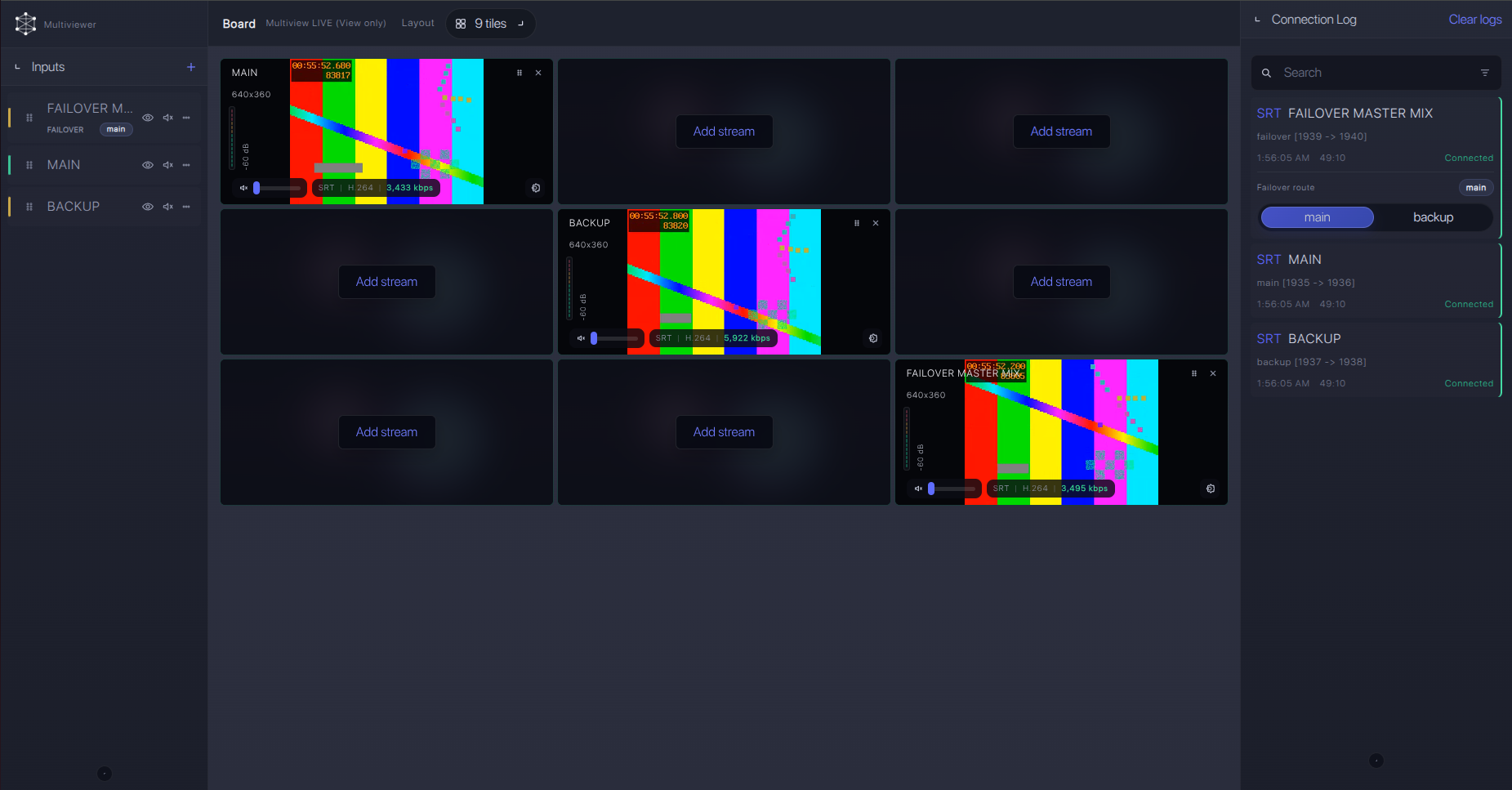
For production events, plan what happens if the main encoder, venue uplink, or primary contribution path fails. Callaba can be part of that continuity plan without changing the basic AJA HELO ingest workflow.
Recording and playback
HELO is also described by AJA as a streaming and recording encoder, but local HELO recording and Callaba cloud recording are separate checks. A valid local recording does not prove that the cloud ingest is healthy. For event confidence, record in Callaba after the RTMPS feed is stable, then test playback or web player output from the received source.
Troubleshooting
| Symptom | Check in Callaba | Check on HELO | Likely fix |
|---|---|---|---|
| No connection | No incoming bitrate or uptime | Server URL, stream key/name, DNS, network | Correct the URL/key and allow outbound TCP to the ingest port. |
| RTMP works but RTMPS fails | RTMPS endpoint is reachable from another test encoder | Firmware version and URL starts with rtmps:// | Update HELO to v3.0 or newer, then retest secure ingest. |
| Video appears, no audio | Preview plays but meters are silent | Embedded SDI/HDMI or analog audio selection | Select the correct input audio and confirm AAC-LC output. |
| Unstable feed | Bitrate drops or connection resets | Configured bitrate and input format | Lower bitrate or frame rate; test with clean uplink headroom. |
| Need SRT features | Callaba can receive SRT from another source | No SRT Stream ID or passphrase fields on HELO | Use RTMPS/RTMP from HELO, or add an external SRT encoder/transcoder. |
| RTSP bridge fails | Bridge output is not reaching Callaba | RTSP URL and client count | Keep the bridge on the same LAN as HELO and stay within the documented RTSP client limit. |
Official references
Use these resources to confirm the exact unit, firmware, and protocol behavior before production.
Vendor references
Protocol references
Callaba resources
FAQ
Can AJA HELO send RTMPS to Callaba?
Yes, when HELO is running firmware v3.0 or newer. Configure the HELO Stream Type as RTMP and use the Callaba RTMPS URL plus stream key/name.
Does the original AJA HELO support SRT?
AJA’s exact HELO documentation does not list SRT Stream ID, passphrase, caller/listener, or rendezvous settings. Use RTMPS/RTMP from HELO, or add an external SRT encoder/transcoder if SRT is required.
Can I use HELO RTSP ingest instead?
HELO RTSP is a pull workflow and AJA documents up to 10 clients. It is useful on a LAN or for a bridge, but RTMPS is the cleaner cloud contribution path.
Is AJA HELO an NDI source?
No. The original HELO documentation used for this guide does not list NDI or SMPTE ST 2110 I/O for this exact model.
What codec should I use for HELO RTMPS to cloud?
Use H.264 video and AAC-LC stereo audio. Official HELO specs list H.264 up to 1080p60 and up to 20 Mb/s; start lower and increase only after the uplink is stable.
Can Callaba send a return feed back to HELO over SDI or HDMI?
No. Treat HELO as the encoder. AJA describes SDI output as an input loop and HDMI output as monitor/proxy output, not a Callaba decoder return.
Next steps
- Update HELO and confirm RTMPS appears to work with a test endpoint.
- Create the Callaba RTMPS ingest and copy the URL plus stream key/name exactly.
- Run a 10-15 minute test while watching Callaba bitrate, preview, audio meters, and recording.
- Save an RTMP fallback only if your event policy allows it and RTMPS cannot be used.
Try Callaba Gateway with AJA HELO RTMPS ingest
Create an RTMP/RTMPS ingest in Callaba, send the HELO feed to the gateway, and check the received stream. After ingest is stable, use Callaba outputs for preview, recording, restreaming, multiview, playback, routing, or API workflows as parallel downstream options.
