

Related vendor hub
Browse all Sony SRT gateway workflows
Use the Sony hub to compare BRC-X400, FR7, and PXW-Z280 SRT workflows.
Use this setup when the Sony PXW-Z280 is at the venue and Callaba is the cloud SRT receiver for monitoring, recording, routing, multiview, or restreaming. The practical goal is simple: get one contribution feed out of the camera, confirm that Callaba is receiving stable video and audio, then decide which downstream outputs you need.
There is one important PXW-Z280 caveat. Sony public material for this exact model includes firmware/update evidence for SRT, while the operating instructions more explicitly document RTMP/RTMPS and MPEG-2 TS/UDP streaming. Before the event, confirm the installed firmware and that your unit exposes the SRT settings you plan to use.
Quick answer
To use Sony PXW-Z280 with SRT, first confirm the firmware version and that the camera exposes SRT caller/client settings. With SRT-capable firmware installed, send the PXW-Z280 feed to a Callaba SRT Listener. If the SRT menu is absent, update firmware first or use the confirmed RTMPS/RTMP fallback.
The camera sends one SRT contribution feed into Callaba. After ingest, preview, recording, routing, multiview, and restreaming are parallel downstream uses, not mandatory sequential setup steps.
- Sony PXW-Z280SRT caller/client when firmware menu is present
- Callaba GatewaySRT listener and cloud receiver
- Preview
- Record
- Route
- Multiview
- Restream
What this setup does
The PXW-Z280 acts as the field camera and encoder. Callaba acts as the public SRT receiver, so the venue does not need to host a public receiver unless you deliberately reverse the SRT direction. After Callaba receives the stream, the same source can be previewed, recorded, routed to another protocol, shown in multiview, or restreamed.
What this model can and cannot do in this workflow
For this exact model, treat the workflow as firmware-dependent. Use direct SRT when the camera firmware exposes SRT settings. If it does not, the documented direct IP fallback is RTMPS/RTMP on firmware V4.00 or later.
- The PXW-Z280 is a 4K 1/2-type 3CMOS handheld camera with RJ-45 LAN and regional Wi-Fi options for network functions.
- Physical outputs include 12G/3G/HD/SD-SDI, HDMI Type A, and a switchable monitor BNC, so an external SRT encoder is a practical backup path.
- Sony documents RTMP/RTMPS setup with Destination URL, Stream Name, and RTMPS certificate handling in the Network > RTMP/RTMPS area.
- Firmware V4.00 or later is required for RTMP/RTMPS streaming.
- The manual also documents MPEG-2 TS/UDP streaming with destination address, destination port, audio channel, and format settings.
- Network Client Mode and QoS workflows are Sony receiver/cloud workflows, not direct Callaba inputs.
- HEVC/H.265 is documented for Sony QoS streaming added in firmware V2.00; do not assume that means HEVC over SRT or RTMPS to Callaba.
- Public exact-model material does not clearly confirm NDI, RTSP, or ST 2110 for the PXW-Z280. Do not plan the PXW-Z280 as a native NDI source.
- SRT Stream ID, passphrase, latency, and caller/listener field names were not clearly shown in the supplied public manual evidence, so confirm them on the installed firmware menu.
Sony support pages may show a regional suffix such as PXW-Z280V. This guide is for the PXW-Z280 support entry and does not assume features from other XDCAM handheld models.
Recommended workflow
Keep the camera at the venue as the outgoing SRT sender and let Callaba listen in the cloud. This avoids inbound UDP rules at the venue. Reversing the roles is an advanced design because the camera side would need a reachable public IP, UDP port forwarding, and firewall rules.
If SRT is unavailable on the installed firmware, use RTMPS/RTMP directly into Callaba when that is acceptable for latency and monitoring. If the production requires SRT but the camera does not expose SRT, feed SDI or HDMI from the PXW-Z280 into a separate SRT encoder.
When not to use this setup
- If the camera and switcher are on the same table or same LAN, SDI or HDMI into the local switcher may be simpler.
- If the only destination is a public platform and you do not need cloud monitoring, routing, or recording, the confirmed RTMPS/RTMP output may be enough.
- If the job depends on NDI, choose a device that is officially documented as an NDI source. The PXW-Z280 is not confirmed for native NDI in the public exact-model sources used here.
Before you start
- Check the camera firmware and confirm the visible SRT menu before booking the path.
- Open the UDP port selected for the Callaba SRT server.
- Decide whether Stream ID and passphrase are required. They are case-sensitive and whitespace-sensitive; a trailing space or copied newline can break the handshake.
- For difficult handshakes, compare SRT compatibility through Sony firmware notes/support information and the Callaba server build or support information.
- For RTMPS fallback, confirm the camera clock, certificate handling, destination URL, and stream name/key.
Create the Callaba ingest
In Callaba, create an SRT server and set it to listen on a known UDP port. For a first internet test, use a simple Stream ID policy or temporarily disable Stream ID until basic connectivity is proven. After the camera connects, confirm incoming bitrate, connection uptime, RTT, packet loss, retransmits, preview, and audio meters.
Configure the PXW-Z280
On the PXW-Z280, connect wired LAN when possible. In the SRT-capable firmware menu, choose the outgoing caller/client style mode if the firmware offers that terminology, then enter the Callaba public address, UDP port, Stream ID, passphrase, and latency values exactly as configured in Callaba. If those SRT fields are not present, do not hunt for hidden settings during show day; move to RTMPS/RTMP or use an external SRT encoder.
Settings table
| Where | What to do / field to fill | First-test value | Why / check |
|---|---|---|---|
| PXW-Z280 system menu | Confirm firmware and visible SRT streaming area | SRT-capable firmware installed | Use direct SRT only when the menu exists. |
| Callaba SRT server | Create server and choose UDP port | 10000 or another open UDP port | Camera must reach the cloud listener. |
| Callaba SRT server | Set Stream ID policy if required | Simple value with no spaces for first test | Must match the camera exactly. |
| Callaba SRT server | Set passphrase/encryption if required | Off for lab test, 16+ characters for event | Mismatch prevents connection. |
| PXW-Z280 SRT streaming area | Enter destination host/address | Callaba public IP or DNS name | Do not include protocol prefixes unless the camera asks for a URL. |
| PXW-Z280 SRT streaming area | Enter destination UDP port | Same port as Callaba | Check Callaba connection uptime. |
| PXW-Z280 encoder/format area | Choose a conservative video rate | 1080p30 at 4-6 Mb/s, 720p at 2.5-4 Mb/s | Starting point only; adjust to uplink and packet loss. |
| PXW-Z280 Network > RTMP/RTMPS | Fallback: Destination URL, Stream Name, RTMPS certificate | Use Callaba RTMP/RTMPS ingest details | Confirmed fallback on V4.00+ when SRT is not available. |
Monitoring
In Callaba, start with the receiver statistics, then preview. A healthy first test shows stable incoming bitrate, increasing uptime, reasonable RTT, low packet loss, and audio meters moving with the camera source. If the preview is delayed but statistics look clean, reduce latency only after retransmits remain stable.
Failover and local ingest options
For production events, plan what happens if the main encoder, venue uplink, or primary contribution path fails. Callaba can be part of that continuity plan without changing the basic Sony PXW-Z280 ingest workflow.
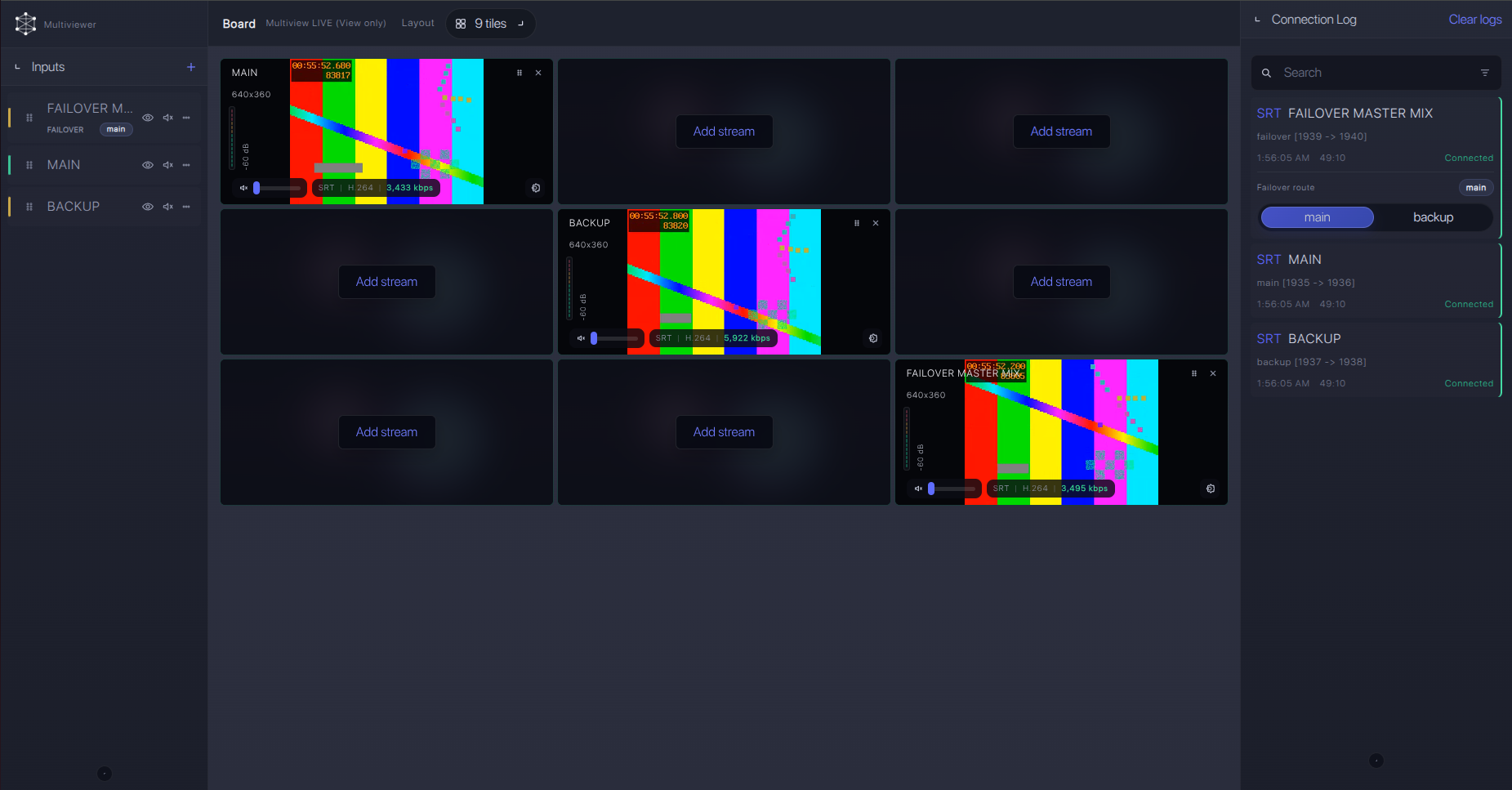
Recording and playback
Once the ingest is stable, enable recording or playback outputs as parallel downstream uses. Do not make recording the first diagnostic step. First prove SRT receive, video preview, and audio levels; then add recording, web playback, multiview, restreaming, or routing as needed.
Troubleshooting
| Symptom | Check in Callaba | Check on PXW-Z280 | Likely fix |
|---|---|---|---|
| No connection | SRT server running, UDP port open, no firewall block | Firmware exposes SRT and destination port matches | Open UDP, correct host/port, or update firmware. |
| Handshake fails | Stream ID and passphrase policy | Copied Stream ID/passphrase exactly | Remove trailing spaces, newlines, and capitalization errors. |
| Unstable video | RTT, packet loss, retransmits, bitrate | Encoder bitrate and uplink quality | Raise SRT latency to 250-500 ms for testing or lower bitrate. |
| No audio | Audio meters and recorded file audio | XLR input, channel selection, camera audio meters | Verify source channel and stream audio settings. |
| RTMPS fallback fails | RTMP/RTMPS ingest URL and stream key/name | Clock, certificate, Destination URL, Stream Name | Load/reset certificate as Sony documents and correct the URL. |
| SRT menu missing | No incoming SRT session | Installed firmware and streaming menus | Update firmware, use RTMPS/RTMP, or use SDI/HDMI to an SRT encoder. |
Official references
Useful references for checking firmware, menus, and fallback behavior:
Vendor references
- Sony PXW-Z280 firmware/update support page
- Sony PXW-Z280 firmware V4.00 support page
- Sony PXW-Z280 Operating Instructions PDF
- Sony PXW-Z280 firmware V2.00 support page
Protocol references
Callaba resources
FAQ
Can the Sony PXW-Z280 send SRT to Callaba?
Use direct SRT when the installed firmware exposes SRT settings. Because public exact-model material is inconsistent, I would confirm firmware and the visible menu before the event.
Should the PXW-Z280 be SRT Caller or Listener?
For cloud contribution, keep the camera as the outgoing sender when that mode is available and make Callaba the SRT Listener. Camera listener mode is harder on the public internet because the venue side must accept inbound UDP.
Where do I put the PXW-Z280 SRT Stream ID?
Use the SRT Stream ID field only if your camera firmware exposes it. Match Callaba exactly, including case and whitespace.
What if the SRT menu is missing on the PXW-Z280?
Update firmware if Sony provides SRT-capable firmware for your unit. If you cannot update, use the confirmed RTMPS/RTMP path or send SDI/HDMI into an external SRT encoder.
Does the PXW-Z280 support native NDI?
Not in the public exact-model sources used for this workflow. Do not plan the PXW-Z280 as a native NDI source.
Can I use HEVC/H.265 for this Callaba ingest?
Sony documents HEVC for its QoS workflow, not as a general direct SRT or RTMPS output in the manual evidence used here. Confirm codec output on the installed firmware and confirm downstream decoder support.
Next steps
Run a short private test before the production call time: create the Callaba SRT server, connect the PXW-Z280, watch statistics for at least a few minutes, check audio, record a sample, and only then add restreaming or routing outputs.
