

Related vendor hub
Browse all Sony SRT gateway workflows
Use the Sony hub to compare BRC-X400, FR7, and PXW-Z280 SRT workflows.
Sony BRC-X400 SRT setup is a direct camera-to-cloud workflow: the PTZ camera sends an SRT contribution feed, and Callaba receives it as a cloud SRT listener. Use this setup when BRC-X400 is at the venue and Callaba is the cloud SRT receiver for monitoring, recording, routing, multiview, or restreaming. The default production pattern is BRC-X400 as SRT Caller into Callaba Gateway.
Quick answer
To use Sony BRC-X400 with SRT, set BRC-X400 as the SRT Caller and send the stream to a cloud SRT Listener. In this guide, Callaba works as the SRT gateway, receiver, monitor, recorder, and routing layer.
The Sony BRC-X400 sends one SRT contribution feed into Callaba Gateway. After ingest, preview, recording, routing, multiview, and restreaming are parallel downstream uses, not mandatory sequential steps.
- Sony BRC-X400SRT Caller
- Callaba GatewaySRT Listener
- Preview
- Record
- Route
- Multiview
- Restream
What this setup does
This workflow turns the BRC-X400 into a remote contribution source. The camera sends SRT over the venue internet connection to a Callaba SRT server. Callaba then gives operators one place to check preview, audio, bitrate, connection uptime, packet loss, RTT, retransmits, recordings, and downstream outputs.
Use outbound SRT Caller from the camera first. It is easier for venues because the camera initiates the connection to Callaba. BRC-X400 SRT Listener is documented by Sony, but using it over the public internet usually means inbound access to the camera side, with firewall and port-forwarding work.
What this model can and cannot do in this workflow
Sony documentation for BRC-X400/X401 confirms RTSP, RTMP, RTMPS, SRT-Caller, and SRT-Listener streaming modes when audio is enabled. Sony also documents SRT destination URL for Caller mode, Listener port, latency, TTL, AES-128/AES-256 encryption, passphrase, and ARC settings.
- Confirmed for this model: direct SRT to Callaba, RTMP/RTMPS publishing, RTSP LAN pull, HDMI output, 3G-SDI output in HD, embedded audio, and NDI|HX with a separate license key.
- Codec caveat: for SRT and RTMP modes, plan around H.264 Image 1 with audio enabled. Sony’s IP image codec path also documents H.265/HEVC for RTSP use.
- Stream ID caveat: I did not find BRC-X400 SRT Stream ID documented in the operating instructions or CGI command list. Do not design routing that depends on Stream ID until you confirm it in the installed firmware UI.
- Firmware and regional caveats: Sony states RTMP(S) and SRT require firmware V3.00. China-market notes exclude RTMPS, and Sony also states China models do not support SRT encryption and passphrase.
- Close variant note: the BRC-X400/X401 operating instructions are shared; SRG models are related Sony PTZ cameras, but the 4K Option note in the manual applies to SRG models, not BRC-X400.
Recommended workflow
For a BRC-X400 SRT gateway workflow, create a Callaba SRT server in Listener mode, open the selected UDP port to the Callaba instance, then set the camera Streaming mode to SRT-Caller. Paste the Callaba public address and port into the camera destination URL as an srt:// address.
Start with 250-500 ms latency for an internet test, then adjust after you see stable RTT, low packet loss, and controlled retransmits. For H.264 contribution, practical first-test bitrates are about 4-6 Mb/s for 1080p30 and 6-8 Mb/s for 1080p60, adjusted to uplink capacity and production quality requirements.
When not to use this setup
- If the camera and switcher are on the same LAN or in the same rack, HDMI, HD-SDI, or licensed NDI|HX may be simpler than cloud SRT.
- If the only destination is a public platform and monitoring, routing, recording, or multiview are not needed, the camera’s RTMP/RTMPS output may be enough.
- If the job specifically requires HEVC from this camera over IP, evaluate the documented RTSP/H.265 path and confirm the downstream decoder or bridge supports it.
- If you want BRC-X400 as SRT Listener, treat it as an advanced fallback. The camera side must accept inbound UDP, so confirm public IP, port forwarding, firewall rules, and NAT behavior before the event.
Before you start
Update or confirm camera firmware V3.00 or later for SRT and RTMP(S). Confirm the camera has a working network route to the Callaba public address, and allow the selected UDP port in the Callaba-side firewall. Prepare an audio source or enable audio in the camera settings, because Sony’s SRT and RTMP streaming modes depend on audio being enabled.
If you use SRT encryption, keep the passphrase exactly the same on both sides. Passphrases are case-sensitive and whitespace-sensitive; a trailing space, copied newline, or changed capitalization can break the SRT handshake. If a handshake issue is difficult to diagnose, confirm compatible SRT major versions through Sony firmware notes or vendor support and through Callaba release or build information.
Create the Callaba ingest
In Callaba, create an SRT server for the BRC-X400 feed. Choose Listener mode, set the UDP port, and configure encryption only if you plan to match the same encryption and passphrase in the camera. Copy the public hostname or IP address and port for the camera destination URL.
Success looks like an incoming connection with bitrate, uptime, preview, and audio activity in Callaba after the camera starts streaming. If nothing connects, check the UDP port first before changing codec settings.
Configure the BRC-X400
Open the BRC-X400 web menu, enable audio, then configure streaming. Select SRT-Caller, enter the Callaba srt://host:port destination, set latency, and match encryption and passphrase if used. Keep Image 1 on H.264 for SRT. Start the stream and watch Callaba statistics while the camera is live.
Do not assume BRC-X400 SRT Stream ID support unless the installed firmware clearly shows it and you have tested it end to end. The public manual and CGI command list I use for setup planning do not clearly document a Stream ID field for this model.
Settings table
| Where | What to do / field to fill | First-test value | Why / check |
|---|---|---|---|
| Callaba SRT server | Create SRT server and choose Listener mode | Listener | Camera calls out to the cloud receiver. |
| Callaba network settings | Choose and open UDP port | Example: 9000/UDP | Callaba must receive inbound SRT packets. |
| Callaba SRT encryption | Set encryption and passphrase if required | Off for first lab test, then AES to match camera | Mismatch causes handshake failure. |
| BRC-X400 audio settings | Enable audio | On | Sony documents SRT/RTMP streaming modes with audio enabled. |
| BRC-X400 streaming mode | Select SRT-Caller | SRT-Caller | Default remote contribution direction. |
| BRC-X400 SRT destination URL | Enter Callaba SRT URL | srt://your-callaba-host:9000 | Use the Callaba public host and UDP port. |
| BRC-X400 SRT latency | Set latency in the SRT settings | 250-500 ms | Increase for unstable internet, lower only after testing. |
| BRC-X400 image codec area | Confirm Image 1 is H.264 for SRT | H.264 | SRT/RTMP modes are planned around H.264 Image 1. |
Monitoring
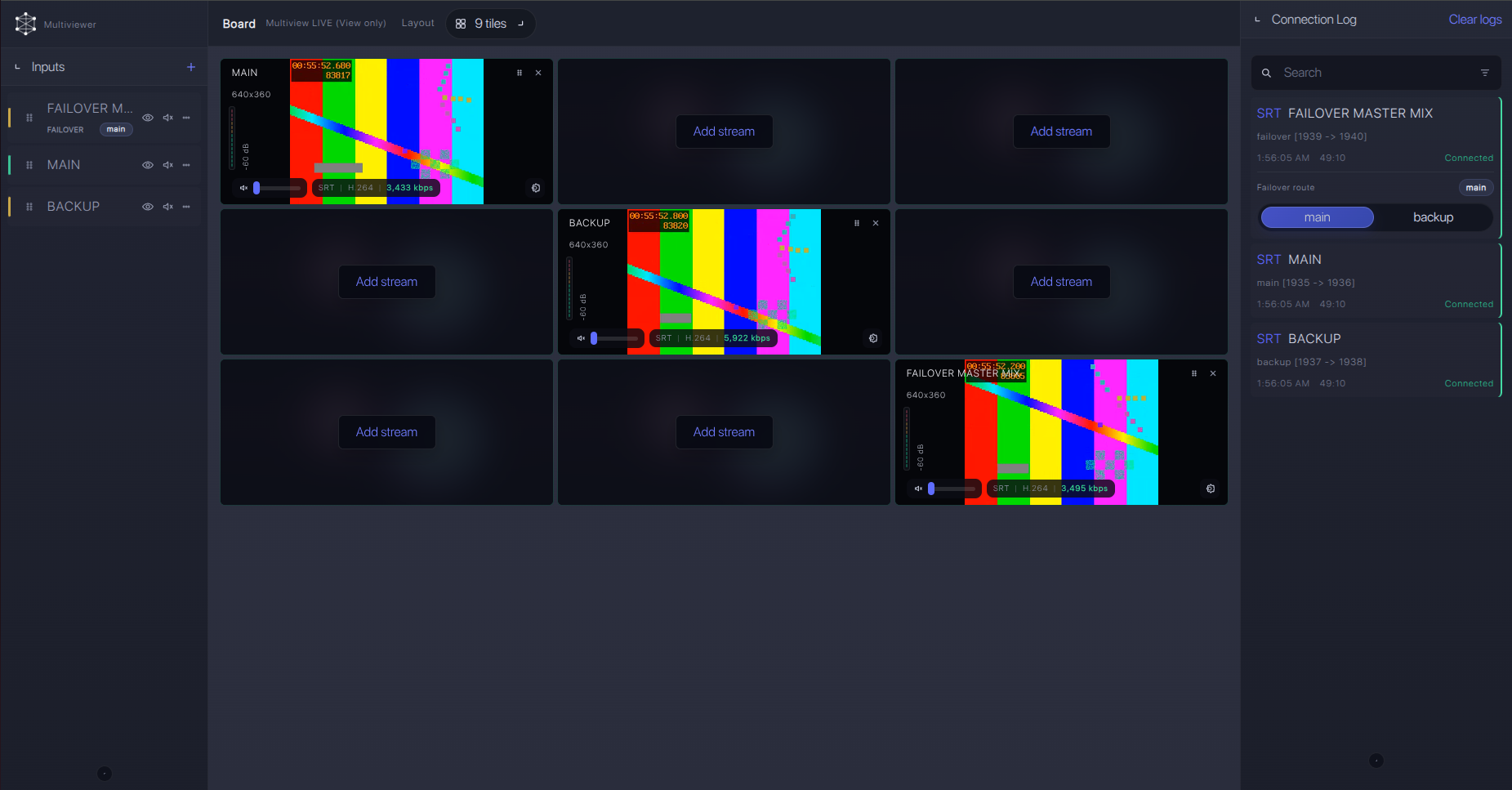
After the BRC-X400 connects, use Callaba to watch incoming bitrate, preview, audio meters, connection uptime, packet loss, RTT, and retransmits. Treat these as live contribution health checks, not only as diagnostics after a failure. If the preview is stable but audio is missing, check the camera audio input and the stream audio setting before changing SRT values.
Failover and local ingest options
For production events, plan what happens if the main encoder, venue uplink, or primary contribution path fails. Callaba can be part of that continuity plan without changing the basic Sony BRC-X400 ingest workflow.
Recording and playback
Once ingest is stable, recording and playback can run in parallel with monitoring, multiview, restreaming, and routing. For operations, I prefer to prove the contribution feed first, then enable recordings or web playback outputs. That keeps troubleshooting focused: first transport, then downstream distribution.
Troubleshooting
| Symptom | Check in Callaba | Check on device | Likely fix |
|---|---|---|---|
| No connection | No uptime or incoming bitrate | SRT-Caller URL and network gateway | Open the UDP port, confirm public host, and retry. |
| Handshake fails | Encryption/passphrase settings | AES mode and passphrase text | Match encryption exactly; remove hidden spaces or copied newlines. |
| Video but no audio | Audio meters are flat | Audio enabled and input level | Enable audio and confirm the mic/line input source. |
| Choppy stream | RTT, packet loss, retransmits, bitrate | Latency and encoder bitrate | Raise latency, reduce bitrate, or improve uplink quality. |
| Stream ID routing does not work | Expected route does not receive feed | Whether firmware exposes Stream ID | Do not depend on Stream ID unless confirmed and tested on this firmware. |
| Need HEVC | Receiver/player codec support | RTSP/H.265 configuration | Use the documented RTSP/H.265 path with a compatible bridge or decoder. |
Official references
These are useful references for planning the BRC-X400 workflow and checking exact menu behavior before a production day.
Vendor references
- Sony Pro BRC-X400 product page
- Sony BRC-X400/X401 Operating Instructions
- Sony BRC-X400/SRG-X400/X120 SRT introduction guide
- Sony BRC-X400/X401 CGI Command List
Protocol references
Callaba resources
FAQ
Can Sony BRC-X400 send SRT directly to Callaba?
Yes. Sony documents SRT-Caller and SRT-Listener modes for BRC-X400/X401. For cloud contribution, use BRC-X400 as SRT Caller and Callaba as the SRT Listener.
Is Callaba the BRC-X400 SRT server or receiver?
In the recommended setup, yes: Callaba is the cloud SRT listener, gateway, and receiver. The camera sends the feed to Callaba, and Callaba handles monitoring, recording, routing, multiview, and restreaming as downstream options.
Does BRC-X400 support SRT Stream ID?
I do not see Stream ID clearly documented in the public operating instructions or CGI command list for this model. Confirm in the camera’s installed firmware UI before building Stream ID-based routing.
Can I use BRC-X400 SRT Listener instead of Caller?
Yes, Listener mode is documented, but it is usually harder across the public internet because the venue camera side must accept inbound UDP. Use it only with a tested public IP, port-forwarding, and firewall plan.
Can the BRC-X400 use RTMP or RTMPS instead?
Yes, Sony documents RTMP and RTMPS with server URL and stream key settings, with RTMP(S) requiring firmware V3.00. RTMPS is not supported on China-market models.
Should I use NDI|HX or RTSP instead of SRT?
Use licensed NDI|HX for local LAN production when that fits the switcher workflow. Use RTSP when you need LAN pull or the documented H.265/HEVC IP stream path. Use SRT for monitored remote contribution to Callaba over the internet.
Next steps
Build the path in this order: update firmware, create the Callaba SRT Listener, open the UDP port, configure BRC-X400 as SRT Caller, start with H.264 and audio enabled, then confirm preview, audio meters, bitrate, RTT, packet loss, retransmits, and recording before adding downstream outputs.
