

Related vendor hub
Browse all Marshall SRT gateway workflows
Use the Marshall hub when a camera workflow needs monitored SRT ingest and Callaba output control.
Marshall CV730-NDI / ND3 SRT setup is practical for the CV730-ND3/ND3W variant that exposes SRT in Marshall documentation. Use this setup when CV730-NDI / ND3 is at the venue and Callaba is the cloud SRT receiver for monitoring, recording, routing, multiview, or restreaming. The working plan is to disable NDI, use HDMI + Streaming, enable SRT, and connect the camera to a Callaba SRT listener. If you have the older CV730-NDI/CV730-NDIW, do not assume SRT or RTMP/RTMPS support.
Quick answer
To use Marshall CV730-NDI / ND3 with SRT, set CV730-NDI / ND3 as the SRT Caller when that option is available in the installed firmware and send the stream to a cloud SRT Listener. In this guide, Callaba works as the SRT gateway, receiver, monitor, recorder, and routing layer.
The camera sends one contribution feed into Callaba. After ingest, Callaba can preview, record, route, restream, and feed multiview in parallel. These are downstream uses, not mandatory sequential setup steps.
- CV730-ND3SRT caller, NDI off
- Callaba GatewaySRT listener
- Preview
- Record
- Route
- Restream
- Multiview
What this setup does
This workflow turns the Marshall CV730-ND3/ND3W into an internet contribution camera and uses Callaba as the cloud SRT receiver. Callaba receives the SRT feed first; preview, recording, routing, restreaming, playback, and multiview are parallel options after ingest. The camera does not need a vendor cloud receiver for this path.
The phrase CV730-NDI / ND3 can be confusing. For SRT, this article is about the CV730-ND3/ND3W generation. The older CV730-NDI/CV730-NDIW documentation I found should be treated as a separate product path.
What this model can and cannot do in this workflow
- Confirmed for CV730-ND3/ND3W: Marshall lists SRT, RTMP, RTMPS, RTSP, MPEG-TS, NDI HX2, and NDI HX3 on the model documentation.
- Outputs: the camera family is documented with 12G/6G/3G-SDI, HDMI 2.0, Ethernet/IP streaming, USB 3.0/UVC, and NDI over Ethernet.
- Codec choices: the product material lists HEVC/H.265 and AVC/H.264 video compression; the manual lists AAC and G.711 audio encoding options.
- Important limitation: Marshall separates NDI and non-NDI streaming. When NDI is enabled, RTSP, RTMP, RTMPS, MPEG-TS, and SRT are not the active streaming path.
- SRT fields: the manual confirms an SRT settings area, enable/open behavior, automatic connection at startup, a port range of 1025-65535, and configurable delay. The public manual text I found does not clearly confirm SRT Stream ID, passphrase, encryption, rendezvous, or exact caller/listener wording.
- Not confirmed: I found no exact-model ST 2110 support claim and no exact-model evidence for a separate SRT, NDI, HEVC, or UHD feature license.
Recommended workflow
For remote production, I recommend the outbound camera-to-cloud pattern: CV730-ND3 as the SRT caller and Callaba as the public SRT listener. This avoids asking the venue camera network to accept inbound internet traffic. If your installed firmware exposes only listener behavior, reversing roles becomes an advanced fallback and may require a public IP, UDP port forwarding, firewall rules, or a tested NAT traversal plan at the venue.
Use H.264 for the first test unless your whole downstream chain is ready for HEVC. HEVC can be useful for bandwidth, but browser preview, decoders, and contribution partners must support it.
When not to use this setup
- If the camera and switcher are on the same LAN, SDI, HDMI, or local NDI may be simpler for live switching.
- If the only target is a public platform and you do not need cloud monitoring, recording, routing, or multiview, RTMP/RTMPS from the CV730-ND3 may be enough.
- If the unit is the older CV730-NDI/CV730-NDIW, plan around that unit’s confirmed NDI/RTSP behavior or use a bridge after checking its firmware. Do not copy this SRT setup onto it.
Before you start
Confirm the exact model label, firmware, camera IP address, admin access, available uplink bandwidth, and whether the event network allows outbound UDP to your Callaba server. Before the event, confirm SRT caller/listener direction, Stream ID, passphrase, encryption, codec, and SRT version compatibility in the installed firmware or vendor support material. If a handshake failure is hard to explain, compare the camera firmware notes with the Callaba server build or support information.
Create the Callaba ingest
In Callaba, create an SRT server and choose the UDP port that the camera will use. For a first test, keep optional SRT Stream ID and passphrase settings off unless the camera firmware exposes matching fields. If you do use them, treat Stream ID and passphrase as case-sensitive and whitespace-sensitive: a copied newline, trailing space, or changed capitalization can stop the handshake.
Success looks like a connected SRT session with incoming bitrate, stable uptime, preview, and audio meters in Callaba.
Configure the camera
Open the Marshall web interface, turn NDI off, and choose the HDMI + Streaming output mode. In the SRT Setting area, enable/open SRT and enter the Callaba host and UDP port if your firmware presents destination fields. Set delay conservatively for the first internet test: 250-500 ms is a useful starting range, then lower it only after RTT, packet loss, and retransmits are stable.
For contribution testing, start with H.264, AAC audio, and a bitrate matched to the uplink. Practical first-test ranges are about 4-6 Mb/s for 1080p30 and 6-8 Mb/s for 1080p60, then adjust for the production format.
Settings table
| Where | What to do / field to fill | First-test value | Why / check |
|---|---|---|---|
| Callaba SRT server | Create an SRT listener and choose UDP port | Port 5000 or another allowed UDP port | Callaba should show a waiting listener before the camera connects. |
| Callaba SRT server | Stream ID and passphrase | Leave empty unless the camera exposes matching fields | Only enable after you can match exact text on both sides. |
| Marshall web UI | NDI mode | Off | Manual separates NDI from SRT/RTMP/RTSP streaming. |
| Marshall web UI | Output Source | HDMI + Streaming | Required for the non-NDI streaming path. |
| Marshall SRT Setting area | Open/enable SRT | Enabled | Camera should attempt connection on startup when configured. |
| Marshall SRT Setting area | Port | Match Callaba UDP port | Manual lists SRT port range 1025-65535. |
| Marshall SRT Setting area | Delay | 250-500 ms | Increase if RTT, packet loss, or retransmits are high. |
| Marshall video/audio areas | Video codec and audio codec | H.264 and AAC | Good first compatibility choice before testing HEVC. |
Monitoring
In Callaba, watch incoming bitrate, connection uptime, preview, audio meters, RTT, packet loss, and retransmits. A stable test is not just a visible image; it is stable timing, continuous bitrate, clean audio, and no growing recovery backlog. If preview is black but bitrate is present, check codec compatibility and try H.264 before debugging the network.
Failover and local ingest options
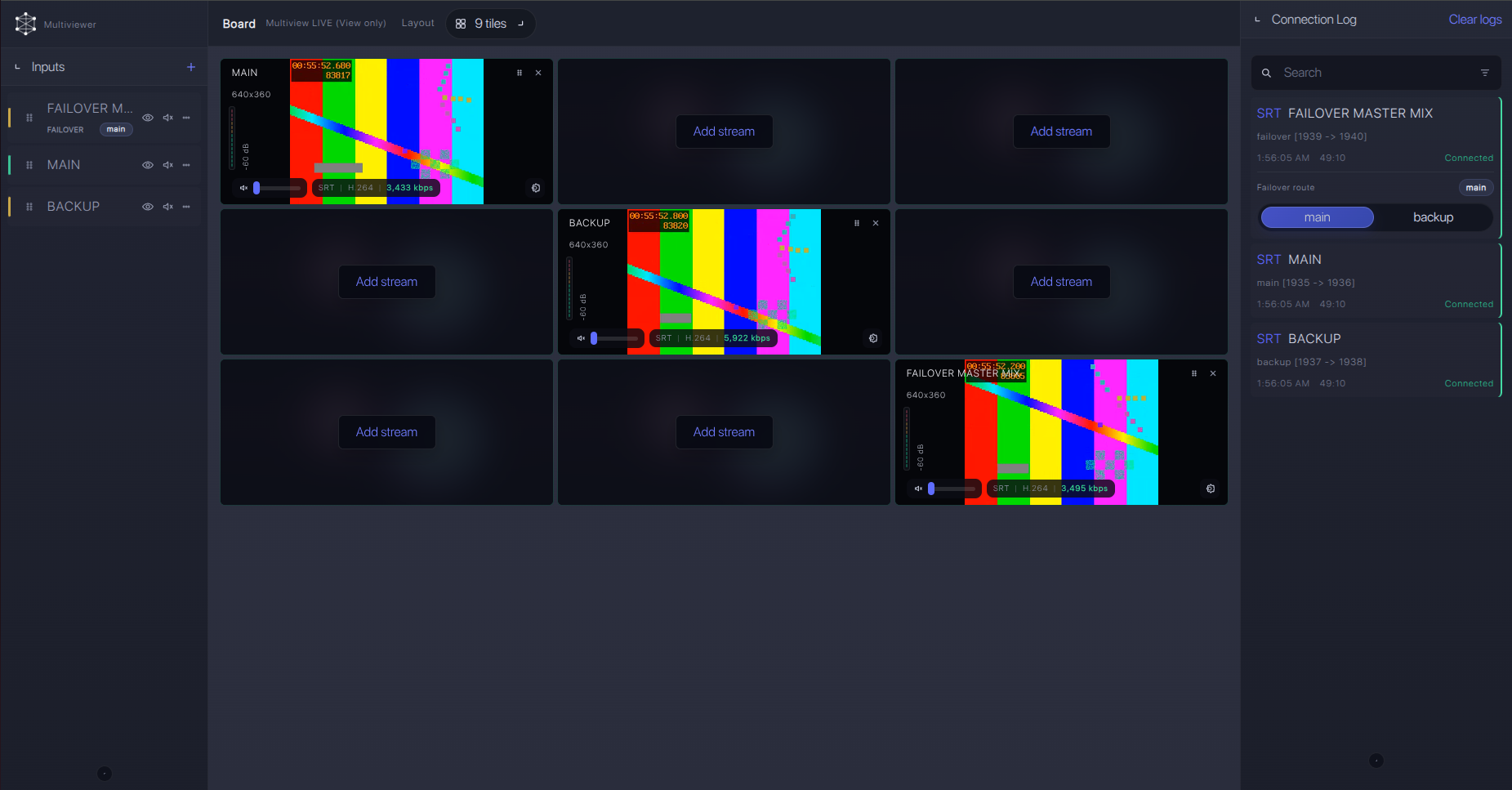
For production events, plan what happens if the main encoder, venue uplink, or primary contribution path fails. Callaba can be part of that continuity plan without changing the basic Marshall CV730-NDI / ND3 ingest workflow.
Recording and playback
After ingest is stable, use Callaba recording and playback as downstream options from the same received source. Recording does not have to come before routing or restreaming. For operational checks, record a short clip, play it back, and confirm that video, audio, and timing match the live preview.
Troubleshooting
| Symptom | Check in Callaba | Check on device | Likely fix |
|---|---|---|---|
| No SRT connection | Listener is running on the expected UDP port | NDI off, HDMI + Streaming selected, SRT enabled | Correct IP/port, firewall, and SRT role direction. |
| Connects, then drops | RTT, packet loss, retransmits, uptime resets | SRT delay and bitrate | Raise delay, reduce bitrate, or improve uplink. |
| Handshake fails after security changes | Stream ID/passphrase exactly as entered | Matching fields, if firmware exposes them | Remove trailing spaces/newlines and match capitalization. |
| Preview black with bitrate | Codec shown on incoming stream | H.264 versus HEVC setting | Use H.264 first, then test HEVC with known-compatible decoders. |
| No audio | Audio meters on the received source | 3.5 mm TRS input level and AAC/G.711 setting | Select the correct mic/line input and start with AAC. |
| NDI works but SRT does not | No incoming SRT session | NDI status and output source | Turn NDI off and use HDMI + Streaming for SRT. |
Official references
Useful references for this setup:
Vendor references
- Marshall CV730-ND3 / CV730-ND3W product page
- Marshall CV730-ND3/ND3W User Manual
- Marshall CV730-ND3 cutsheet
Protocol references
Callaba resources
FAQ
Does Marshall CV730-NDI / ND3 support SRT?
The CV730-ND3/ND3W documentation lists SRT. Do not apply that claim to the older CV730-NDI/CV730-NDIW unless that exact unit and firmware expose SRT.
Is CV730-NDI / ND3 an SRT caller or SRT listener?
For cloud contribution, use the camera as caller and Callaba as listener when the installed firmware supports that direction. The public manual text I found does not clearly name caller/listener/rendezvous fields, so confirm this in the UI.
Where do I enter CV730-NDI / ND3 SRT Stream ID or passphrase?
Only use Stream ID or passphrase if the camera firmware exposes matching fields. They are case-sensitive and whitespace-sensitive on SRT systems.
Can I use NDI and SRT at the same time on CV730-ND3?
Plan as if you cannot. The manual separates NDI mode from RTSP, RTMP, RTMPS, MPEG-TS, and SRT streaming.
Should I send H.264 or HEVC to Callaba?
Start with H.264 for compatibility. Test HEVC only after confirming downstream player, decoder, and recording requirements.
Can Callaba record and restream the CV730-ND3 SRT feed?
Yes. Once Callaba receives the SRT feed, monitoring, recording, routing, restreaming, multiview, and playback are parallel downstream options.
Next steps
Build the first test with simple SRT settings: one Callaba listener, NDI off on the camera, H.264 video, AAC audio, and conservative SRT delay. Run a 15-minute stability test, then add recording, multiview, routing, or API automation only after the ingest is clean.
