

Browser-based hub to receive, route, monitor, failover, record, and deliver live video for live sports teams, remote production crews, corporate event teams, OTT teams, AV integrators, and broadcast engineers.
- See every source
- Know what is live
- Switch to backup
- Record the feed
- Deliver to the right destination
Event control view
LiveMain feed status: unstable bitrate detected. Backup is ready and already monitored.
Switch output to backupQuick answer
Use Callaba when your live video workflow needs more than SRT or RTMP transport. Callaba becomes the control layer around the stream: receive it, preview it, check status, route it, prepare backup, record it, and deliver it to production tools, web players, CDNs, remote operators, and API workflows.
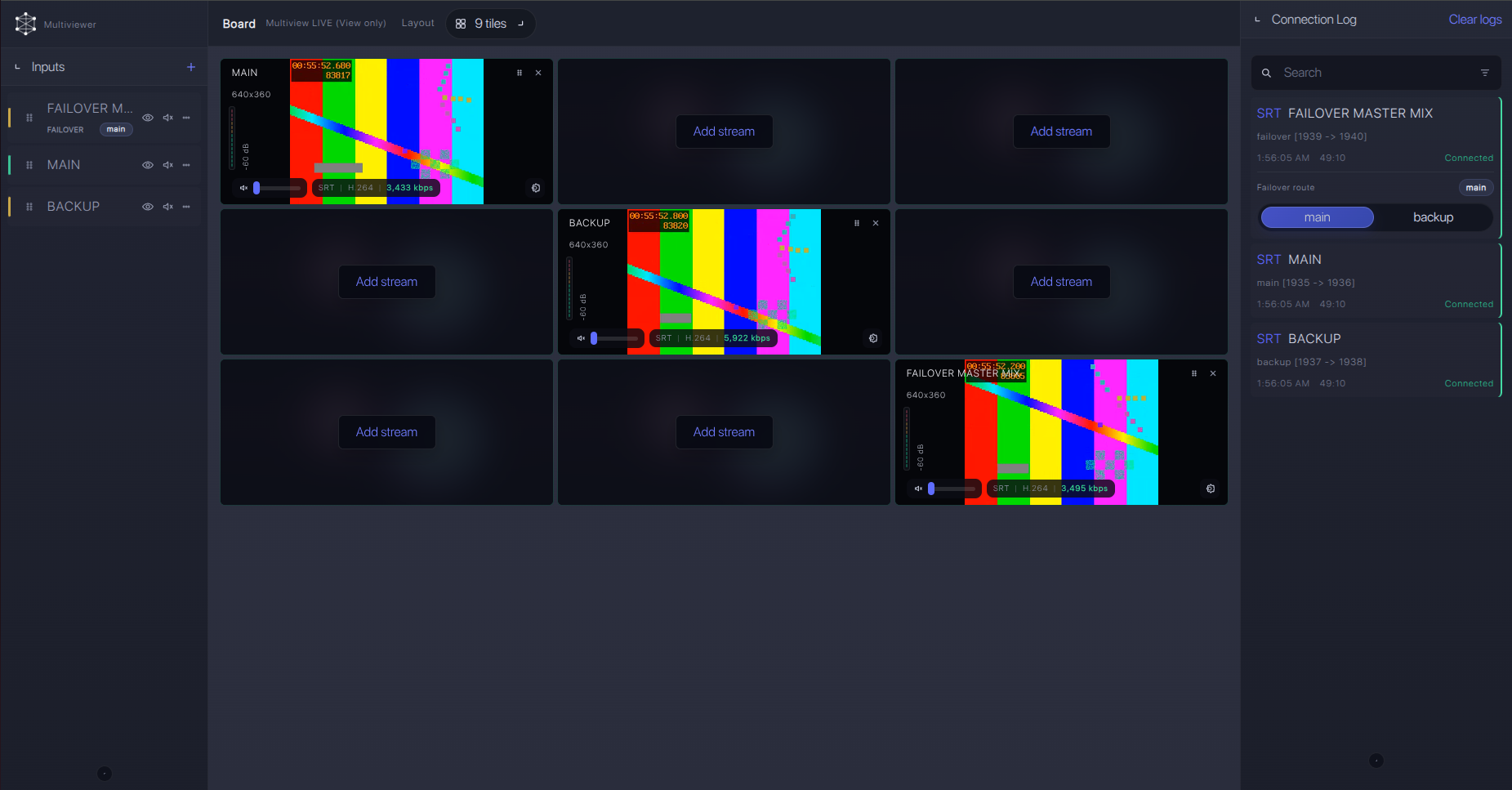
For teams that need control during a live event
The main problem is not always sending a stream. The harder problem is operating the stream when people are watching. Callaba is built for teams that need a clear browser view of sources, routes, backup state, recording, and delivery.
Why the control layer matters
Transport solves one part of the job. It moves video from one place to another. But the pressure starts when the event is live and the team needs to answer operational questions in seconds.
The infographic shows transport, routing, monitoring, protection, and delivery as layers that become one control workflow in Callaba.
- 1ReceiveConnect cameras, encoders, WebRTC callers, RTMP feeds, SRT feeds, HLS sources, or internal sources.
- 2MonitorCheck preview, audio, bitrate, packet loss, RTT, uptime, and route state in the browser.
- 3ProtectKeep a backup source ready and switch when the main path becomes unstable or goes offline.
- 4DeliverSend the feed to recording, multiview, CDN, web player, production tools, archive, or API workflows.
How it works
Callaba sits between contribution sources and production or delivery outputs. The same live feed can be previewed, routed, recorded, switched to backup, sent to multiview, delivered to a player, and controlled through API logic.
Sources feed into Callaba. Callaba handles monitoring, routing, failover, recording, and API control. Outputs go to production tools, web players, CDN, social platforms, and storage.
Sources
Callaba control layer
Outputs
Operator visibility
During a live event, source names are not enough. Operators need visual confidence and technical status: is the feed live, is audio present, is the route stable, is recording active, and is the backup ready?
Failover during the event
Backup should not be an idea that appears after the main stream fails. For live production, the main and backup path should be planned before the show. Callaba helps keep that logic visible to the operator.
The diagram shows main feed and backup feed entering Callaba, where the operator can switch the output to the delivery path.
Key capabilities in business language
The value is not only that Callaba supports protocols. The value is that teams can control what happens around the live stream without being locked into one encoder, switcher, player, or cloud design.
Receive SRT, RTMP, WebRTC, HLS, and other inputs depending on the workflow.
Use preview, bitrate, audio state, RTT, packet loss, uptime, and route state to find issues fast.
Use the stream once and route it to multiple downstream jobs without changing the encoder.
Build repeatable event workflows, remote control panels, and internal tools around Callaba controls.
Record live inputs and keep files available for post-event use, fast review, or workflow automation.
Browser multiview helps teams check live sources and outputs even when they are not in the control room.
How Callaba is different from adjacent tools
Callaba is not trying to replace every tool in the live production chain. It is the control layer around contribution, routing, monitoring, failover, recording, and delivery.
Deployment options
Callaba can run where the workflow needs control: in the cloud, on AWS, in private cloud, or as a self-hosted Linux setup. This keeps teams flexible instead of forcing one fixed appliance or one closed ecosystem.
Recommended first workflow
The first workflow should be simple enough to test in minutes: one source, one monitoring view, one backup, one recording path, and one delivery output.
Start with one real live event path
- 1Create ingestStart with one SRT or RTMP source from an encoder, camera, or production tool.
- 2Open multiviewCheck preview, audio, bitrate, stream state, and output confidence in the browser.
- 3Add backupPrepare a second source before the event and confirm it is ready.
- 4Record and deliverRecord the feed and send it to the production tool, player, CDN, or archive path.
FAQ
Is Callaba only an SRT gateway?
No. Callaba can receive SRT streams, but the stronger use case is the full live workflow around the stream: monitoring, routing, failover, recording, playback, delivery, and API control.
Does Callaba replace a production switcher?
No. Callaba is not a cloud switcher. It does not replace vMix, Wirecast, hardware switchers, graphics systems, or creative production tools. Callaba controls routing, monitoring, failover, recording, and delivery around those tools.
What about latency?
Latency depends on the protocol, network path, region, bitrate, encoder settings, and player path. For contribution workflows, teams usually balance latency against stability. Callaba helps operators see stream health and choose the right setup for the event.
What servers do I need?
It depends on the number of inputs, outputs, recordings, transcodes, viewers, and whether the workflow runs in the cloud, on AWS, or self-hosted Linux. A simple routing and monitoring workflow can start small, while high-output or transcoding-heavy jobs need stronger instances.
Can Callaba work with different encoders?
Yes. Callaba is encoder-agnostic. It can fit into workflows built around cameras, hardware encoders, software encoders, WebRTC sources, SRT sources, RTMP sources, and production tools.
Can the workflow run in the cloud and locally?
Yes. Callaba can be used in cloud workflows, AWS deployments, private cloud setups, and self-hosted Linux installations.
Why does browser multiview matter?
Browser multiview gives operators a fast way to check incoming feeds and output state without extra viewing hardware. It helps remote teams understand what is live, what is ready, and what needs attention.
Try live video routing with Callaba
Start with one live source, check it in the browser, add routing, prepare backup, record the feed, and deliver the output. Callaba gives your team one place to control the workflow around the stream.
