

Related vendor hub
Browse all Canon SRT gateway workflows
Use the Canon hub to compare CR-N, CR-X, and XF camera workflows before choosing the exact SRT setup.
For a Canon CR-X300 SRT setup, keep the CR-X300 at the venue as the SRT Caller and send the camera feed to a cloud SRT Listener. Use this setup when CR-X300 is at the venue and Callaba is the cloud SRT receiver for monitoring, recording, routing, multiview, or restreaming. The CR-X300 documentation confirms SRT settings on supported firmware, including Caller/Listener, latency, Stream ID, AES encryption, and passphrase, so the main workflow is direct SRT rather than an RTSP or NDI bridge.
Quick answer
To use Canon CR-X300 with SRT, set CR-X300 as the SRT Caller and send the stream to a cloud SRT Listener. In this guide, Callaba works as the SRT gateway, receiver, monitor, recorder, and routing layer. Before the event, confirm the installed firmware exposes the SRT menu; if it does not, update firmware or use RTMP/RTMPS first, then RTSP or NDI bridge paths only when needed.
The Canon CR-X300 sends one SRT contribution feed into Callaba. After ingest, Callaba can preview, record, route, restream, and play back the same source in parallel.
- Canon CR-X300SRT Caller at venue
- Callaba GatewaySRT Listener / receiver
- Preview
- Record
- Route
- Restream
- Playback
What this setup does
The CR-X300 is a remote camera with 6G-SDI, HDMI, and RJ-45 IP output. In this workflow the camera contributes one SRT feed over the network to Callaba. Callaba receives the feed, shows preview and statistics, and can then use the same source for recording, multiview, routing, playback, or restreaming. Those downstream uses are parallel options after ingest, not a required chain.
What this model can and cannot do in this workflow
Canon sources for the exact CR-X300 confirm the practical path, but they are not perfectly aligned. The current product page and the user manual SRT settings confirm SRT, and Canon firmware Version 1.1.0 says SRT protocol support was added. One manual specification summary omits SRT from the video transmission protocol list. I would confirm the installed firmware and the visible SRT menu on the unit before the event.
- Confirmed direct contribution: SRT is documented for CR-X300 with SRT enable, audio stream, Caller/Listener connection mode, destination or listening port, latency, Stream ID, AES-128/192/256 or off, passphrase, and adaptive bitrate.
- Default role: use CR-X300 as SRT Caller and Callaba as the cloud SRT Listener. CR-X300 Listener mode is documented, but it usually requires inbound UDP reachability at the camera side.
- Not found in the manual: SRT Rendezvous mode. Do not plan the show around Rendezvous unless your exact firmware exposes it and you test it.
- Codec facts: the manual documents Mainstream H.264 and H.265/HEVC, H.264 Substream 1, JPEG Substream 2, and AAC-LC 48 kHz audio. For a first SRT test, H.264 is usually the safer compatibility choice.
- Fallback protocols: RTMP, RTMPS, RTSP/RTP, and NDI|HX / NDI|HX2 are documented. Canon notes that RTMP cannot be used when Mainstream is set to H.265.
- Firmware nuance: Version 1.4.0 added NDI 6 support, RTMP automatic reconnection, SRT automatic reconnection, and SRT start/stop buttons.
Recommended workflow
For internet contribution, use outbound SRT from the camera. This keeps the venue network simple: the CR-X300 initiates the connection, and Callaba listens on a known UDP port in the cloud. Reverse the roles only when you have a tested reason to make the camera a Listener and the venue can accept inbound UDP through NAT and firewall rules.
When not to use this setup
- If the camera and switcher are on the same production LAN or in the same rack, 6G-SDI, HDMI, or local NDI|HX may be simpler than a cloud SRT path.
- If the only destination is a public platform and you do not need cloud monitoring, recording, routing, or multiview, RTMP/RTMPS may be enough. Keep the CR-X300 Mainstream codec on H.264 for that fallback.
- If the SRT menu is missing, update the CR-X300 firmware first. Use RTMP/RTMPS as the first confirmed fallback; use RTSP/RTP or NDI through a bridge only when the production design calls for it.
Before you start
- Check the CR-X300 firmware version and confirm that the SRT settings are visible.
- Decide the UDP port, Stream ID, encryption mode, and passphrase before the show.
- Confirm the uplink can carry the chosen bitrate with headroom.
- For hard-to-diagnose handshakes, confirm compatible SRT major versions using Canon firmware notes or support information and Callaba server build/support information.
Create the Callaba ingest
In Callaba, create an SRT server for the CR-X300 feed, choose a UDP port, and configure the expected Stream ID and passphrase if you use them. Open the selected UDP port to the Callaba instance. Copy the listener address, port, Stream ID, and encryption details into your run sheet. If you automate ingest creation, use the SRT servers API.
Configure the CR-X300
In the CR-X300 web interface or camera streaming settings, open the SRT settings area. Enable SRT, enable the audio stream if the program needs camera audio, set connection mode to Caller, enter the Callaba public address and UDP port, then copy the Stream ID and passphrase exactly. Stream ID and passphrase are case-sensitive and whitespace-sensitive; a trailing space, copied newline, or changed capitalization can break the SRT handshake.
Settings table
| Where | What to do / field to fill | First-test value | Why / check |
|---|---|---|---|
| Callaba | Create SRT server and choose UDP port | One dedicated port for this camera | Callaba must show a listening server before the camera starts. |
| CR-X300 SRT settings | SRT enable | On | The camera should expose SRT status and streaming controls. |
| CR-X300 SRT settings | Connection mode | Caller | Caller mode avoids inbound UDP at the venue. |
| CR-X300 SRT settings | Destination address | Callaba public IP or DNS name | Use the cloud receiver address, not a private LAN address. |
| CR-X300 SRT settings | Destination port | Callaba SRT server UDP port | Port must match Callaba and firewall rules. |
| CR-X300 SRT settings | Latency | 250-500 ms for first internet test | Lower only after RTT, loss, and retransmits are stable. |
| CR-X300 SRT settings | Stream ID | Exact Callaba Stream ID | Case and whitespace must match. |
| CR-X300 SRT settings | AES encryption and passphrase | Match Callaba; use a strong passphrase | AES mode and passphrase must match on both sides. |
Monitoring
When the CR-X300 connects, check Callaba for connection uptime, incoming bitrate, RTT, packet loss, retransmits, preview, and audio meters. If the connection is stable but preview fails, test H.264 first and confirm downstream decoder or player support before returning to H.265/HEVC.
Failover and local ingest options
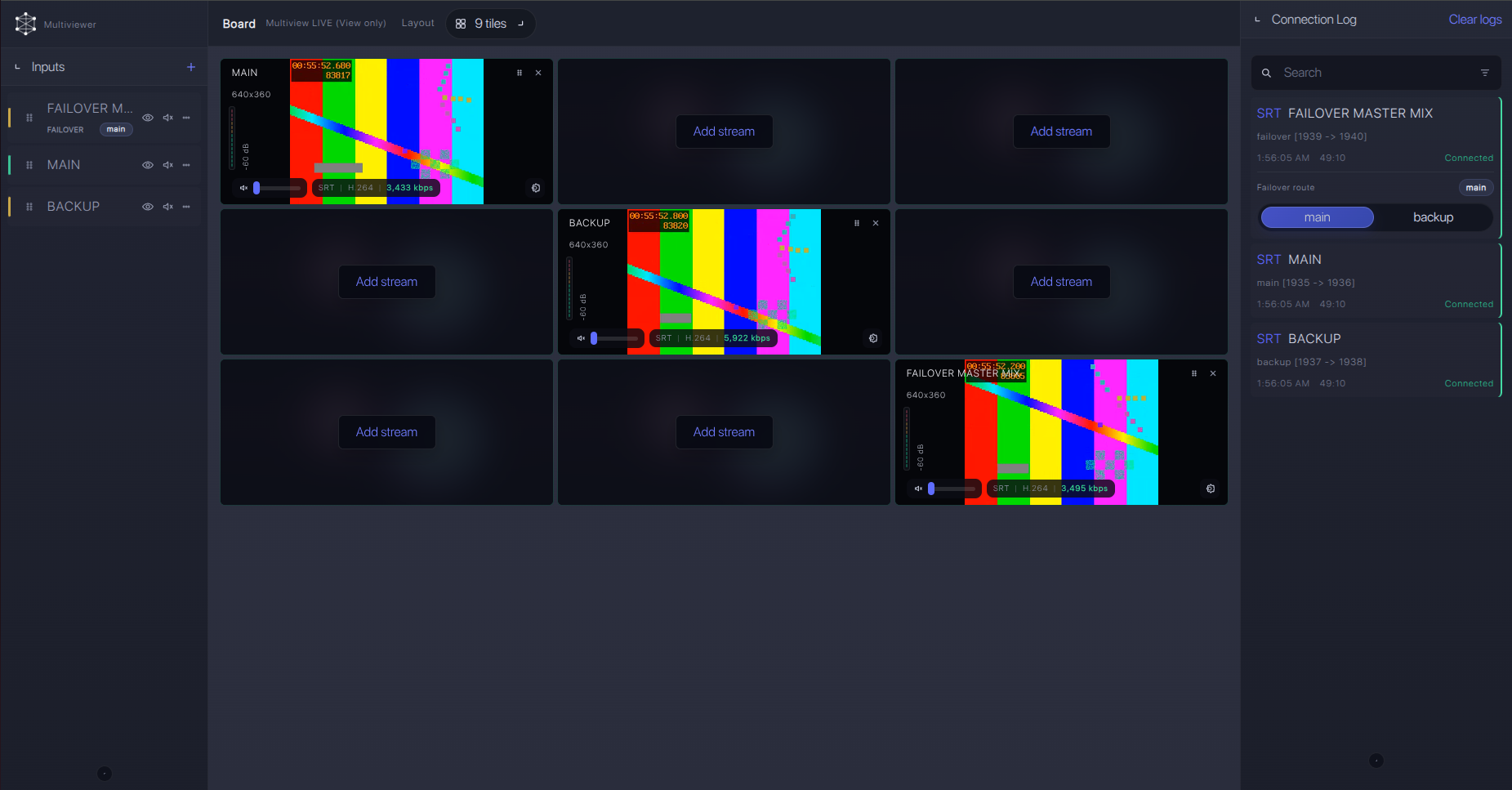
For production events, plan what happens if the main encoder, venue uplink, or primary contribution path fails. Callaba can be part of that continuity plan without changing the basic Canon CR-X300 ingest workflow.
Recording and playback
After the SRT ingest is stable, enable recording or create playback outputs from the received stream. Treat recording, preview, restreaming, routing, multiview, and playback as separate downstream uses of the same source. If you publish browser playback, confirm player support for the selected codec and audio format.
Troubleshooting
| Symptom | Check in Callaba | Check on CR-X300 | Likely fix |
|---|---|---|---|
| No connection | No uptime or bitrate on the SRT server | Caller mode, destination address, destination port | Open the UDP port, fix DNS/IP, and confirm the camera is sending to Callaba. |
| Handshake fails | Short connection attempts or auth rejection | Stream ID, AES mode, passphrase | Re-type values; remove trailing spaces and copied newlines. |
| Connected but no picture | Incoming bitrate and preview status | Mainstream codec and output format | Start with H.264, then retest H.265 only if all downstream devices support it. |
| No audio | Audio meters and recording audio track | SRT audio stream and AAC-LC audio | Enable audio transmission and confirm the program really needs camera audio. |
| RTMP fallback fails | RTMP/RTMPS ingest URL and stream key | Mainstream codec | Set Mainstream to H.264; Canon says RTMP cannot be used with H.265. |
| Dropouts | RTT, loss, retransmits, bitrate graph | Latency, bitrate, adaptive bitrate, firmware | Raise latency, reduce bitrate, and consider firmware with SRT automatic reconnection. |
Official references
These are the most useful exact-model resources to keep near the run sheet.
Vendor references
- Canon U.S.A. CR-X300 product page
- Canon Remote Camera CR-X300 User Manual
- Canon CR-X300 Firmware Version 1.1.0 notice
- Canon CR-X300 Firmware Version 1.4.0 notice
Callaba resources
For protocol behavior beyond the camera manual, check the relevant SRT, RTMP, RTSP, and NDI documentation for the firmware and receiver versions you deploy.
FAQ
Does Canon CR-X300 support SRT with Callaba?
Yes, Canon documents SRT settings for the CR-X300 and a firmware notice says SRT protocol support was added in Version 1.1.0. Because public sources are not perfectly aligned, confirm the installed firmware and visible SRT menu before the event.
Should I use CR-X300 SRT Caller or Listener mode?
Use Caller for most cloud workflows. CR-X300 Listener mode is documented, but it usually requires inbound UDP to the camera side, which means NAT, firewall, and port-forwarding work.
Can I use CR-X300 SRT Stream ID and passphrase?
Yes. The manual documents Stream ID, AES encryption choices, and passphrase. Copy these values exactly; Stream ID and passphrase are case-sensitive and whitespace-sensitive.
What if the SRT menu is missing on CR-X300?
Update firmware first. If you cannot update before the job, use RTMP/RTMPS with H.264 as the first fallback, or use RTSP/RTP or NDI through a bridge if that is already part of the production design.
Can I use NDI or RTSP instead of SRT?
Yes. NDI|HX / NDI|HX2 and RTSP/RTP are documented for this model. They are useful on a local production network or through a deliberate bridge workflow, but direct SRT is cleaner for internet contribution to Callaba.
Does RTMP/RTMPS work with H.265 on CR-X300?
No. Canon notes that RTMP cannot be used when Mainstream is set to H.265. Use H.264 for RTMP or RTMPS fallback.
Next steps
Build the path in this order: confirm firmware and SRT menu, create the Callaba SRT server, configure the CR-X300 as Caller, verify bitrate and preview, then add recording, multiview, restreaming, playback, or routing as needed.
