

Related vendor hub
Browse all Canon SRT gateway workflows
Use the Canon hub to compare CR-N, CR-X, and XF camera workflows before choosing the exact SRT setup.
For Canon CR-N100 SRT setup, keep the PTZ camera at the venue and send its SRT feed directly to a cloud SRT listener. Use this setup when CR-N100 is at the venue and Callaba is the cloud SRT receiver for monitoring, recording, routing, multiview, or restreaming. The default production pattern is CR-N100 as SRT Caller and Callaba Gateway as SRT Listener.
Quick answer
To use Canon CR-N100 with SRT, set CR-N100 as the SRT Caller and send the stream to a cloud SRT Listener. In this guide, Callaba works as the SRT gateway, receiver, monitor, recorder, and routing layer. Before the event, confirm that the installed firmware exposes the expected SRT streaming fields.
The Canon CR-N100 sends one SRT contribution feed into Callaba. After ingest, Callaba can preview, record, route, restream, and feed multiview in parallel, not as mandatory sequential setup steps.
- Canon CR-N100SRT Caller at venue
- Callaba GatewaySRT Listener in cloud
- Preview
- Record
- Route
- Restream
- Multiview
What this setup does
The CR-N100 acts as the camera and encoder. Callaba acts as the SRT receiver in the cloud. Once the SRT session is connected, the same contribution feed can be used for operator preview, recording, routing to another destination, multiview, playback, or restreaming. Those are parallel downstream uses after ingest, not required steps in a chain.
What this model can and cannot do in this workflow
Canon documentation for the CR-N100 confirms SRT, RTMP/RTMPS, RTSP/RTP, and NDI wording for IP streaming. Canon also documents SRT Caller and Listener modes, Stream ID, latency, AES-128/AES-192/AES-256 encryption, and passphrase fields in the CR-N100 Settings Guide.
- Confirmed direct path: CR-N100 can send SRT directly to Callaba without a vendor receiver cloud.
- SRT role: use Caller from the camera to Callaba Listener as the normal internet workflow. Camera Listener mode is possible only when the venue network can accept inbound UDP.
- Codec behavior: use H.264 for the first SRT test. H.265/HEVC is documented for mainstream video, but test downstream decode support before production.
- RTMP limit: Canon states RTMP cannot be used with H.265 mainstream, so RTMP/RTMPS fallback should be H.264.
- Other I/O: the model has HDMI output, USB-C camera output, LAN, RS-422 control, 3.5 mm mic/line input, PoE+ or 24 V DC power.
- Not listed for this model: do not plan CR-N100 as an SDI or ST 2110 source unless you add external conversion.
Canon materials use both NDI|HX and NDI HX2 wording for this model, and Canon firmware version 1.2.0 adds NDI 6 support. If your local receiver is strict about NDI profile, confirm the installed firmware and receiver compatibility. Black and white CR-N100 SKU variants do not change this workflow; avoid copying assumptions from larger Canon PTZ models without checking their manuals.
Recommended workflow
For internet contribution, I recommend CR-N100 Caller to Callaba Listener. It avoids inbound port forwarding at the venue, keeps the cloud endpoint stable, and gives operators one place to check received bitrate, uptime, preview, audio, packet loss, RTT, and retransmits.
If SRT is not available on the installed camera firmware, update firmware first. If you still cannot use SRT for the event, use RTMPS or RTMP to Callaba with H.264. Use RTSP/RTP or NDI through a bridge only when the production design needs a LAN bridge or local switcher integration.
When not to use this setup
- If the camera and switcher are on the same LAN, HDMI or NDI may be simpler for local production.
- If the only destination is a public platform and you do not need cloud monitoring, recording, routing, or multiview, RTMPS may be enough.
- If the venue network blocks outbound UDP and cannot be changed, test RTMPS fallback early.
- If the job requires SDI or ST 2110 directly from the camera, choose another signal path or add external conversion.
Before you start
- Update the CR-N100 and confirm the SRT menu is visible.
- Confirm outbound UDP from the venue to the Callaba public IP and selected SRT port.
- Prepare exact Stream ID and passphrase values if you use them. They are case-sensitive and whitespace-sensitive.
- Start with H.264. For 1080p30, 4 to 6 Mb/s is a practical first internet test; adjust to uplink and production needs.
- Canon does not publish the CR-N100 SRT library version in the checked public guide. If handshake problems persist, confirm SRT version compatibility through firmware notes or vendor support.
Create the Callaba ingest
In Callaba, create an SRT server and run it as a Listener. Choose the UDP port, decide whether to require Stream ID, and set encryption only if the camera uses the same AES mode and passphrase. Copy the public IP or DNS name and port for the CR-N100.
Success in Callaba looks like an active connection, increasing incoming bitrate, stable uptime, and visible preview. If Callaba shows no packets, troubleshoot network reachability before changing codec settings.
Configure the CR-N100
Open the Canon Settings Page for the camera. In the SRT streaming settings, enable SRT, choose Caller, enter the Callaba address and port, then match latency, Stream ID, encryption, and passphrase. For the first test, use H.264 and a conservative bitrate. A 250 to 500 ms SRT latency is a reasonable internet starting point; lower it only after RTT, packet loss, and retransmits are stable.
Use CR-N100 Listener mode only when there is a tested reason to reverse roles. That requires the camera side to accept inbound UDP, usually involving firewall rules, a public IP or port forwarding, and a checked NAT plan.
Settings table
| Where | What to do / field to fill | First-test value | Why / check |
|---|---|---|---|
| Callaba | Create SRT server and choose UDP port | Listener on a known open port | Camera connects out to this endpoint. |
| Callaba | Stream ID requirement | Use only if you need source matching | Must match the camera exactly, including case and spaces. |
| Callaba | Encryption and passphrase | Off for first LAN test, AES/passphrase for production if required | A copied newline or trailing space can break the handshake. |
| CR-N100 Settings Page | Enable SRT streaming | Enabled | Confirms the installed firmware exposes SRT. |
| CR-N100 SRT settings | Caller mode | Caller | Best default for a venue camera sending to cloud. |
| CR-N100 SRT settings | Destination address and destination port | Callaba public IP or DNS plus SRT port | Callaba should show an incoming session. |
| CR-N100 SRT settings | Latency | 250 to 500 ms for first internet test | Increase if retransmits or packet loss cause instability. |
| CR-N100 video settings | Mainstream codec | H.264 for initial test | H.264 is safest for preview and RTMP fallback. |
Monitoring
In Callaba, watch incoming bitrate, connection uptime, RTT, packet loss, retransmits, preview, and audio meters. On the camera side, confirm the SRT session state and that the selected stream is actually running. If bitrate is present but preview fails, check codec, resolution, and decoder support. If audio meters are flat, check the CR-N100 mic/line input, audio transmission settings, and the downstream player.
Failover and local ingest options
For production events, plan what happens if the main encoder, venue uplink, or primary contribution path fails. Callaba can be part of that continuity plan without changing the basic Canon CR-N100 ingest workflow.
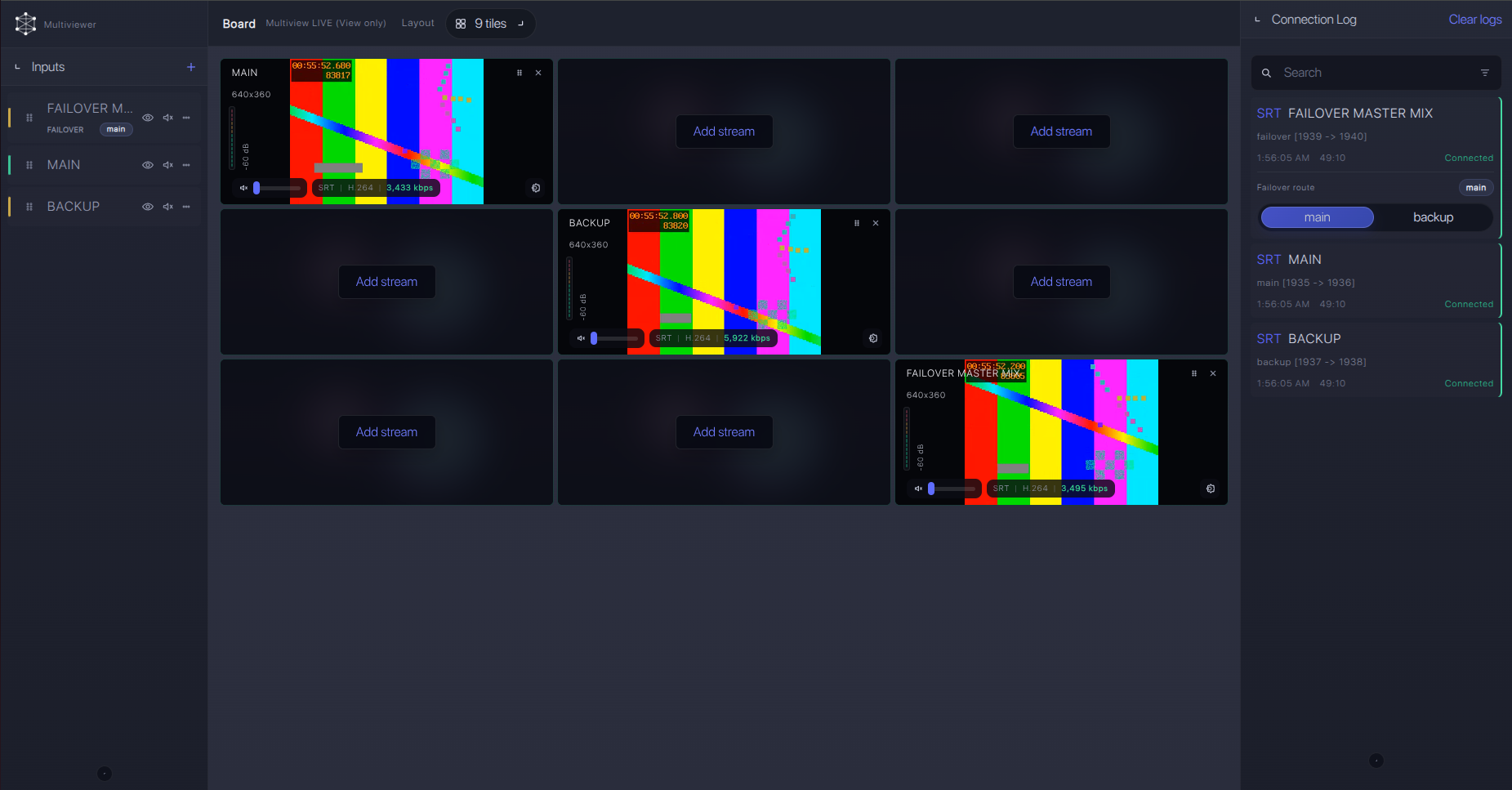
Recording and playback
After the SRT feed is stable, record the incoming source in Callaba and use playback or web preview as separate outputs. Recording should not be treated as a prerequisite for routing or restreaming; route, record, preview, and multiview can be planned as parallel uses of the same ingest.
Troubleshooting
| Symptom | Check in Callaba | Check on CR-N100 | Likely fix |
|---|---|---|---|
| No connection | No incoming bitrate or packets | Caller address, port, SRT enabled | Open outbound UDP, correct IP/port, confirm SRT menu. |
| Handshake fails | Stream ID and encryption settings | Stream ID, AES mode, passphrase | Remove trailing spaces, match capitalization, test without encryption. |
| Connects then drops | RTT, packet loss, retransmits, uptime | Latency and bitrate | Raise latency, reduce bitrate, improve uplink. |
| Preview but no audio | Audio meters and player output | Mic/line input and audio transmission | Confirm input level, mute state, and AAC audio path. |
| RTMP fallback fails | RTMP ingest logs | Mainstream codec | Switch the CR-N100 mainstream codec to H.264. |
| NDI receiver mismatch | Bridge input status | NDI|HX or NDI HX2 profile, firmware | Update firmware and confirm NDI 6/profile support on receiver. |
Official references
Useful references for checking the exact camera menu, firmware, and protocol behavior:
Vendor references
- Canon Support for CR-N100
- Canon Remote Camera Settings Guide for CR-N100
- Canon CR-N100 Firmware Version 1.2.0 notice
Protocol references
Callaba resources
FAQ
Does Canon CR-N100 support SRT to Callaba?
Yes. Canon documentation confirms SRT for CR-N100, including Caller and Listener modes. The practical setup is CR-N100 Caller to a Callaba SRT Listener.
Should I use CR-N100 SRT Caller or Listener?
Use Caller for most cloud contribution jobs. Listener mode on the camera is an advanced network design because the venue side must accept inbound UDP.
Can I use a CR-N100 SRT Stream ID and passphrase?
Yes. Canon documents Stream ID, AES encryption, and passphrase settings. Match them exactly in Callaba; case changes, trailing spaces, or copied newlines can stop the session.
What if the SRT menu is missing on the CR-N100?
Confirm the exact model and update firmware. If SRT is still not available for the event, use H.264 RTMPS/RTMP fallback or an RTSP/NDI bridge workflow.
Can I use H.265 with this workflow?
H.265/HEVC is documented for the mainstream path, but test downstream decode support. For RTMP or RTMPS fallback, use H.264 because Canon states RTMP cannot be used with H.265 mainstream.
Is CR-N100 an NDI source?
Canon documents NDI wording for the CR-N100, with public materials varying between NDI|HX and NDI HX2. Firmware version 1.2.0 adds NDI 6 support, so confirm the receiver profile before relying on it.
Next steps
Build the first test with H.264, CR-N100 Caller mode, Callaba Listener, and conservative latency. After the feed is stable, add Stream ID, passphrase, recording, restreaming, multiview, and routing one at a time so failures are easy to isolate.
