

Related vendor hub
Browse all Blackmagic Design SRT gateway workflows
Use the Blackmagic Design hub to compare encoder, decoder, HD, and 4K SRT gateway workflows.
Blackmagic Streaming Encoder can send a live feed over SRT or RTMP. In a Callaba workflow, the practical SRT path is simple: send the encoder output to a Callaba SRT route, verify the stream in the browser, then use the received feed for recording, restreaming, multiview, playback or API-controlled routing.
This guide is written for Blackmagic Streaming Encoder HD and Blackmagic Streaming Encoder 4K. Use the HD model for HD-first H.264 workflows. Use the 4K model when you need Ultra HD, 2160p workflows or H.265/HEVC tests. For the first test, start with H.264 and a stable HD signal.
Quick answer: how do you send SRT from Blackmagic Streaming Encoder to Callaba?
Create an SRT listener or SRT route in Callaba, open the selected UDP port, then configure Blackmagic Streaming Encoder as the SRT sender. Enter the Callaba server address, UDP port, Key / Stream ID and Passphrase if encryption is used. Start with H.264, confirm incoming bitrate and preview in Callaba, then route the feed to recording, restreaming, multiview, playback or API workflows.
What this setup does
This workflow takes a live SDI signal, encodes it on Blackmagic Streaming Encoder, sends it to Callaba over SRT, and then uses Callaba as the controlled cloud workflow layer.
The important part is separation of duties. The Blackmagic device creates a clean encoded contribution feed. Callaba gives the operator a place to inspect, route and reuse that feed without changing the encoder every time the downstream workflow changes.
Which Streaming Encoder model?
Blackmagic Streaming Encoder HD and Blackmagic Streaming Encoder 4K are close in workflow, but not identical in practical use.
| Model | Best first test | Use when |
|---|---|---|
| Blackmagic Streaming Encoder HD | H.264 HD over SRT | You need a compact HD encoder for SDI live contribution and do not need UHD output. |
| Blackmagic Streaming Encoder 4K | H.264 HD first, then H.265 / UHD | You need 4K/UHD, HEVC, or higher-end SDI contribution workflows. |
Recommended SRT mode
For the first cloud test, use the simplest SRT pattern:
Blackmagic Streaming Encoder as SRT Caller → Callaba as SRT Listener or route receiver
This keeps the public endpoint on the cloud side. The encoder only needs outbound UDP access to Callaba. You do not need to expose the encoder site to inbound traffic.
Example SRT target:
srt://YOUR_CALLABA_IP:5000?streamid=stream1

Blackmagic fields:
Server: YOUR_CALLABA_IP
Port: 5000
Key / Stream ID: stream1
Passphrase: optional, same on both sides
Key rule: treat the Blackmagic Key field as the Stream ID / route key. Keep it simple for the first test, for example stream1. Copy the same value in Callaba, including lowercase letters. Treat it as case-sensitive: if Callaba expects stream1, enter stream1, not Stream1 or STREAM1.
Before you start
Step 1: create the Callaba SRT route
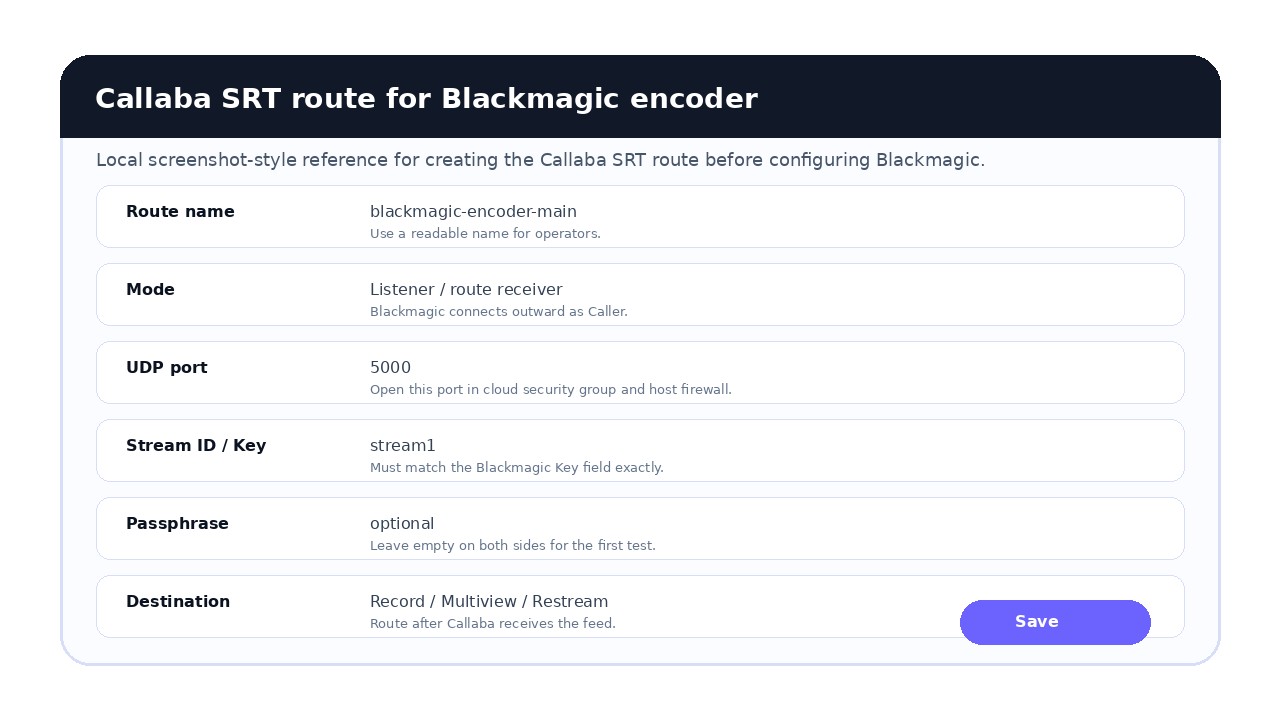
In Callaba, create an SRT listener or SRT route for the incoming Blackmagic stream. For the first test, keep the route simple:
- Name:
blackmagic-encoder-main - Mode: Listener / route receiver
- Port: one open UDP port, for example
5000 - Key / Stream ID: simple value such as
stream1 - Passphrase: empty for first test, or the same value on both sides if encryption is required
Do not skip the firewall step: SRT uses UDP. If the route port is closed in the cloud security group or host firewall, the Blackmagic encoder will not reach Callaba.
Step 2: configure Blackmagic Streaming Encoder
On the Blackmagic side, create or edit a streaming destination profile. Depending on software version and workflow, this may be done in Blackmagic Streaming Setup, a custom streaming XML file, or API-controlled configuration.
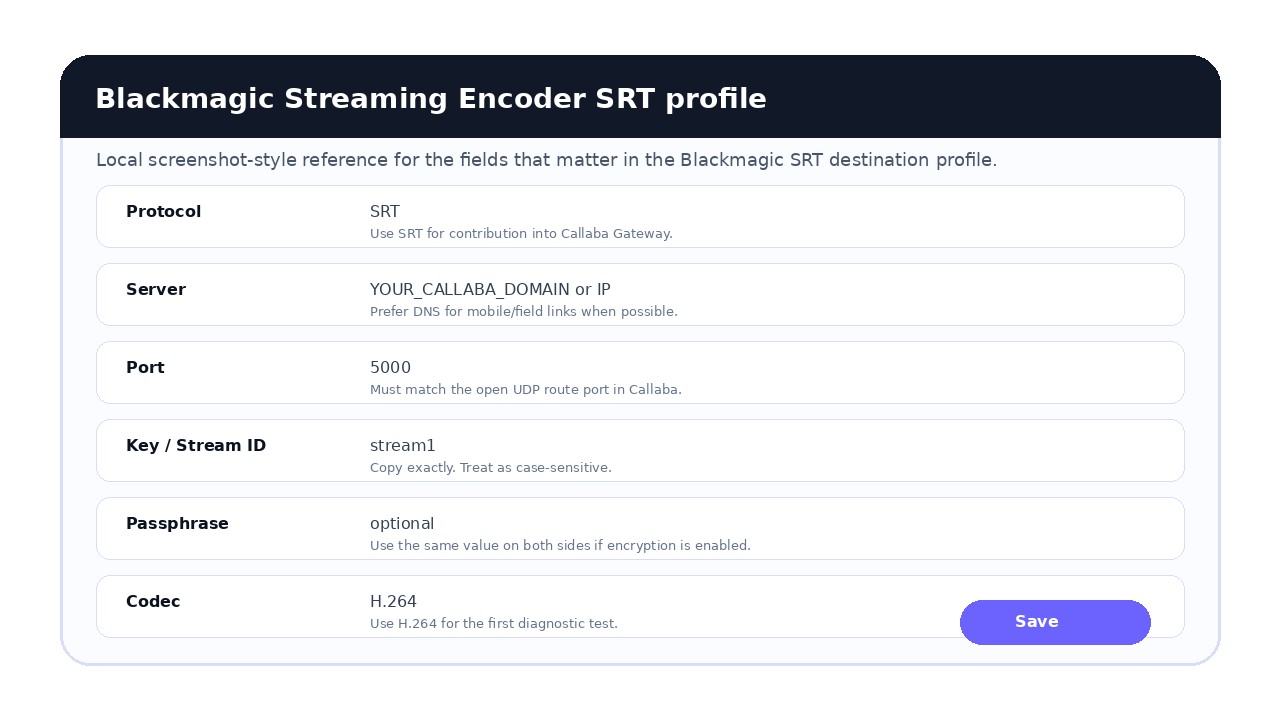
Use these values from Callaba: Server, Port, Key, Passphrase, Codec and Quality / bitrate. Use H.264 for the first test.
First test profile:
Protocol: SRT
Server: YOUR_CALLABA_IP
Port: 5000
Key: stream1
Passphrase: empty or same as Callaba
Codec: H.264
Resolution: 1080p or source HD format
Latency: 300–500 ms starting point
Automation note: Blackmagic Streaming Encoder can also be configured through Ethernet Protocol or REST API. This is useful for integrators who need centralized setup, remote control, or automated profile changes. Links to the official Ethernet Protocol and REST API documents are included in the references section.
Settings table
| Setting | Blackmagic | Callaba | Why |
|---|---|---|---|
| Mode | Caller / push | Listener / route | Starts connection from encoder to cloud. |
| Port | UDP route port | Open UDP port | SRT traffic must reach the server. |
| Key / Stream ID | stream1 | same value | Routes the stream to the right input. |
| Passphrase | same if used | same if used | Encryption fails if values differ. |
| Codec | H.264 first | receive / route | Best diagnostic path. |
| Resolution/FPS | HD first, 1080p if possible | source format should match | Simplifies diagnostics before UHD/HEVC tests. |
| Latency | 300–500 ms start | same recovery policy | Gives recovery time on imperfect networks. |
After ingest: what Callaba can do
- Browser preview: check whether the feed is arriving with video and audio.
- Multiview: place the Blackmagic feed next to other live sources.
- Recording: create a cloud-side copy of the received feed.
- Restreaming: send the received feed to YouTube, Twitch, Facebook, another SRT target, RTMP, or other outputs.
- Playback: generate a web player or HLS path for approved viewers.
Monitoring thresholds
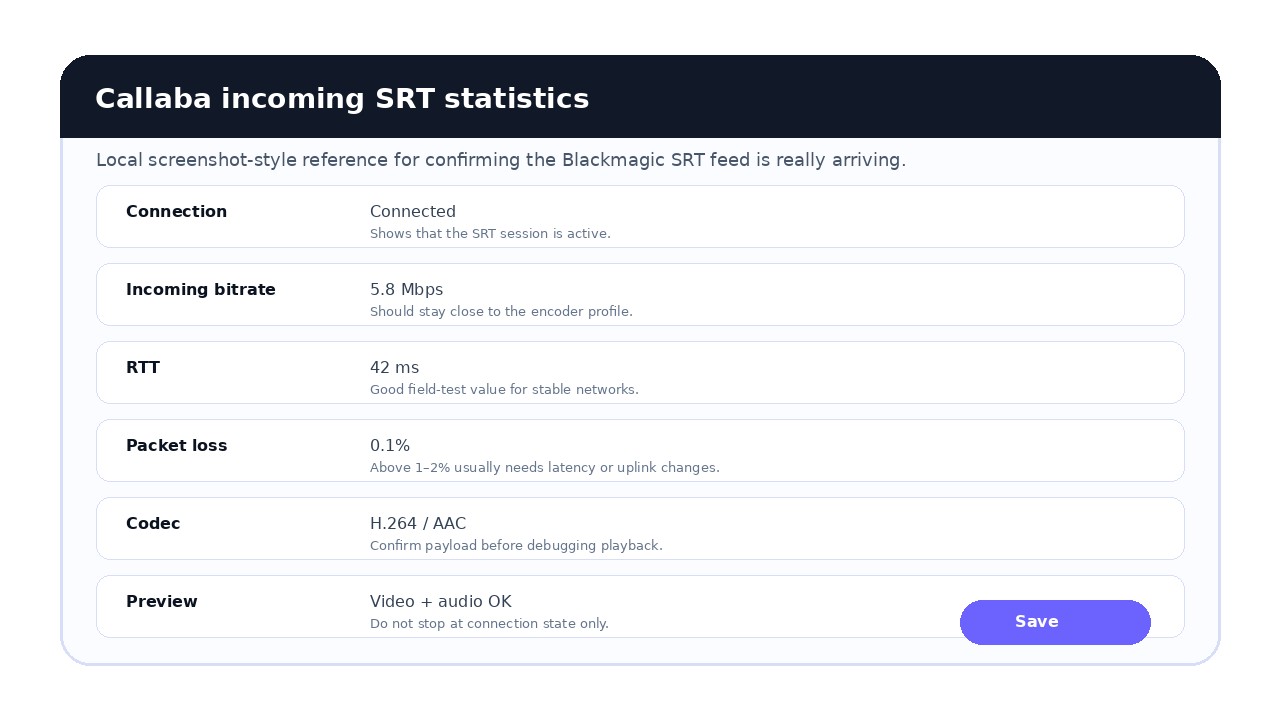
Do not stop at “connected.” Confirm the stream is stable and usable.
Practical thresholds: in good conditions, RTT is often around 20–60 ms. If RTT is consistently above 150 ms or keeps growing, check the network. Packet loss above 1–2% usually means you should increase latency, lower bitrate, or improve the uplink.
Also confirm incoming bitrate, audio presence, codec, resolution, key/Stream ID, passphrase state and downstream route.
Bitrate check: incoming bitrate should be stable and close to the value selected in the Blackmagic profile. If the bitrate drops or swings heavily, check the uplink, mobile network behavior, encoder load and real available bandwidth.
RTMP option
Blackmagic Streaming Encoder can also be used with RTMP workflows. Use RTMP or RTMPS when the destination platform expects RTMP ingest. Use SRT when you want a stronger contribution path into Callaba first, especially over imperfect networks.
Blackmagic Streaming Encoder → SRT to Callaba → RTMP/RTMPS restream to social platforms
Troubleshooting
1. Stream does not appear in Callaba
- Confirm the encoder is actively streaming, not only configured.
- Check Callaba IP/DNS and UDP port.
- Open the selected UDP port in the cloud security group and host firewall.
- Confirm the Key / Stream ID exactly matches the Callaba route.
2. SRT connects but no picture appears
- Check that the SDI input is stable and recognized by the encoder.
- Temporarily switch to H.264 HD and test again.
- Check whether the selected resolution or frame rate is supported by the workflow.
- Confirm the stream is not routed to the wrong Callaba input.
3. Audio is missing
- Confirm audio is embedded in the SDI source.
- Check Blackmagic audio settings and source routing.
- Check Callaba preview or multiview before debugging downstream playback.
4. Stream is unstable over 4G/5G
- Lower bitrate and start with 720p or 1080p H.264.
- Increase latency to 500–800 ms for a field test.
- Check packet loss and RTT in Callaba.
- Test Ethernet separately to isolate mobile network behavior.
- For 4G/5G field workflows, prefer a Callaba DNS name over a fixed IP when your mobile path may change carrier or route during reconnects. This makes reconnection and operational changes easier.
Official references and related reading
FAQ
Can Blackmagic Streaming Encoder send SRT to Callaba?
Yes. Create an SRT listener or SRT route in Callaba, then configure the Blackmagic Streaming Encoder destination with the Callaba server address, UDP port, stream key or Stream ID, and passphrase if encryption is used.
Should I use Blackmagic Streaming Encoder HD or 4K?
Use the HD model when your workflow is HD-first and H.264 is enough. Use the 4K model when you need Ultra HD, 2160p workflows, or H.265/HEVC testing. For first diagnostics, start with H.264 even on the 4K model.
Does Blackmagic Streaming Encoder support RTMP too?
Yes. Blackmagic Streaming Encoder models support RTMP-style publishing workflows as well as SRT. Use SRT when contribution reliability and packet recovery matter, and RTMP or RTMPS when the target platform expects RTMP ingest.
What should I enter in the Blackmagic Key field for SRT?
Use the stream ID or route key expected by Callaba. Keep it simple for the first test, for example stream1, and copy it exactly. Treat the value as case-sensitive.
What SRT mode should I use?
For the first cloud ingest test, use Blackmagic as SRT caller and Callaba as SRT listener or route receiver. This keeps the public endpoint on the cloud side and avoids inbound firewall work at the encoder site.
What codec should I use first?
Use H.264 for the first test. After the SRT path is stable, test H.265 or UHD profiles if your model and workflow require them.
Do I need to open UDP ports?
Yes. SRT uses UDP. Open the selected UDP port in the cloud security group, host firewall, router, or network policy so packets from the encoder can reach Callaba.
Where is the passphrase configured?
The passphrase is part of the SRT streaming profile. If you enable SRT encryption, the same passphrase must be present on both the Blackmagic side and the Callaba side. If you do not use encryption, leave it empty on both sides.
Why does the encoder connect but show no picture in Callaba?
Check the SDI input signal first, then codec, resolution, bitrate, key/stream ID, passphrase, and UDP path. Temporarily use H.264 HD for diagnostics before testing H.265 or UHD.
Can Callaba record the Blackmagic SRT feed?
Yes. After Callaba receives the SRT feed, it can be routed to recording, restreaming, multiview, web playback, or API-controlled workflows depending on your deployment.
Can I use a 4G or 5G phone connection?
Blackmagic lists mobile data via a 4G or 5G phone as a streaming path for the Streaming Encoder line. Test this path under real network conditions and use conservative latency and bitrate for the first field test.
Does Callaba replace Blackmagic Cloud?
No. Callaba is a live video workflow and routing layer. For the model-specific SRT setup, see the Blackmagic Web Presenter SRT guide. Use it when you need your own SRT ingest, monitoring, recording, restreaming, player delivery, API control, or self-hosted/private cloud deployment.
Is the Blackmagic Key / Stream ID case-sensitive?
Treat the Key / Stream ID as case-sensitive. If Callaba expects stream1, enter stream1 exactly, not Stream1 or STREAM1.
Can I automate Blackmagic Streaming Encoder configuration?
Yes. Blackmagic provides Ethernet Protocol and REST API documentation for Streaming products. This is useful for integrators who need centralized setup, remote control or automated profile changes.
What should incoming bitrate look like in Callaba?
Incoming bitrate should be stable and close to the bitrate selected in the encoder profile. If it drops or swings heavily, check uplink capacity, mobile network behavior, encoder load and available bandwidth.
Next steps
Last updated: May 21, 2026
Try Callaba Gateway with Blackmagic Streaming Encoder
Create an SRT listener in Callaba, send your Blackmagic Streaming Encoder feed to the gateway, and monitor the received stream before routing it to recording, restreaming, multiview, playback, or API workflows.
See SRT server setup Open multiview demo SRT servers API docs
