

Related vendor hub
Browse all Blackmagic Design SRT gateway workflows
Use the Blackmagic Design hub to compare encoder, decoder, HD, and 4K SRT gateway workflows.
Blackmagic Streaming Encoder HD SRT setup is a direct contribution workflow: connect SDI program video to the encoder, send SRT over Ethernet or phone tethering, and receive it in Callaba as the cloud SRT listener. Use this setup when Streaming Encoder HD is at the venue and Callaba is the cloud SRT receiver for monitoring, recording, routing, multiview, or restreaming.
Quick answer
To use Blackmagic Streaming Encoder HD with SRT, set Streaming Encoder HD as the SRT Caller and send the stream to a cloud SRT Listener. In this guide, Callaba works as the SRT gateway, receiver, monitor, recorder, and routing layer. Before the event, confirm that the installed firmware exposes the expected SRT URL, key or Stream ID, passphrase, and codec settings.
The encoder sends one SRT contribution feed into Callaba. After ingest, Callaba can preview, record, route, multiview, and restream the same source in parallel, not as mandatory sequential steps.
- SDI programEmbedded audio
- Streaming Encoder HDSRT caller
- Callaba GatewaySRT listener
- Preview
- Record
- Route
- Multiview
- Restream
What this setup does
The encoder is the field-side contribution device. Callaba is the public SRT server, or SRT receiver, that accepts the incoming UDP stream. After the connection is stable, preview, recording, routing, multiview, restreaming, and playback are parallel downstream uses of the same ingest.
This is useful for a remote venue, small OB position, press room, or studio handoff where you want a simple SDI-to-cloud path without a vendor receiver layer.
What this model can and cannot do in this workflow
- Official Blackmagic sources list Streaming Encoder HD as an HD streaming encoder with SRT and RTMP direct streaming.
- The unit has a 12G-SDI input, SDI loop output, SDI monitor output, HDMI monitor output, Ethernet, and USB-C webcam output up to 1080p60.
- Blackmagic documentation for this family shows SRT URL or server configuration, Stream Key or stream-id handling, and Password as an SRT passphrase for encrypted SRT.
- For the default cloud workflow, treat Streaming Encoder HD as the outbound SRT caller or pusher. Public docs found do not clearly confirm listener or rendezvous operation for this exact encoder.
- Use H.264 for the first test. Public Blackmagic sources for this model are inconsistent on H.265: product copy emphasizes H.264 HD, while direct streaming and XML documentation include H.265. Confirm the visible codec option on the unit before relying on HEVC.
- Do not plan Blackmagic Streaming Encoder HD as a native NDI source. NDI is not listed for this exact model in the official streaming specifications used here.
- RTSP and RTMPS are not listed as native outputs for this exact model in the official exact-model protocol sections used here. RTMP is confirmed.
- Phone tethering is a network path, not bonded multi-modem contribution. If you need bonding, use a separate bonded network solution before the encoder reaches Callaba.
Recommended workflow
My recommended path is SDI source to Streaming Encoder HD, then SRT to a Callaba SRT server. Use Ethernet when possible. USB-C phone tethering can be useful as a single mobile uplink, but it does not replace bonded transport.
The practical split is simple: the Blackmagic encoder sends SRT out, and Callaba listens in the cloud. Treat device Listener mode as a separate advanced requirement, and verify it in the installed firmware before the event.
When not to use this setup
If the encoder and production switcher are in the same rack or room, SDI monitoring or the loop output may be simpler than cloud ingest. If the only destination is a public platform and you do not need cloud monitoring, recording, routing, or multiview, the confirmed RTMP path may be enough.
Do not use this guide for a decoder return feed. This model is the contribution encoder in the workflow; a decoder workflow runs in the opposite direction, from Callaba output to a hardware decoder and then SDI or HDMI.
Before you start
- Install current Blackmagic Streaming software and firmware for the unit.
- Confirm that the device menu or setup software exposes SRT URL, key or Stream ID, passphrase, and codec settings.
- Choose a Callaba public hostname or IP address and an open UDP port.
- Start with H.264, HD resolution, and a conservative bitrate that fits the venue uplink.
- Have the SRT passphrase and Stream ID ready. They are case-sensitive and whitespace-sensitive; a trailing space or copied newline can break the handshake.
Create the Callaba ingest
In Callaba, create an SRT server for the event. Choose the UDP port, set the Stream ID or access rule you want to require, and set the passphrase if you want encrypted SRT. Open that UDP port in the cloud firewall and in any upstream security group.
Success on the Callaba side means you see a connection, incoming bitrate, uptime, and then video preview and audio activity. If the encoder is started but Callaba shows no connection attempt, check public IP, DNS, UDP firewall rules, and whether the venue network blocks outbound UDP.
Configure Streaming Encoder HD
Connect the program feed to the 12G-SDI input and verify embedded audio. In Blackmagic Streaming Setup or the device streaming configuration, choose or create an SRT destination. Enter the Callaba SRT URL, use the Callaba Stream ID value in the Blackmagic Key or stream-id setting, and use the same passphrase in the Blackmagic Password or Passphrase field.
Start with H.264. If the installed firmware exposes H.265 and your downstream monitoring and playback chain supports HEVC, test it separately after the H.264 path is stable.
Settings table
| Where | What to do / field to fill | First-test value | Why / check |
|---|---|---|---|
| Callaba: SRT server | Create SRT server and choose UDP port | Example: 10080 | Listener must be running and reachable from the venue. |
| Callaba: access / Stream ID | Set the required Stream ID | bmd-hd-main | Must match the encoder key or stream-id exactly. |
| Callaba: encryption | Set SRT passphrase if encryption is used | Same value on both sides | Mismatch causes handshake failure. |
| Blackmagic: SRT URL | Enter the Callaba SRT server URL | srt://your-host:10080 | The encoder sends the contribution feed to Callaba. |
| Blackmagic: Key / stream-id | Paste the Callaba Stream ID | bmd-hd-main | Check capitalization and hidden whitespace. |
| Blackmagic: Password / Passphrase | Paste the SRT passphrase | Same as Callaba | Use the exact same string on both sides. |
| Blackmagic: codec profile | Select video codec | H.264 for first test | H.265 is documented inconsistently for this model; confirm on the unit. |
| Blackmagic: streaming quality | Set bitrate or quality profile | 1080p30: 4-6 Mb/s; 1080p60: 6-8 Mb/s | Adjust to uplink, packet loss, and production needs. |
Monitoring
In Callaba, watch incoming bitrate, connection uptime, packet loss, retransmits, RTT, preview, and audio meters. A stable SRT connection should show steady bitrate and preview without repeated reconnects. If audio is silent, confirm SDI embedded audio at the Blackmagic input and then check the Callaba audio meters before checking downstream players.
Failover and local ingest options
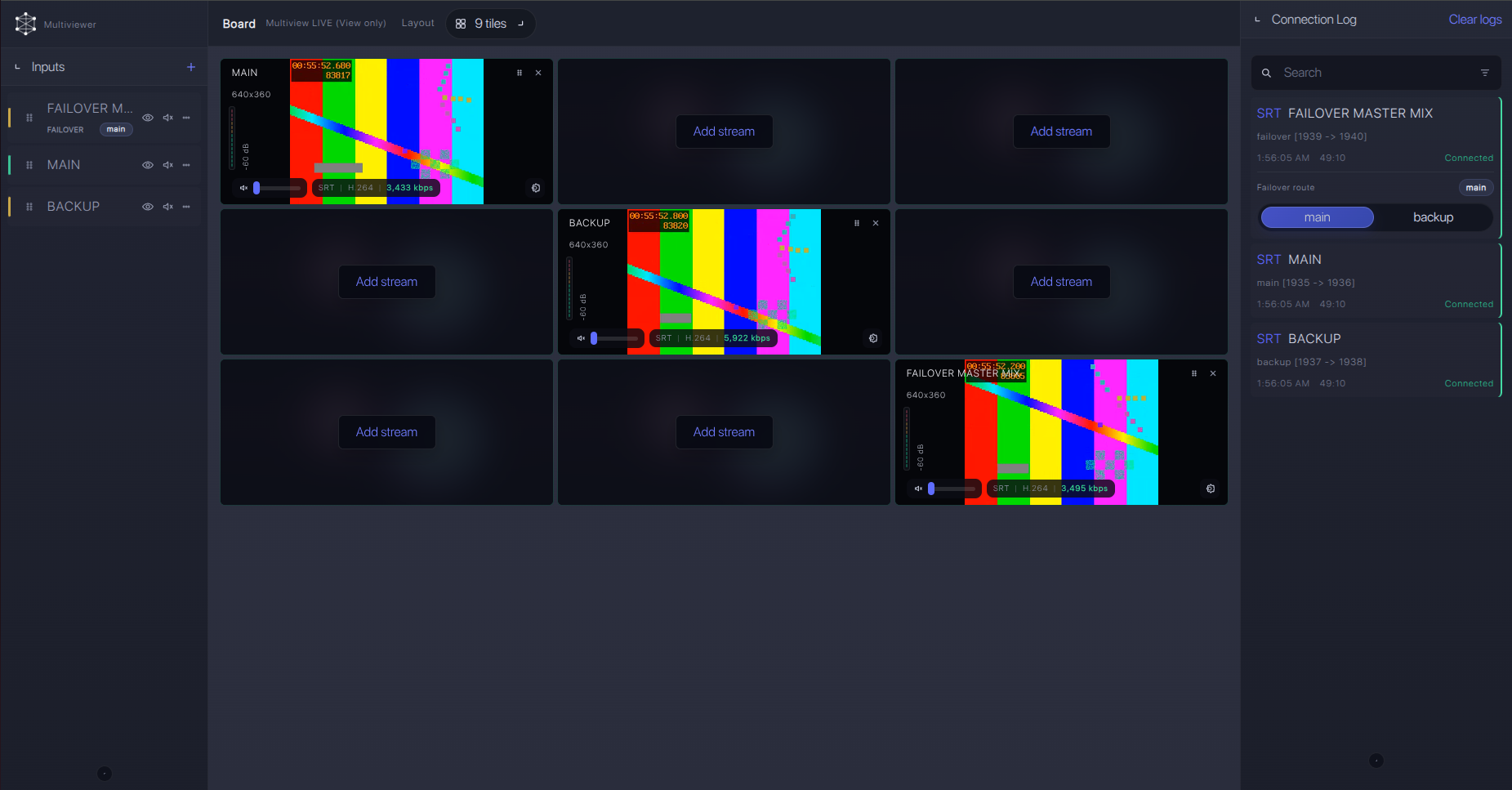
For production events, plan what happens if the main encoder, venue uplink, or primary contribution path fails. Callaba can be part of that continuity plan without changing the basic Blackmagic Streaming Encoder HD ingest workflow.
Recording and playback
Recording is Callaba-side in this workflow. After the SRT ingest is stable, enable recording for the source or route the source to web playback, multiview, restreaming, or another output. These do not need to be enabled in a strict sequence; treat them as parallel outputs from the same received contribution feed.
Troubleshooting
| Symptom | Check in Callaba | Check on device | Likely fix |
|---|---|---|---|
| No connection | SRT server running, UDP port open, no blocked firewall | SRT URL host and port | Fix DNS/IP, port, or venue outbound UDP policy. |
| Handshake fails | Stream ID and passphrase values | Key or stream-id and Password fields | Remove trailing spaces, copied newlines, or changed capitalization. |
| Connects but no picture | Incoming bitrate and preview | SDI input format and codec setting | Start with H.264 HD and a known-good SDI source. |
| Video breaks up | RTT, packet loss, retransmits, bitrate | Streaming quality or bitrate | Lower bitrate or improve uplink; use Ethernet instead of unstable tethering. |
| HEVC does not play | Preview/player compatibility | Whether H.265 is visible in installed firmware | Return to H.264 unless the full chain supports HEVC. |
| SRT menu missing | Use RTMP ingest only if needed | Firmware/software version and streaming service list | Update firmware or use confirmed RTMP until SRT settings are available. |
If handshake failures are hard to explain, confirm SRT major-version compatibility through Blackmagic firmware/support information and Callaba server build or support information.
Official references
Vendor references
- Blackmagic Streaming Processors product page
- Blackmagic Streaming Processors technical specifications
- Blackmagic Streaming Processors installation and operation manual
- Blackmagic Streaming Encoder Ethernet Protocol
- Blackmagic Streaming XML File Format
Protocol references
Callaba resources
FAQ
Does Blackmagic Streaming Encoder HD support SRT to Callaba?
Yes. Official Blackmagic sources list SRT for Streaming Encoder HD. I still recommend confirming the installed firmware and visible SRT fields before the event.
Is Streaming Encoder HD an SRT caller or SRT listener?
The practical Callaba workflow uses the encoder as the outbound SRT caller or pusher to a Callaba listener. Public docs found do not clearly confirm listener or rendezvous mode for this exact encoder.
How should I use Streaming Encoder HD SRT Stream ID and passphrase?
Use the same Stream ID in Callaba and in the Blackmagic Key or stream-id setting. Use the same passphrase on both sides if encryption is enabled. Both values are sensitive to whitespace and capitalization.
Can I use RTMP or RTMPS instead?
RTMP is confirmed for this model and can be a fallback when SRT is not available. RTMPS was not listed in the exact-model protocol sections used for this guide.
Does Streaming Encoder HD support NDI or RTSP natively?
Do not plan Streaming Encoder HD as a native NDI or RTSP source. Those protocols were not listed for this exact model in the official streaming specifications used here.
Should I use H.264 or H.265?
Use H.264 for the first SRT test. Public Blackmagic sources are inconsistent on H.265 for this HD model, so only use HEVC after you confirm the visible codec option and downstream support.
Next steps
Create the Callaba SRT server, paste the SRT URL, Stream ID, and passphrase into Streaming Encoder HD, and run a private test before production. During the test, check connection uptime, video preview, audio meters, packet loss, retransmits, and recording before adding restreaming or routing outputs.
