

Related vendor hub
Browse all Teradek SRT gateway workflows
Compare Prism, Prism Rack, Prism Flex, and Prism Mobile workflows before choosing the exact setup path.
For a Teradek Prism Mobile bonded SRT setup, use Prism Mobile at the venue as the bonded field encoder, debond the contribution in the vendor cloud or a licensed receiver layer, then send that receiver output to Callaba Gateway as SRT. Use this setup when Prism Mobile is at the venue and Callaba is the cloud SRT receiver for monitoring, recording, routing, multiview, or restreaming.
Prism Mobile also documents direct SRT, RTMP/RTMPS, RTSP/RTP, and MPEG-TS streaming. The important distinction is that direct SRT is not the same as multi-network bonding.
Quick answer
To use Teradek Prism Mobile in a bonded SRT workflow, send the Prism Mobile contribution through the vendor receiver/cloud layer, then send that SRT output to a Callaba SRT Listener. Callaba works as the SRT gateway, receiver, monitor, recorder, and routing layer. If bonding is not required, Prism Mobile can also send SRT directly to Callaba as Caller over one active network path.
Prism Mobile sends a bonded contribution to the vendor receiver or cloud layer. That layer sends one SRT feed into Callaba. Preview, recording, routing, multiview, and restreaming are parallel downstream uses after ingest, not required sequential steps.
- Prism Mobilebonded field encoder
- Receiver/clouddebonded output
- Callaba GatewaySRT listener
- Preview
- Record
- Route
- Multiview
- Restream
What this setup does
This workflow turns a Prism Mobile field contribution into a stable cloud ingest. In the bonded version, Prism Mobile uses its network links toward the vendor receiver/cloud layer. Callaba does not replace that debonding layer; Callaba receives the resulting SRT feed for operations such as confidence monitoring, recording, routing to another destination, multiview, and restreaming.
If the production does not need bonded transport, Prism Mobile can be configured as an SRT Caller directly to a Callaba SRT Listener. That is a simpler Prism Mobile SRT output path, but it uses one selected or automatic active interface rather than the full bonded receiver workflow.
What this model can and cannot do in this workflow
- Teradek lists Prism Mobile video transport support for SRT, RTMP/RTMPS, RTSP/RTP, and MPEG-TS.
- The Prism Streaming guide documents SRT Caller, Listener, and Rendezvous modes, with Host, Port, Source Port, Stream ID, Encryption Passphrase, Latency, and Interface settings.
- Prism Mobile accepts 12G/6G/3G/HD/SD-SDI and HDMI 2.0 video input, with embedded audio and a 3.5 mm TRRS analog audio input.
- Video compression is documented as H.264/AVC and HEVC/H.265 Main; AAC-LC audio is documented. Start with H.264/AAC for first tests unless your whole downstream path is already proven with HEVC.
- RTMP is documented as H.264-only in the current Prism encoder guide, so use H.264 for RTMP/RTMPS fallback.
- Do not plan Teradek Prism Mobile as a native NDI or ST 2110 source. Those protocols are not listed for this model in the Prism Mobile protocol lists used here.
- Multi-connection bonding requires the vendor cloud subscription or a debonding-licensed receiver path. Direct SRT to Callaba does not provide the same debonded multi-link behavior.
- Return-video decoding on a Prism encoder is a licensed feature. Do not treat a normal Prism Mobile contribution setup as a decoder unless that license and menu are present.
One product-family distinction matters: do not copy Prism RU or Prism Flex Decoder instructions onto Prism Mobile. Prism Mobile is the field encoder; a debonding-licensed decoder or cloud layer is the receiving side for private bonded workflows.
Recommended workflow
For a real bonded job, I would keep the architecture simple: Prism Mobile contributes to the vendor receiver/cloud layer, and that layer sends one SRT output to Callaba. In Callaba, create an SRT Listener and keep it waiting on a public UDP port. The receiver/cloud output should call that address and port.
For a non-bonded first test, set Prism Mobile itself to SRT Caller and make Callaba the cloud Listener. Reversing the roles is possible only when the venue side can accept inbound UDP, which may require a public IP, firewall rules, and port forwarding.
Use RTMP/RTMPS only when SRT is unavailable or the destination requires it. Use RTSP/RTP through a bridge only when you deliberately need a pull-style LAN workflow before handing the feed to Callaba.
When not to use this setup
- If the production switcher is at the same table as the encoder, local SDI or HDMI may be simpler than cloud ingest.
- If the only destination is a public platform and monitoring, recording, routing, and low-latency return are not important, Prism Mobile RTMP/RTMPS may be enough.
- If the job requires native NDI from the encoder, this is not the right assumption for Prism Mobile. Use an external conversion path or a different device with documented NDI support.
- If you need a return monitor feed out to SDI/HDMI, confirm the Prism return-video/decode license or use a dedicated decoder.
Before you start
- Update or confirm Prism Mobile firmware and check that the expected SRT, RTMP/RTMPS, RTSP/RTP, codec, and licensed menus are visible.
- Choose whether this is a bonded receiver/cloud workflow or a direct one-interface SRT test.
- Open the Callaba UDP listener port in the cloud firewall or security group.
- Prepare exact SRT values: mode, host, port, Stream ID, passphrase/encryption, latency, and codec.
- Stream ID and passphrase matching is case-sensitive and whitespace-sensitive. A copied newline, trailing space, or changed capitalization can break the handshake.
Create the Callaba ingest
- In Callaba, create an SRT Server and set it to listen on an unused UDP port.
- Set the Stream ID and passphrase policy you want to enforce for this feed.
- Confirm the cloud firewall allows inbound UDP on that port.
- Keep the server open and watch for connection state, incoming bitrate, RTT, packet loss, retransmits, preview, and audio meters.
For API-driven deployments, the same receiver can be created through the Callaba SRT servers API.
Configure Prism Mobile or the receiver output
For the bonded path, configure Prism Mobile to contribute to the vendor receiver/cloud layer according to the Teradek workflow, then configure that receiver/cloud output to call the Callaba SRT Listener. I would verify the debonded output before the event, not during the first live minute.
For the direct Prism Mobile SRT test, open the Prism Streaming configuration area, choose SRT Caller, and enter the Callaba host, port, Stream ID, Encryption Passphrase, Latency, and Interface. Use 250-500 ms latency for a first internet test, then lower it only after packet loss, RTT, and retransmits are stable. Start with H.264 and AAC-LC; test HEVC/H.265 only with the actual decoder, player, or downstream route you will use.
Settings table
| Where | What to do / field to fill | First-test value | Why / check |
|---|---|---|---|
| Callaba SRT Server | Create listener and choose UDP port | Any unused open UDP port | Callaba should show a waiting listener before the sender starts. |
| Callaba SRT Server | Stream ID | prism-mobile-main | Match exactly on the sender side. |
| Callaba SRT Server | Passphrase / encryption | Use the production passphrase or leave disabled for a lab test | Must match the sender exactly if enabled. |
| Prism Mobile SRT settings | Mode | Caller | Best default for internet contribution because the venue initiates outbound UDP. |
| Prism Mobile SRT settings | Host | Callaba public IP or DNS name | Points the encoder to the cloud listener. |
| Prism Mobile SRT settings | Port | Same UDP port as Callaba | A mismatch usually means no session appears in Callaba. |
| Prism Mobile SRT settings | Stream ID | Same text as Callaba | Case and whitespace must match. |
| Prism Mobile SRT settings | Encryption Passphrase | Same passphrase as Callaba | Check for copied spaces or hidden line breaks. |
Monitoring
Once the session connects, look at the Callaba receiver state first: incoming bitrate, uptime, RTT, packet loss, retransmits, preview video, and audio meters. On Prism Mobile or the receiver/cloud side, confirm that the selected SDI/HDMI input is locked, the encoder is running, and the selected network path is active.
If the stream is bonded upstream, also watch the vendor receiver/cloud health. Callaba can only report the final SRT handoff it receives.
Failover and local ingest options
For production events, plan what happens if the main encoder, venue uplink, or primary contribution path fails. Callaba can be part of that continuity plan without changing the basic Teradek Prism Mobile ingest workflow.
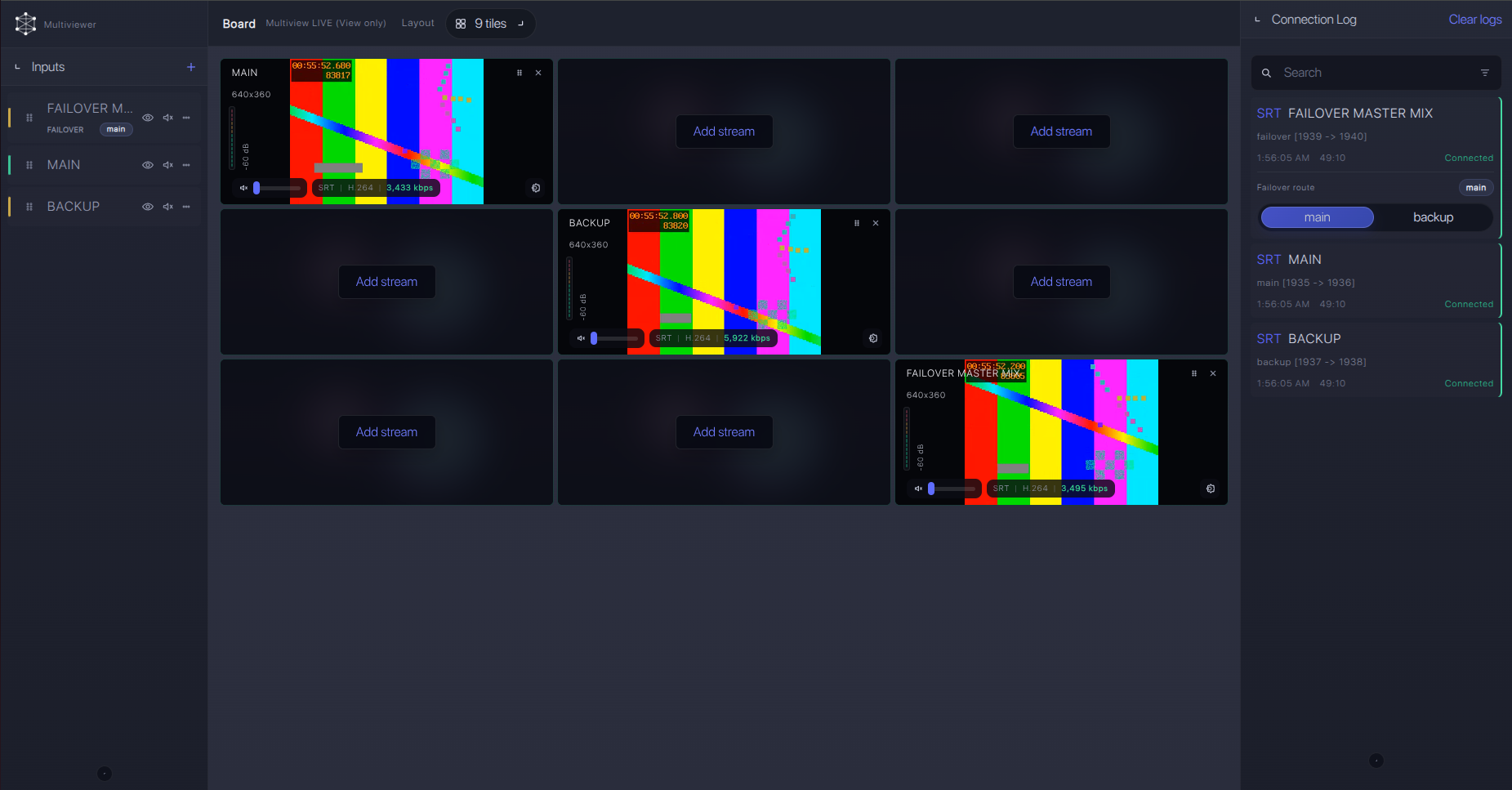
Recording and playback
After ingest is stable, recording and playback are downstream choices in Callaba. You can record the same received source, preview it in a browser, route it to another destination, or place it in multiview. These are parallel uses of the received feed, not a required sequence.
Troubleshooting
| Symptom | Check in Callaba | Check on Prism Mobile or receiver | Likely fix |
|---|---|---|---|
| No connection | Listener port, firewall, session list | SRT mode, Host, Port | Use Caller toward Callaba Listener and open inbound UDP on the Callaba side. |
| Handshake fails | Stream ID and passphrase policy | Stream ID and Encryption Passphrase text | Remove trailing spaces, copied newlines, and capitalization mismatches. |
| Connects but drops | RTT, packet loss, retransmits, uptime | Latency, Interface, bitrate, bonding health | Raise latency, reduce bitrate, or move back to the bonded receiver/cloud path. |
| Video or audio missing | Preview and audio meters | SDI/HDMI input lock, embedded audio, codec selection | Start with H.264 and AAC-LC, then test HEVC only after the full path is proven. |
| RTMP fallback rejected | RTMP URL/key and ingest state | RTMP mode and encoder codec | Use H.264 for RTMP/RTMPS as documented in the Prism guide. |
| Hard-to-explain SRT failure | Server build/support information | Firmware version and vendor SRT compatibility notes | Confirm compatible SRT major versions with vendor support if normal field checks pass. |
Official references
Vendor references
- Teradek Prism Mobile user guide
- Teradek Prism Mobile product page
- Teradek Prism Streaming guide
- Teradek Prism Encoder Configuration guide
- Teradek Return Video License guide
- Teradek Debonding License guide
Protocol references
Callaba resources
FAQ
Can Prism Mobile send SRT to Callaba?
Yes. Teradek documents SRT streaming for Prism Mobile, including Caller, Listener, and Rendezvous modes. For the bonded workflow, send the debonded receiver/cloud output to Callaba. For a simple test, Prism Mobile can call Callaba directly.
Should Prism Mobile be SRT Caller or Listener?
Use Caller for most internet jobs. Listener mode means the venue side must accept inbound UDP, which can require public addressing, port forwarding, and firewall changes.
Can I use Prism Mobile as a native NDI source?
No. Do not plan Prism Mobile as a native NDI source for this workflow. The official Prism Mobile protocol lists used here do not list NDI or ST 2110.
What if the SRT menu is missing?
Confirm the installed firmware and the visible streaming menu before the event. If SRT is not available on that unit, use a confirmed RTMP/RTMPS path or an RTSP/RTP bridge path after testing.
Can I use HEVC/H.265?
Prism Mobile documentation lists HEVC/H.265 Main, but the whole chain must support it. For first tests and RTMP fallback, H.264 with AAC-LC is the safer starting point.
Do I need a separate receiver for bonding?
For multi-connection bonding, yes: plan the vendor cloud or a debonding-licensed receiver layer before Callaba. Direct SRT from Prism Mobile to Callaba is useful, but it is not the same as debonded multi-link contribution.
Next steps
- Decide whether this event needs bonded contribution or direct one-path SRT.
- Create the Callaba SRT Listener and open the UDP port.
- Configure the receiver/cloud SRT output, or configure Prism Mobile as direct SRT Caller for a non-bonded test.
- Verify preview, audio meters, bitrate, RTT, packet loss, and recording before the live window.
Try Callaba Gateway with Teradek Prism Mobile bonded SRT setup
Create an SRT server in Callaba, send the Prism Mobile receiver/cloud output to the gateway, and check the received stream. After ingest is stable, use Callaba outputs for preview, recording, restreaming, multiview, playback, routing, or API workflows as parallel downstream options.
