

Related vendor hub
Browse all Teradek SRT gateway workflows
Compare Prism, Prism Rack, Prism Flex, and Prism Mobile workflows before choosing the exact setup path.
Teradek Prism Flex SRT setup is a direct contribution workflow: keep Prism Flex at the venue as the SRT Caller and let Callaba Gateway listen in the cloud. Use this setup when Prism Flex is at the venue and Callaba is the cloud SRT receiver for monitoring, recording, routing, multiview, or restreaming. This guide is for live production operators sending an SDI or HDMI program feed over the public internet.
The main path is direct SRT. Prism Flex documentation also lists RTMP, RTMPS, RTSP, MPEG-TS, RTP Push, RIST, HLS/DASH, and WHIP/WHEP, but SRT is the cleaner first choice when you need a managed cloud receiver and live production diagnostics.
Quick answer
To use Teradek Prism Flex with SRT, set Prism Flex as the SRT Caller and send the stream to a cloud SRT Listener. In this guide, Callaba works as the SRT gateway, receiver, monitor, recorder, and routing layer. Before the event, confirm firmware, Stream ID, passphrase, latency, and codec settings on the exact unit.
Teradek Prism Flex sends one SRT contribution feed into Callaba Gateway. After ingest, Callaba can preview, record, route, restream, and multiview the same source in parallel; these are not required sequential steps.
- Prism FlexSRT Caller at venue
- Callaba GatewaySRT Listener in cloud
- Preview
- Record
- Route
- Restream
- Multiview
What this setup does
This setup uses Prism Flex as a hardware encoder and Callaba as the cloud SRT receiver. Prism Flex takes the venue feed from SDI or HDMI, encodes it, and initiates an outbound SRT connection to Callaba. Callaba receives that contribution feed once, then the same source can be used for monitoring, recording, routing, multiview, playback, or restreaming in parallel.
For most venue networks, Prism Flex Caller to Callaba Listener is simpler than reversing the roles because the venue side usually only needs outbound UDP. A Prism Flex SRT Listener workflow is possible only when the venue network can accept inbound UDP or when you have a tested NAT and firewall plan.
What this model can and cannot do in this workflow
Prism Flex is documented as an encoder-decoder product family, so confirm that your unit is the encoder SKU before building a venue-to-cloud contribution path. Teradek’s Prism Flex Mk I documentation separates Encoder 855 and Decoder 875 variants; this article is for the encoder sending SRT to Callaba. A decoder workflow is the opposite direction: Callaba output to decoder, then SDI or HDMI.
- Confirmed SRT controls: Teradek documents Caller, Listener, and Rendezvous modes, plus Host, Port, Source Port, Stream ID, Encryption Passphrase, Latency, and Interface settings.
- Confirmed inputs: the Prism Flex encoder workflow uses SDI, HDMI, or Auto source selection. Hardware documentation lists 12G-SDI and HDMI 2.0 input on the encoder SKU.
- Confirmed codecs: Prism Flex documentation lists H.264/AVC and H.265/HEVC, with 4:2:0 or 4:2:2 and 8-bit or 10-bit options. I normally start with H.264 for first connection tests.
- Confirmed fallbacks: current Prism Flex and Prism streaming documentation list RTMP/RTMPS and RTSP paths. Older Mk I tables are not equally detailed, so check the visible menu on the installed firmware before relying on a fallback during a show.
- Not confirmed for this exact model: do not plan Prism Flex as a native NDI or ST 2110 source. Official Prism Flex sources used for this article do not list those native workflows.
Direct SRT to Callaba does not require a Teradek receiver or cloud layer. Bonded multi-link contribution is different: local debonding requires a compatible Prism decoder and debonding license, or you can use a Teradek cloud route before handing the feed to Callaba.
Recommended workflow
Use Prism Flex as the SRT Caller and Callaba as the SRT Listener. In SRT language, Caller means the endpoint that starts the connection. Listener means the endpoint that waits on a UDP port. That role choice is operationally important: the venue device can usually make an outbound connection more easily than it can accept an inbound internet connection.
If you reverse the roles and make Prism Flex the Listener, the Prism Flex side may need a public IP address, UDP port forwarding, firewall rules, and a tested inbound path. Rendezvous is also documented, but I would treat it as an advanced option and test it with the exact networks before the event.
When not to use this setup
- If Prism Flex and the production switcher are in the same rack, SDI or HDMI may be the simpler local path.
- If the only destination is a public platform and you do not need cloud monitoring, recording, or routing, RTMP or RTMPS may be enough after you confirm the installed firmware exposes the required menu.
- If the job requires Teradek multi-link bonding, do not treat that as direct SRT. Use the appropriate Teradek cloud or licensed decoder/debonding layer, then pass a standard output such as SRT, RTMP, RTSP, or SDI into the rest of the workflow.
- If the plan depends on NDI, choose another confirmed NDI source or add a separate bridge device. Prism Flex is not documented as a native NDI source.
Before you start
- Confirm the exact Prism Flex SKU and firmware version.
- Confirm that the encoder sees the SDI or HDMI source and that audio is embedded or routed as expected.
- Choose a Callaba public IP address or DNS name and an open UDP port.
- Decide whether to use an SRT Stream ID and passphrase. Both are case-sensitive and whitespace-sensitive; a trailing space, copied newline, or changed capitalization can break the handshake.
- Use H.264 for the first RTMP or SRT compatibility test unless the complete downstream chain has already been tested with HEVC.
- For difficult SRT handshake problems, confirm compatible SRT major versions from Prism firmware information or vendor support and from the Callaba server build or support information. Teradek’s public Prism Flex pages do not publish the SRT library version.
Create the Callaba ingest
In Callaba, create an SRT server for this Prism Flex feed. Choose Listener mode, assign a UDP port, and copy the connection details you plan to use in the encoder. If your workflow uses a Stream ID or passphrase, create them in Callaba first, then paste the exact values into Prism Flex rather than retyping them during setup.
Before you start the encoder, the Callaba side should show that the SRT server is waiting for a connection. After Prism Flex connects, check incoming bitrate, connection uptime, and preview before you build recording or routing on top of the feed.
Configure Prism Flex
Open the Prism Flex encoder configuration page or app, select the correct video source, and set the stream mode to SRT. In the Prism Flex SRT settings, choose Caller, enter the Callaba host and UDP port, and paste the Stream ID and Encryption Passphrase if your Callaba ingest requires them.
Set the SRT Latency field in the Prism Flex SRT settings in milliseconds. If you do not already have a measured value, start around 250-500 ms for an internet test, then lower it only after RTT, packet loss, and retransmits are stable. If the Interface setting is exposed, choose the intended network path, such as Ethernet, Wi-Fi, or modem, instead of leaving the encoder on the wrong link.
Settings table
| Where | What to do / field to fill | First-test value | Why / check |
|---|---|---|---|
| Callaba SRT servers | Create an SRT server and choose the UDP port | Use an allowed public UDP port | Callaba should wait for the Prism Flex connection |
| Prism Flex encoder streaming settings | Select SRT as the stream mode | SRT | Confirms you are not configuring RTMP or RTSP by mistake |
| Prism Flex SRT settings | Choose Caller | Caller | Keeps the venue side as the outbound endpoint |
| Prism Flex SRT Host | Enter the Callaba public IP address or DNS name | Your Callaba gateway address | Must resolve from the venue network |
| Prism Flex SRT Port | Enter the Callaba UDP port | Same port as the Callaba SRT server | A port mismatch leaves Callaba waiting |
| Prism Flex SRT Stream ID | Paste the exact Callaba Stream ID if used | Copy from Callaba | Case, spaces, and copied newlines matter |
| Prism Flex Encryption Passphrase | Paste the exact passphrase if encryption is enabled | Copy from Callaba | Both sides must match exactly |
| Prism Flex SRT Latency | Set latency in milliseconds | 250-500 ms for first internet test | Tune after checking RTT, loss, and retransmits |
Monitoring
Once Prism Flex starts streaming, confirm three things in Callaba before you trust the feed: connection uptime is increasing, incoming bitrate is close to the expected encoder bitrate, and preview plus audio meters are active. For network quality, watch RTT, packet loss, and retransmits. For production quality, check cadence, audio sync, channel mapping, and whether the selected codec is accepted by every downstream output you plan to use.
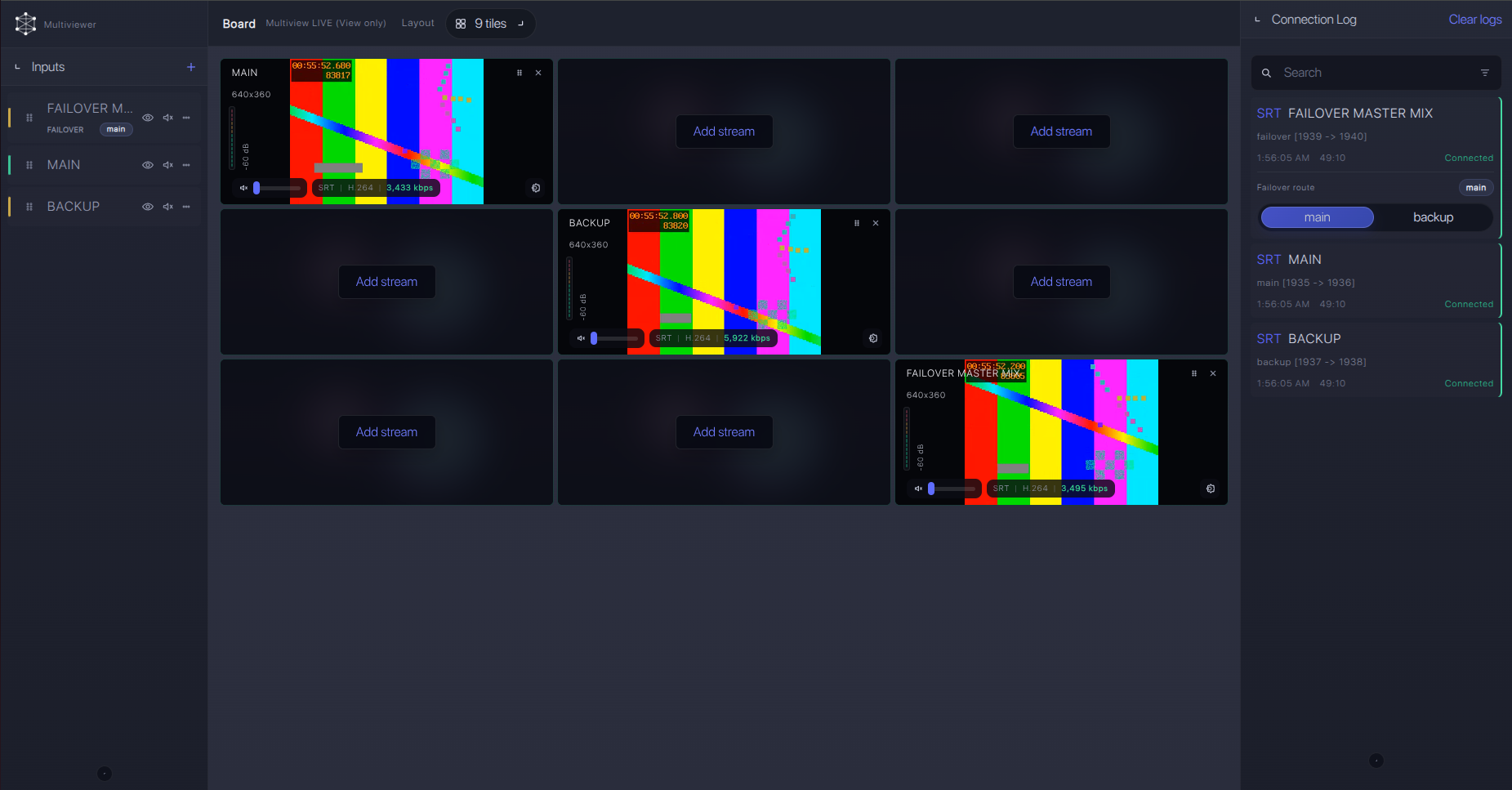
Failover and local ingest options
For production events, plan what happens if the main encoder, venue uplink, or primary contribution path fails. Callaba can be part of that continuity plan without changing the basic Teradek Prism Flex ingest workflow.
Recording and playback
After the SRT ingest is stable, recording and playback are downstream Callaba tasks. They do not have to be configured before preview, routing, or restreaming. Start a short test recording, play it back, and verify audio channels before the event. If you plan browser playback, keep the first test conservative with H.264 and AAC-style audio unless your complete playback chain has already been tested with HEVC or other audio options exposed by the installed Prism firmware.
Troubleshooting
| Symptom | Check in Callaba | Check on Prism Flex | Likely fix |
|---|---|---|---|
| No connection | SRT server is listening on the expected UDP port | Caller mode, Host, Port, selected Interface | Fix the address or firewall rule; confirm outbound UDP from venue |
| Handshake fails quickly | Stream ID and passphrase expected by the server | Stream ID, Encryption Passphrase, encryption setting | Paste values again and remove trailing spaces or newlines |
| Connected but no usable preview | Incoming bitrate, codec shown in received stream, preview errors | Video codec, resolution, frame rate, source selection | Test H.264 first; confirm HEVC support only after the chain accepts it |
| Audio missing | Audio meters and recorded test clip | Embedded audio source and encoder audio codec options | Confirm audio routing at the SDI/HDMI source and use a known compatible audio codec |
| Unstable video | RTT, packet loss, retransmits, connection uptime | SRT Latency, bitrate, network Interface | Raise latency, reduce bitrate, or move from Wi-Fi/modem to a better link |
| Listener mode does not connect | Whether Callaba can reach the venue public address | Prism Flex Listener port and local firewall path | Use Prism Flex Caller instead, or build a tested inbound UDP path |
Official references
Use these resources to confirm menu names, firmware behavior, and protocol details for the exact unit in front of you.
Vendor references
- Teradek Prism Flex product page
- Teradek Prism Flex Mk I documentation
- Teradek Prism streaming guide
- Teradek Prism encoder configuration
- Teradek Prism decoder configuration
- Teradek Prism debonding license guide
Protocol references
Callaba resources
FAQ
Does Teradek Prism Flex support direct SRT to Callaba?
Yes. Teradek’s Prism Flex and Prism streaming documentation confirm SRT, including Caller, Listener, Rendezvous, Stream ID, passphrase, and latency controls. For a normal venue-to-cloud setup, use Prism Flex as the Caller and Callaba as the Listener.
Should Prism Flex be SRT Caller or SRT Listener?
Use Caller first. It lets the encoder initiate an outbound UDP connection from the venue. Listener mode on Prism Flex is an advanced network choice because the venue side must accept inbound UDP.
Do I need a Teradek receiver or cloud layer for this setup?
No for direct SRT. Prism Flex can send SRT directly to Callaba. You need a Teradek cloud route or licensed Prism decoder/debonding layer only when you enable bonded multi-link contribution.
Can I use RTMP, RTMPS, or RTSP instead?
Yes, those are documented Prism paths, but I treat them as fallbacks for this Callaba workflow. Use H.264 for the first RTMP or RTMPS test, and confirm the fallback menu on the installed firmware before the event.
Can Prism Flex send native NDI to Callaba?
Do not plan Prism Flex as a native NDI source. The official Prism Flex sources used for this guide do not list NDI or ST 2110 for this model.
Can I use HEVC with Prism Flex SRT?
Prism Flex documentation lists H.265/HEVC support. Use it only when Callaba outputs, decoders, players, and any restreaming destinations in the chain have been tested with HEVC. H.264 is the safer first test.
Next steps
Build the SRT path first, then run a short operational test: connect Prism Flex, watch Callaba receiver statistics, confirm preview and audio, make a test recording, and document the exact Stream ID, passphrase, latency, codec, bitrate, and firmware version used for the event.
