

Related vendor hub
Browse all Kiloview SRT gateway workflows
Kiloview D260 SRT decoder setup is a return-feed workflow, not a camera contribution workflow. The D260 receives an SRT source from Callaba, decodes it, and outputs video over HDMI or 3G-SDI. Use this when Callaba is the cloud receiver and routing layer for a live source, while the D260 is at a venue, control room, or monitor position that needs program video for confidence monitoring, recording review, routing, multiview return, or local display.
Quick answer
To use Kiloview D260 with SRT, create or select the live source in Callaba, publish an SRT return feed from Callaba, then add that SRT source in the D260 web interface and route it to HDMI or 3G-SDI. The D260 is the decoder/receiver; it is not the device sending camera video into Callaba.
A live source first reaches Callaba. After ingest, preview, recording, routing, restreaming, and the D260 return feed are parallel downstream uses, not mandatory sequential setup steps.
- Live sourceSRT, RTMP, RTSP, NDI, or other ingest
- Callaba GatewayCloud receiver and router
- Preview
- Record
- Route
- Restream
- SRT return
- Kiloview D260SRT decoder to HDMI/SDI
What this setup does
This workflow sends a program feed, clean feed, confidence feed, or playback source from Callaba to the Kiloview D260. The D260 decodes the network source and outputs it locally over its two HDMI outputs and one 3G-SDI output. Use Callaba for the cloud-side receiving, monitoring, recording, restreaming, and routing decisions; use the D260 when someone on site needs a physical HDMI or SDI signal.
The important direction is Callaba to D260. If your job is to connect a camera or switcher into Callaba, choose an encoder or another source device. The D260 has network inputs for IP video sources, not HDMI or SDI video inputs.
What this model can and cannot do in this workflow
- Confirmed role: D260 is a decoder. It receives IP sources and outputs decoded video, rather than contributing a camera feed to the cloud.
- Confirmed protocols: Kiloview lists SRT, RTMP, RTMPS, RTSP, HLS, TS over UDP/RTP, NDI High Bandwidth, NDI HX2, and NDI HX3 as D260 decode/source options.
- Confirmed SRT controls: the D350/D260 manual lists SRT Caller, Listener, and Rendezvous modes, plus address, port, latency, AES-128/192/256 encryption, key, bandwidth overhead, and payload size settings.
- Stream ID caveat: the public manual section I rely on does not clearly show a dedicated SRT Stream ID field. If your Callaba route requires Stream ID, test the exact firmware and URL-parameter behavior before the event.
- Output limit: D260 is the HD model, with HDMI and 3G-SDI output listed up to 1920×1080p60. Do not copy 4K output assumptions from the D350 sibling.
- Codecs: the documented video decode set includes H.264/AVC up to Level 5.2, H.265/HEVC Main Profile up to Level 5.1, and SpeedHQ for NDI High Bandwidth. Audio formats listed include AAC, MPEG audio, G.711, Opus, and LPCM.
- No ST 2110 plan: ST 2110 is not listed for D260 in the official product page or current manual, so I would not design this model as an ST 2110 endpoint.
- Licensing: the official D260 product page and manual do not state a separate SRT, RTMP, RTSP, NDI, or HEVC license requirement. Confirm commercial options with your supplier if your procurement process requires it.
Recommended workflow
For an internet return feed, I usually start with SRT and set the D260 connection role to match the Callaba side. A common first test is D260 as SRT Caller and Callaba as the listening endpoint for that return route, because the venue device initiates the UDP connection and usually avoids inbound firewall work at the venue. If your network design requires D260 Listener mode, plan public IP, UDP forwarding, firewall rules, or a tested NAT traversal method.
Keep the first test simple: H.264 video, AAC audio, 1080p60 or lower, no Stream ID unless the route requires it, and 250-500 ms SRT latency for a public internet path. After the D260 output is stable, lower latency or switch to HEVC only if the whole downstream chain supports it.
When not to use this setup
- If the display is on the same rack as the production switcher, direct SDI or HDMI from the switcher may be simpler than a cloud return path.
- If the source and D260 are on the same LAN, NDI High Bandwidth or NDI HX may be a cleaner local workflow, especially when Discovery Server or controlled source discovery is already in use.
- If you only need to decode a simple platform or camera URL, RTMP/RTMPS, RTSP, HLS, or UDP/RTP may be enough.
- If you need a field encoder sending video to Callaba, this is the wrong model. Use an encoder workflow instead of the D260 decoder workflow.
Before you start
- Confirm the installed D260 firmware exposes the SRT source settings you plan to use.
- Decide SRT Caller, Listener, or Rendezvous mode before opening firewall tickets.
- Match UDP port, latency, encryption mode, and key on both sides.
- Treat SRT keys and any Stream ID value as case-sensitive and whitespace-sensitive. A pasted newline or trailing space can break the handshake.
- Check that the Callaba output format is within D260 HD output expectations: 1920×1080p60 or lower for the local HDMI/SDI output path.
- Kiloview public D260 documentation does not publish the SRT library version. If handshake failures are hard to explain, compare firmware notes or ask vendor support about SRT version compatibility.
Create the Callaba source
If Callaba is not already receiving the program, create the ingest first. For SRT contribution into Callaba, create an SRT server in Callaba, choose a UDP port, and send the upstream encoder or production source to that listener. Confirm preview, incoming bitrate, audio meters, packet loss, RTT, retransmits, and connection uptime before you build the D260 return.
Then create the route or output that will feed the D260. Keep this separate in your mind: the upstream source enters Callaba first; the D260 receives a return or monitoring feed from Callaba after that.
Configure the D260
Open the D260 web interface and add a new network source in the source setup area. Choose SRT when you want the lower-latency internet return path. Enter the Callaba address and UDP port, choose the SRT mode that matches the Callaba endpoint, set latency, and enable AES encryption only when both sides use the same mode and key.
After the source connects, assign it to the required D260 output or layout. Check both HDMI and SDI destinations if the venue uses both. If SRT does not connect quickly, test with RTMP/RTMPS or RTSP only after you confirm the issue is not firewall, mode, encryption, or codec mismatch.
Settings table
| Where | What to do / field to fill | First-test value | Why / check |
|---|---|---|---|
| Callaba route/output | Create an SRT endpoint for the D260 return feed and choose the UDP port | Use an allowed high UDP port, for example 10080 | Callaba should show waiting, then connected when D260 joins |
| D260 SRT source | SRT mode | Caller for the first internet test | Usually avoids inbound UDP rules at the venue; match the Callaba side |
| D260 SRT source | Address | Callaba public hostname or IP | Do not include extra spaces or copied line breaks |
| D260 SRT source | Port | Same UDP port used in Callaba | A one-digit mismatch looks like a firewall problem |
| D260 SRT source | Latency | 250-500 ms for first internet test | Lower only after packet loss, RTT, and retransmits are stable |
| D260 SRT source | AES encryption and key | Off for first lab test, then AES-128/192/256 with matching key if required | Mode and key must match exactly; whitespace matters |
| Callaba output profile | Video codec and resolution | H.264, 1080p60 or lower | D260 supports H.264 and H.265, but H.264 is the simplest first compatibility test |
| D260 SRT source area | Stream ID or URL parameters, if your firmware exposes or accepts them | Leave empty unless the Callaba route requires it | The public manual does not clearly document a dedicated Stream ID field |
Monitoring
In Callaba, watch the source preview, outgoing route status, bitrate, RTT, packet loss, retransmits, and uptime. On the D260 side, confirm that the SRT source shows connected, the selected output layout contains the source, and the physical HDMI or SDI monitor shows the expected frame rate and audio.
If the picture appears but audio does not, do not start by changing SRT. First check the Callaba audio meters, the output profile, embedded audio on HDMI/SDI, and the D260 analog line-out only if that output is actually used.
Failover and local ingest options
For production events, plan what happens if the main encoder, venue uplink, or primary contribution path fails. Callaba can be part of that continuity plan without changing the basic Kiloview D260 ingest workflow.
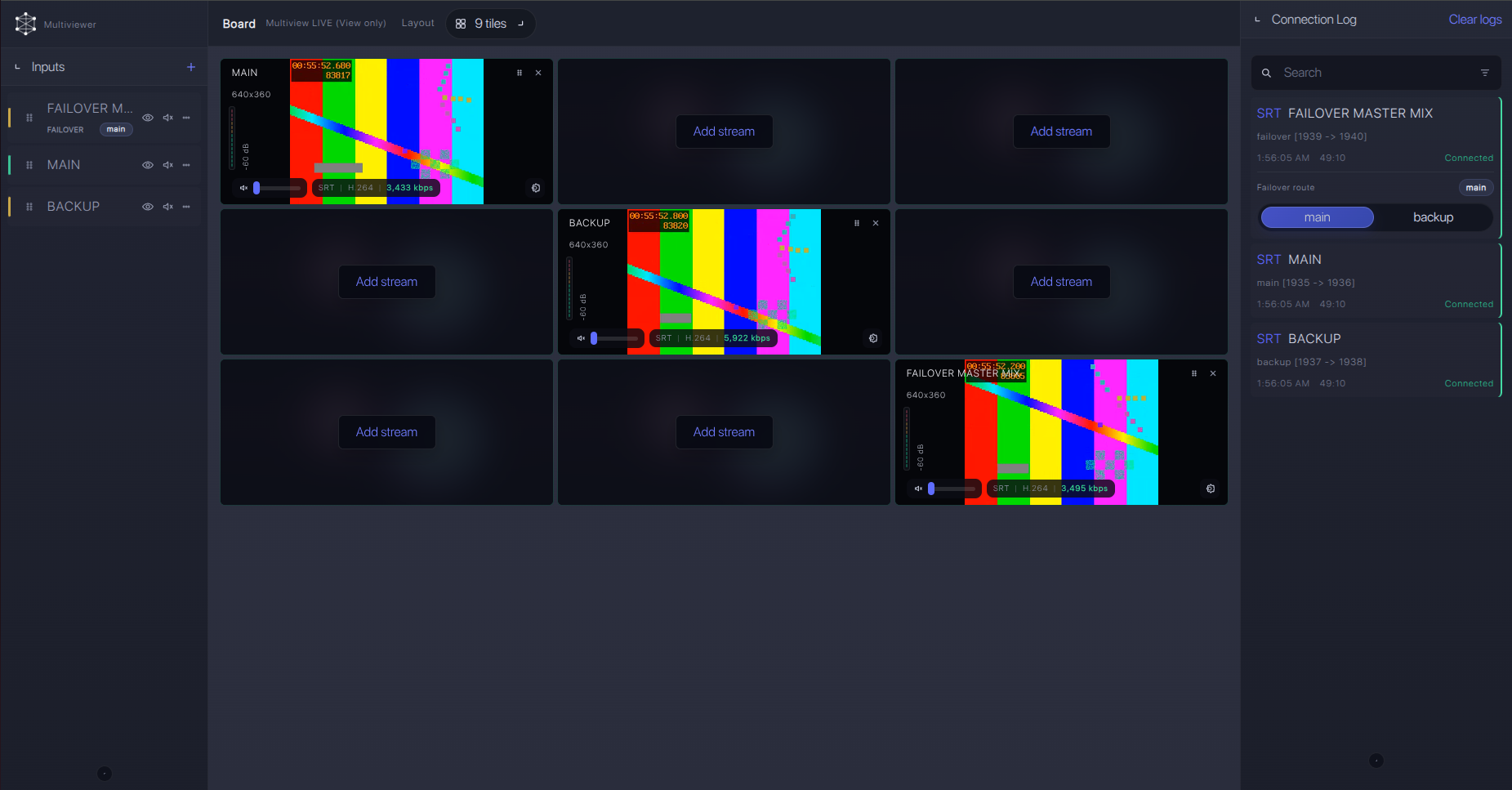
Recording and playback
Recording in this workflow belongs on the Callaba side. Record the incoming source in Callaba while the same source is routed to the D260 as a parallel output. Playback can also be routed to the D260 when you need local review on an HDMI or SDI monitor. Preview, recording, playback, routing, and restreaming are parallel downstream uses; they do not need to be chained unless your production design requires it.
Troubleshooting
| Symptom | Check in Callaba | Check on D260 | Likely fix |
|---|---|---|---|
| No SRT connection | Endpoint is listening or calling in the expected mode; UDP port is open | SRT mode, address, and port | Match Caller/Listener roles and fix firewall or NAT rules |
| Connects, then drops | RTT, packet loss, retransmits, and output bitrate | Latency and network quality | Raise SRT latency, reduce bitrate, or improve the network path |
| Connected but black output | Preview and output profile | Source assigned to HDMI/SDI layout | Use H.264 first and confirm D260 output is 1080p60 or lower |
| Handshake fails with encryption | AES mode and key | AES-128/192/256 selection and key | Retype the key; remove trailing spaces and copied newlines |
| Route requires Stream ID | Whether the route requires a Stream ID | Whether installed firmware exposes a field or accepts URL parameters | Test before production or use a route that does not require Stream ID |
| NDI source does not appear | Whether the source is meant to be SRT return or local NDI | NDI discovery, group, IP scan, or Discovery Server settings | Use manual NDI add or Discovery Server on LAN; do not troubleshoot this as SRT |
Official references
Useful references for confirming exact model behavior and protocol details:
Vendor references
- Kiloview D260 product page
- Kiloview D350/D260 Series Decoder User Manual V2.1
- Kiloview D260 datasheet
Protocol references
Callaba resources
FAQ
Is the Kiloview D260 an SRT encoder?
No. The D260 is a decoder. In this workflow Callaba sends a return or monitoring feed to the D260, and the D260 outputs HDMI or 3G-SDI.
Can the Kiloview D260 receive SRT and output SDI or HDMI?
Yes. Official D260 documentation lists SRT decode/source support, and the manual lists SRT source settings. Confirm the installed firmware and visible SRT menu before production.
Does D260 support SRT Stream ID?
The public manual confirms SRT mode, address, port, latency, encryption, key, bandwidth overhead, and payload size, but it does not clearly document a dedicated Stream ID field. Test your exact firmware if Stream ID is mandatory.
Can I use RTMP, RTMPS, or RTSP instead of SRT?
Yes. D260 documentation lists RTMP, RTMPS, and RTSP receive/decode support. Use them when they match the source better or when a network blocks SRT UDP traffic.
Can I use NDI with this model?
Yes. D260 is documented with NDI High Bandwidth, NDI HX2, and NDI HX3 receive/decode support. I would use NDI mainly for LAN workflows or controlled Discovery Server deployments.
What is the D260 versus D350 difference that matters here?
The D260 is the HD output model listed up to 1920×1080p60 on HDMI and SDI. The D350 is the close sibling in the same manual, but you should not apply D350 4K output expectations to a D260 installation.
Next steps
Build the return path in a lab before the event. Confirm Callaba preview and output status, D260 SRT connection, HDMI/SDI picture, embedded audio, and the exact SRT role. If the site firewall is uncertain, prepare RTMPS/RTMP or RTSP as a fallback that the D260 can decode.
Try Callaba Gateway with Kiloview D260 return decoding
Create or select a live source in Callaba, route an SRT return feed to the D260, and check the HDMI or SDI output. After ingest is stable, use Callaba outputs for preview, recording, restreaming, multiview, playback, routing, or API workflows as parallel downstream options.
