

A live video command center is not only a room with screens. For live production teams, it is the control layer where incoming feeds are received, monitored, switched, routed, recorded, and shared. Callaba lets teams build this layer in the cloud with SRT ingest, browser multiview, failover control, recording, NDI output, HLS playback, restreaming, and API access.
Quick answer
A cloud video command center gives operators one place to receive SRT feeds, watch stream health, see main and backup sources, react to problems, and send clean outputs to production tools, viewers, recorders, partners, or platforms. The main goal is control over the live workflow, not simply more screens.
Remote cameras, encoders, venues, and production teams send SRT or RTMP feeds into Callaba. Callaba becomes the cloud command center for monitoring, failover, routing, recording, NDI, HLS, WebRTC, and API workflows.
- Live sourcesCameras, encoders, venues, remote teams, SRT and RTMP feeds
- Callaba command centerSRT ingest, multiview, failover, routing, recording, API
- Preview
- Multiview
- Failover
- Recording
- Routing
- API
- OutputsNDI, HLS, WebRTC, RTMP, social platforms, CDN, partners
What is a live video command center?
A live video command center is the operational place where the production team can see what is happening and control what happens next. In a classic setup, this may be a physical control room with monitors, routers, switchers, intercom, and people sitting together. In a cloud setup, many of the same jobs can move into a secure browser-based workflow.
For live video, the command center has one practical job: keep the event under control. Operators need to know which feeds are live, which feed is healthy, which backup is ready, which output is being sent, where the recording is stored, and who can receive the stream.
Important: a command center is not defined by the number of displays. It is defined by the workflow: ingest, monitor, decide, switch, route, record, and share.
Why it is not just a video wall
A video wall is useful when many people need to see the same information in the same room. But a wall alone does not solve live production problems. It does not automatically receive SRT streams from a venue, create backup paths, record the feed, route NDI to a cloud mixer, restream to platforms, or expose control through an API.
That is why live production teams should start with the workflow, not the screen layout. Ask what the operators need to do under pressure. Then choose the tools that make those actions clear and fast.
Core layers of a cloud video command center
The cleanest way to design the system is to separate it into layers. Each layer has a clear responsibility. This makes the workflow easier to test, easier to explain to operators, and easier to scale for bigger events.
Callaba sits in the middle of these layers. It can receive the feed, make it visible to the team, help operators choose the correct path, and send the result to the next destination.
Recommended workflow
Start with one critical path and make it stable. For example, send one SRT program feed from the venue to Callaba, monitor it in the browser, record it in the cloud, and route it to the destination. After that path is stable, add backup feeds, multiview layouts, NDI output, partner feeds, and API control.
This prevents the command center from becoming too complex too early. Operators learn the basic flow first: where the stream enters, where they check it, how they switch, and where it goes next.
Before you start
Before you build the command center, define the job it must handle. A sports event, a webinar, a 24/7 camera network, and a remote production workflow do not need the same layout. The right design depends on the number of sources, the risk level, the operators involved, and the outputs required.
- List all incoming feeds, including main and backup sources.
- Define who needs access: operator, producer, engineer, client, partner, or remote team.
- Write down every output: NDI, HLS, RTMP, recording, CDN, social platform, or API route.
Also decide what must be visible at all times. In many live workflows, the operator does not need every setting on screen. They need the current feed, backup feed, bitrate, connection state, audio presence, and a clear way to react.
Build the ingest layer
The ingest layer is where contribution feeds enter the cloud. In Callaba, this usually starts with SRT servers or RTMP servers. SRT is a strong default for contribution because it is designed for unstable networks and supports latency, encryption, and retransmission behavior that is useful for live production.
Create a separate ingest point for each important source. Use clear names such as main-camera-1, backup-program, remote-guest-feed, or venue-return-feed. This helps operators understand the board without asking an engineer what each input means.
For SRT, document the host, UDP port, mode, Stream ID, passphrase, encryption setting, and expected bitrate. Keep these values in the event runbook so the same setup can be rebuilt quickly.
Build the monitoring layer
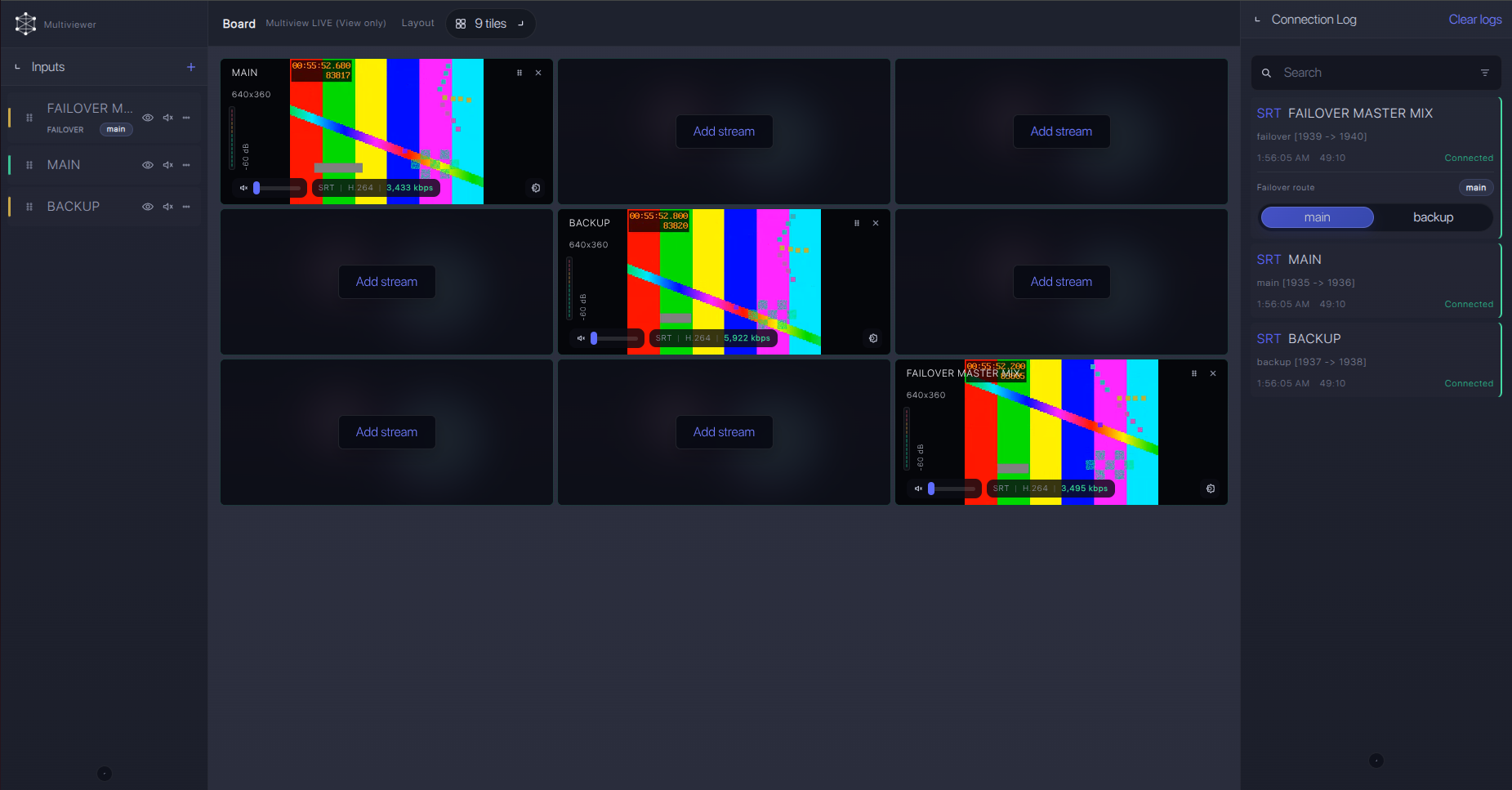
The monitoring layer is where the command center becomes useful. Operators need to see the feed and the signal state in one place. A browser-based multiview board helps remote and on-site teams work from the same picture without requiring everyone to sit in the same room.
The multiview should not be overloaded. Use clear tiles. Show the most important feeds first. Group sources by role: main feeds, backup feeds, remote guests, return feeds, and output checks. If a tile is only useful to the engineering team, it can live on a separate board.
Add failover control
Failover is one of the main reasons to build a command center instead of a passive monitoring page. The operator should not only see that the main feed is in trouble. The operator should also know what backup is ready and how to switch to it.
In Callaba, main and backup feeds can be placed in the same operator view. This makes it easier to compare sources and react before viewers notice the problem. The goal is not to hide every technical issue. The goal is to give the team enough control to protect the event.
| Risk | What the operator should see | Action |
|---|---|---|
| Main feed drops | Main tile disconnected, backup tile still healthy | Switch to backup route and keep monitoring the main source. |
| Packet loss increases | Bitrate unstable, preview stutters, retransmits increase | Raise SRT latency, reduce bitrate, or prepare backup path. |
| Audio missing | Video preview is present, audio meter is silent | Check source audio selection and confirm the output path. |
| Wrong source on air | Preview does not match the expected program feed | Stop and confirm route labels before sending downstream. |
Route outputs
After ingest and monitoring are stable, the command center can route the feed to the next layer. This can be a cloud mixer over NDI, an HLS player, a recorder, a partner endpoint, a CDN, or a social destination.
This is where a cloud command center becomes more than monitoring. It becomes the routing layer for the event. The same incoming feed can be recorded, previewed, converted, sent to production, and delivered to viewers as parallel downstream workflows.
Physical room vs cloud command center
A physical control room is still useful when the whole team works in one location, the facility has fixed infrastructure, and local SDI/NDI gear is already in place. A cloud command center is useful when feeds come from multiple locations, operators are remote, or the team wants to avoid building a new hardware stack for every event.
| Question | Physical command center | Cloud video command center |
|---|---|---|
| Where are the operators? | Mostly in one room. | In the browser, from different locations if needed. |
| Where do feeds come from? | Often local facility sources. | Venues, encoders, remote teams, cameras, cloud services. |
| How fast can it scale? | Limited by hardware, displays, cabling, and room design. | Limited mostly by cloud capacity, network design, and workflow planning. |
| Best fit | Permanent facility, fixed staff, fixed source list. | Live events, remote production, temporary events, distributed teams. |
Many teams use both. The physical room gives people a shared operations space. The cloud command center gives them flexible ingest, monitoring, routing, failover, and remote access.
Cloud video command center checklist
Use this checklist before rehearsal. It keeps the setup practical and makes it easier to find weak points before the event starts.
| Area | Question to answer | Callaba workflow |
|---|---|---|
| Mission | What problem must this command center solve? | Monitoring, failover, routing, recording, remote production, or all of them. |
| Sources | How many live feeds enter the system? | Create named SRT or RTMP ingest points for each source. |
| Operators | Who needs to see and control the workflow? | Create browser views and access rules for operators and stakeholders. |
| Visibility | What must always stay visible? | Use multiview boards for main feeds, backups, audio, and route state. |
| Failover | What happens when the main feed fails? | Keep backup feeds ready and visible in the same operational view. |
| Outputs | Where does the signal go after ingest? | Route to NDI, HLS, WebRTC, RTMP, CDN, recorder, partner, or API workflow. |
| Rehearsal | Has the team tested the same path on the real network? | Run a full test with the expected bitrate, latency, and source count. |
Troubleshooting
| Symptom | Check | Likely fix |
|---|---|---|
| The command center has too many tiles | Operators cannot quickly identify main, backup, and output state. | Create separate boards for producer view, engineering view, and client view. |
| SRT source does not connect | Mode, host, UDP port, Stream ID, passphrase, firewall, and security group. | Confirm caller/listener roles and open the correct UDP port. |
| Preview works but output fails | Route target, protocol, destination URL, bitrate, and codec compatibility. | Test output routes one by one before adding more destinations. |
| Backup is visible but not ready | Backup bitrate, latency, audio, and route label. | Treat backup as a live source, not as a cold spare. |
| Remote operators see different information | Board permissions, browser cache, shared naming, and runbook version. | Use one agreed board and one agreed event runbook. |
Useful references
These Callaba resources are useful when turning the command center plan into an actual workflow.
FAQ
What is a cloud video command center?
It is a cloud-based control layer for live video workflows. It helps teams receive feeds, monitor stream health, manage main and backup paths, route outputs, record streams, and give operators one place to control the event.
Is a command center the same as a video wall?
No. A video wall is a display layer. A command center is an operational workflow. For live video, the workflow includes ingest, monitoring, failover, routing, recording, distribution, and operator access.
Can Callaba replace a physical control room?
For some workflows, yes. If the team mainly needs cloud ingest, browser monitoring, routing, recording, and remote access, Callaba can act as the command center layer. For fixed facilities, it can also work alongside a physical control room.
Why use SRT for a video command center?
SRT is useful for live contribution over imperfect networks. It gives teams a practical way to send video from venues, encoders, and remote locations into the cloud while controlling latency, encryption, and recovery behavior.
What should operators see in the command center?
Operators should see the current program feed, backup feed, audio state, connection state, bitrate, route state, and any output that must be confirmed before going live.
How should I start building a cloud command center?
Start with one stable ingest path, one multiview board, one recording path, and one output. After the basic path is stable, add backup sources, more boards, more destinations, and API automation.
Next steps
Build the first version around one real event workflow. Create the ingest points, name every source clearly, build one operator multiview, test failover, record the feed, and route one clean output. After rehearsal, expand the command center only where the team needs more visibility or control.
Build a cloud video command center with Callaba
Create SRT ingest points, monitor streams in browser multiview, keep main and backup feeds visible, record the event, and route outputs to production tools, players, partners, or API workflows.
