
选择满足合规、延迟和网络要求的环境;需要扩展部署时,可通过明确的节点角色和令牌握手接入内部节点。
自托管部署路径
在你可控的基础设施上保留同样的直播工作流。
在你自己的云账户、私有基础设施或专用服务器上使用 Callaba 作为受控的传输、播放、录制和监看层。把 SRT ingest、浏览器播放、多目标分发和存储集成保留在同一个工作流模型里,同时继续掌握环境的所有权。
适合关注固定成本规划、合规边界、自定义网络和可预测运营的团队,尤其是在工作流已经超出快速托管启动阶段之后。
基础设施控制把网络、存储与部署边界掌握在自己手里
在不依赖托管 runtime 的前提下,运行同样的 SRT、播放、restream 和录制工作流。
成本形态当使用量稳定后,更接近固定成本规划
按自己的计算、CDN 和存储提供商来设计,而不是把所有场景都当作纯按量付费。
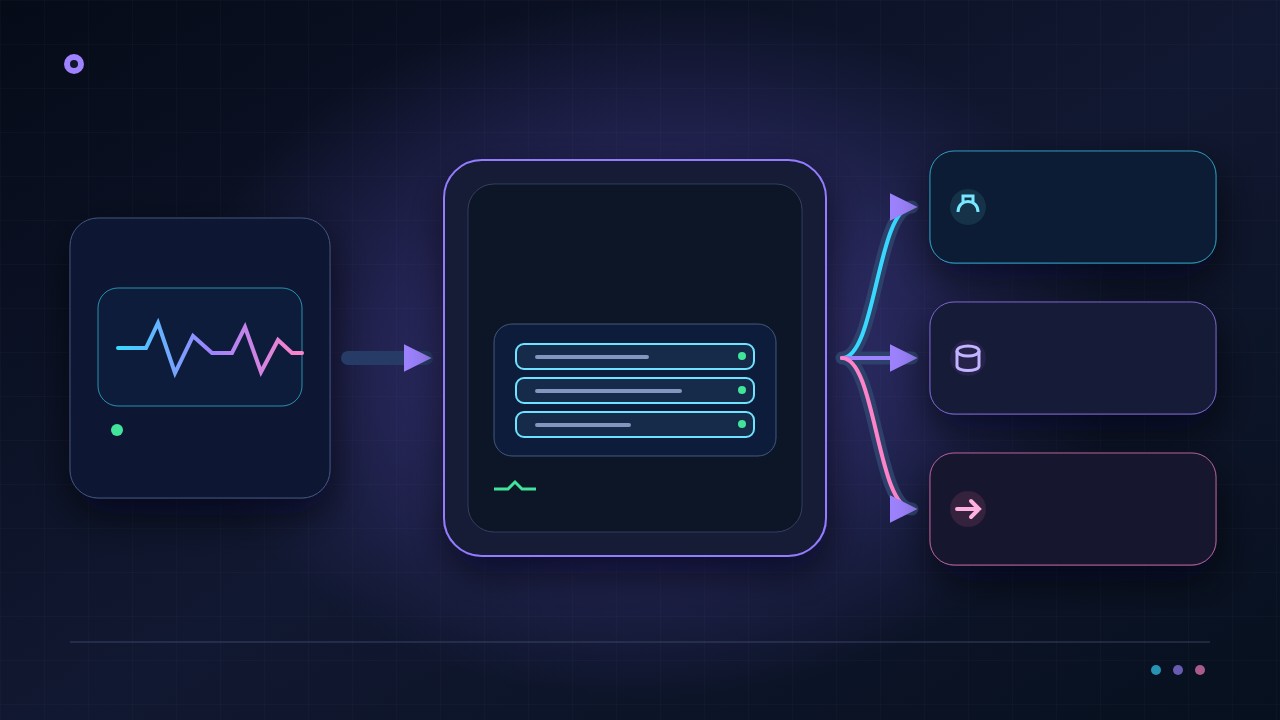
运营匹配通过一个控制界面管理集群和系统健康状态
在界面中接入可信集群节点,查看 CPU、内存、磁盘、流错误和活动端口,同时让工程团队继续掌控基础设施。
安全配置直接在界面中签发并自动续期免费 SSL
设置控制面板和流媒体域名,使用可自动续期的免费 Let's Encrypt 证书,或提交经过审核的自定义证书,无需先在终端中执行证书操作手册。
“嵌入式 SRT 播放器很好,也能很好地控制谁可以观看。”
自托管真正改变的是什么运营优先控制
Callaba 保留工作流层,而基础设施层由你决定。
你不是从零重建视频产品,而是在决定同样的 ingest、监看、交付和归档工作流运行在哪里:自己的云账户、裸金属,或其他可控环境。
在 SRT 输入、播放、转推和录制旁直接查看系统状态,无需把日常运维分散到以终端操作为主的工具中。
根据成本结构、区域覆盖和保留策略选择分发与存储提供商,并可导出或导入指定的应用和模块设置,用于备份或迁移。
集中管理控制面板、流媒体、WebRTC 和 TURN 域名设置,以及自签名、自定义或免费 Let's Encrypt 证书。
偏向固定成本更适合合规云端或本地部署界面化健康管理可迁移配置
Callaba Self-Hosted 是面向希望将媒体技术栈部署在自有基础设施内的团队的自托管流媒体平台。它的价值很直接:系统在哪里运行、如何连接、如何保障安全、何时升级,以及如何与您的产品或广播工作流集成,都由您掌控。相应的取舍也同样明确:Linux 环境及其相关运维工作由您的团队负责。
因此,对于需要掌控路由、存储、部署时间、数据边界或客户专属交付模式的工程团队、广播机构、OTT 运营商和系统集成商,自托管是合适的选择。如果您的首要目标是以较少的基础设施工作尽快完成评估,请先使用 AWS 上的 Callaba Cloud。如果现在就需要拥有基础设施的控制权,则应从自托管方案开始评估。
Callaba Self-Hosted 起价为每月 5 美元,许可证可按功能单元和模块灵活配置,无需被迫购买一个过于庞大的套装。
这套自托管解决方案是什么
Callaba Self-Hosted 是安装在您自己的 Linux 服务器或虚拟基础设施上的自托管流媒体服务器软件。它既不是固定功能的设备,也不是由他人管理的黑盒。主机、网络边界、存储模式以及工作流所需的功能都由您选择。
在实际部署中,您可以将流媒体层放在自己的数据中心、私有云、客户环境或受控托管环境内,并使其符合自身的防火墙规则、保留策略、可观测性体系、发布窗口和内部服务。对于要构建真正媒体产品、而非只测试一路流的团队,这种控制力往往正是选择自托管的主要原因。
团队何时会选择它
当流媒体不再只是简单的发布工具,而是产品或运营模式的一部分时,团队通常会选择自托管。广播机构和 OTT 运营商会在路由、出站策略、资产保留和正常运行流程必须留在自身环境内时使用它;产品团队会在媒体层必须顺畅连接自有 API、身份系统、计费逻辑或客户专属配置时选择它;系统集成商则会在部署必须位于客户自有基础设施、而非共享托管环境中时采用它。
如果您预计系统形态会随项目变化,这同样是合理选择。一个客户可能只需要接入和分发,另一个客户则可能需要录制、VOD、API 控制或视频会议。由模块组合而成的自托管平台,比单一固定套装更容易适应这些差异。
可以用它组合哪些能力
Callaba Self-Hosted 可围绕您真正需要运行的工作流进行组合。部署可以从 Multi-Streaming 开始,用于接入、路由、协议转换和向多个目的地分发。如果应用需要以编程方式创建和控制工作流,可添加 Video API,并查阅 Callaba Engine 文档,尽早验证控制接口。
对于需要保留的资产和播放工作流,可添加 Video on Demand。对于全天候频道和定时输出,可使用 Continuous Streaming。如果产品包含实时会话,可添加 Video Conferencing。如果运营付费直播活动,也可以添加 Pay-Per-View Streaming,无需迁移到其他平台。
对采购方而言,关键在于这不是一个狭窄的单一 SKU。您可以先为一项任务许可较小的部署,再随着工作流增长而扩展。这在路线图仍在演进,或不同业务部门需要不同媒体能力时尤其有用。
这是一个平台,还是只有媒体服务器?
自托管媒体服务器可以解决某一项传输或处理任务,而自托管视频平台还必须为团队提供一条贯通直播接入、路由、录制、保留资产、播放、访问控制、自动化和后续运维的完整路径。部署边界归您的团队所有,但产品应让这些工作流层保持衔接。
应先按照所需结果评估 Callaba。使用 Multi-Streaming 完成接入、路由和多目的地分发;使用 Video on Demand 管理资产和播放;使用 Pay-Per-View Streaming 提供付费访问;使用 Video Conferencing 支持互动会话。只有当您的应用需要编程控制时才添加 Video API。API 是实施层,而不是产品价值本身。
- 当基础设施所有权、专用网络、数据边界或发布控制是实际要求时,选择自托管。
- 当眼前目标是用较少的运维工作验证工作流时,从云端开始。
- 不要只比较许可证价格,应综合基础设施、监控、更新、备份、事件响应和工程时间来核算完整成本。
部署如何进行
好的自托管评估应从工作流而不是服务器开始。明确需要接入哪些内容、哪些内容必须转码或转换、需要哪些输出、哪些内容要录制、哪些 API 或后端系统需要控制平台,以及必须遵守哪些安全边界。这样得到的是切实可行的部署设计,而不是泛泛的平台讨论。
- 选择符合待运行工作流的模块和功能单元。
- 按照生产环境预期的网络、存储和访问模式配置一台或多台 Linux 主机。
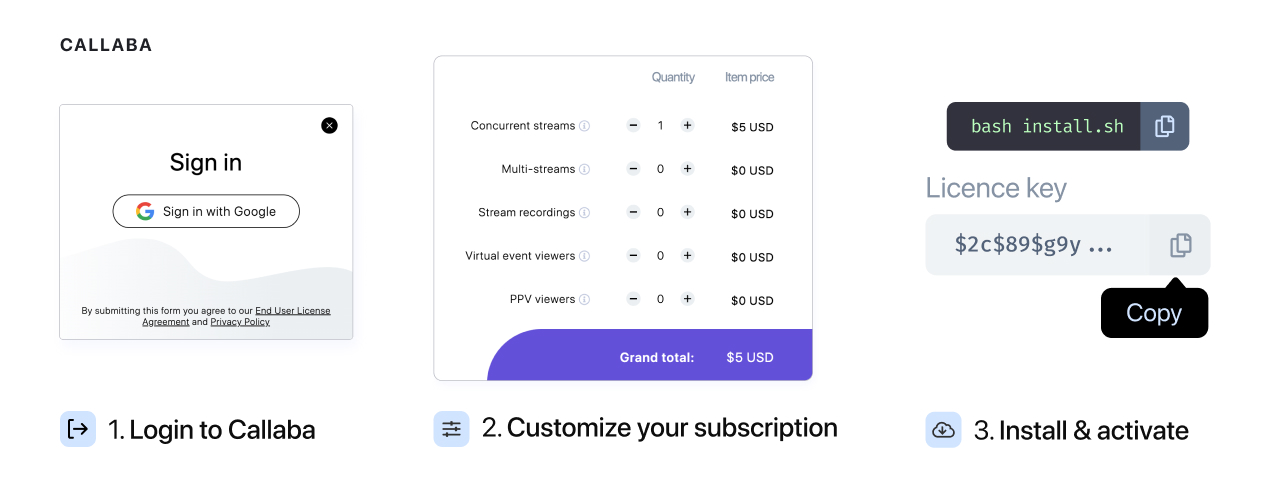
- 安装并激活软件,然后使用真实流、预期并发量以及实际的监控和备份方案进行验证。
对于技术评估人员,最佳比较方式是在云端与自托管测试中采用相同的接入格式、目的地、编解码器和流量假设。这样可在做出承诺前揭示运维简便性与基础设施控制权之间的真实取舍。
安装路径
主要的 Linux 部署路径是自托管解决方案安装指南。如果希望按标准流程在自己的服务器上启动 Callaba 并验证核心系统,请使用该指南。
如果部署依赖更新的软件包,或 HDR、HEVC、AV1、VP9、视频会议工作流等特定媒体功能,请使用面向编码配置和视频会议的 Callaba 8.2 安装指南。当编解码器支持和特定版本能力是购买决策的一部分、而不是事后考虑时,这就是正确的路径。
如果应用将直接控制工作流,请在安装指南之外同时查阅 API 文档。这样工程团队可以一并评估部署和集成工作量,而不是将两者视为彼此独立的决定。
定价方式
价格每月 5 美元起。许可证可围绕功能单元和模块配置,因此比大型固定套装更易理解。简单来说,您只需为工作流需要的能力付费,不必一开始就购买所有功能。
这一点很重要,因为不同部署承担的任务并不相同。简单的路由和分发节点不应按带有 API 控制、VOD、视频会议和变现功能的完整 OTT 技术栈来计价。单元数量越多,单价越低,因此大规模部署可享受基于数量的定价优势。

确定价格范围的实用方式是先梳理工作流:接入、处理、分发、存储、播放、API 控制以及任何特殊模块。相比依据笼统的平台名称估算,这能形成更清晰的成本模型。
自托管与云端对比
这一决策主要是在控制权与运维负担之间取舍。自托管让您对基础设施、安全边界、存储、升级时间和深度集成拥有更多控制;云端则以较少的运维责任提供更快的起点。两者都并非普遍更优,正确选项取决于团队在当前阶段更看重速度还是基础设施控制权。
| 决策因素 | 自托管 | 云端优先 |
|---|---|---|
| 启动速度 | 由于需要配置和运营环境,启动较慢。 | 基础设施已经托管,评估更快。 |
| 基础设施控制 | 对网络边界、存储、发布时间和集成拥有高度控制。 | 基础设施控制较少,但设置工作也更少。 |
| 运维负担 | 更新、监控、备份、扩展和事件响应由您的团队负责。 | 评估和早期上线阶段的运维责任较低。 |
| 最佳适用场景 | 长期拥有平台、客户专属部署,以及更严格的安全或合规边界。 | 概念验证、早期产品验证、较小的运维投入和快速试验。 |
如果尚不确定,通常可以按顺序推进:先在 AWS 上的 Callaba Cloud 中验证工作流,待产品形态明确且基础设施所有权成为更重要的要求后,再迁移到自托管。
您的团队必须承担哪些运维工作
在自托管模式下,Linux 主机、软件包生命周期、网络和防火墙策略、TLS 和密钥处理、存储布局、备份策略、可观测性、告警、回滚规范、容量规划以及事件响应均由您的团队负责。您还需要制定更新的测试和引入方案,避免中断直播流量。
这并非藏在小字中的缺点,而是这种模式的运营方式。对于已经运行生产基础设施的团队,这是正常且往往更理想的选择。对于缺少 Linux 运维或值班能力的团队,通常更适合从云端开始。
自托管视频平台常见问题
什么是自托管视频平台?
它是在您组织所控制的基础设施内运行的视频平台。您的团队负责 Linux 环境、网络和运维,产品则提供相互连接的直播、播放、存储和自动化工作流。
自托管视频平台等同于媒体服务器吗?
不等同。媒体服务器可能只涵盖接入、传输或处理;平台还需要为播放、保留资产、访问、自动化、可观测性和持续运维提供明确路径。
自托管何时优于托管云服务?
当基础设施控制、专用网络、合规边界、客户自有部署或发布时间带来的价值足以承担额外运维责任时,它通常更合适。
在 Linux 上安装前,可以先在云端评估 Callaba 吗?
可以。先通过云端工作流验证产品形态,当团队准备好承担基础设施责任时,再使用 Linux 安装指南。
运维人员如何在部署前预览工作流?
打开 Callaba Multiview 演示查看浏览器监控体验。请将其视为产品演示;生产容量和支持的工作流细节仍需根据您的部署计划验证。
实用的后续步骤
- 在 Callaba Cloud 中启动工作流,以最快速度完成产品评估。
- 需要拥有基础设施时,在 Linux 上安装 Callaba。
- 打开 Multiview 演示,查看运维人员的监控体验。
如果已准备在自己的基础设施上部署,请从 Linux 自托管安装指南开始。如果需要高级编解码器或视频会议功能,请直接转到 8.2 安装路径。
然后查看符合实际用例的模块:Multi-Streaming、Video API、Video on Demand、Continuous Streaming、Video Conferencing 和 Pay-Per-View Streaming。如果在承担 Linux 基础设施责任前仍需比较运营模式,请以 AWS 上的 Callaba Cloud 作为更快的评估基准。
如果需要协助将模块对应到部署方案,或估算合适的功能单元组合,请联系 [email protected]。
产品决策指南
当控制权有明确负责人时,选择自托管流媒体
Callaba 自托管产品将流媒体控制平面和媒体工作流部署在您的 Linux 基础设施上。它面向需要专用网络部署、基础设施策略或明确所有权,并准备好承担容量、升级和恢复工作的团队。
本地流媒体就绪性测试
- 基础设施负责人:在生产流量到来前,明确负责 Linux、存储、网络、TLS、监控、备份和升级窗口的团队。
- 工作负载范围:按峰值活动的余量确定并发输入、输出、录制和转码规模,并设置有文档记录的容量告警。
- 恢复证明:重建或恢复一个测试实例,轮换凭据并演练节点故障响应,不要把安装成功等同于韧性。
自动化应放在第二步。先安装并验证产品工作流,再自动化基础设施或媒体资源。在明确责任、监控和回滚机制之后,API 访问才有意义。
自托管流媒体平台相关问题
自托管视频流媒体等同于运行一台媒体服务器吗?
不一定。生产平台需要结合接入、路由、播放或 VOD、访问、可观测性和运维。所需的 Callaba 模块取决于您部署的工作流。
Callaba 可以在没有托管媒体服务的情况下于本地运行吗?
可以。在受支持的 Linux 基础设施上安装 Callaba,并在您的环境内运营主机、网络和容量。请根据计划的工作负载验证许可证和硬件。
在 Linux 安装前,是否应先在云端测试?
云端评估可以快速验证媒体工作流。自托管安装完成后应再次执行验收测试,因为网络位置、存储和容量责任都发生了变化。
继续采用自主管理的工作流
在确定生产 Linux 规模前验证工作流
在云端评估 Callaba 或将其安装在您的主机上,然后使用 Multiview 运行相同的运维验收测试。