Wowza Streaming Engine
More live video workflow notes and product updates.

Wowza Streaming Engine is widely used across legacy and hybrid stacks, and teams often evaluate complementary paths for reliability, latency control, and operational automation. This guide helps engineering teams evaluate when to keep Wowza, when to modernize, and how to run a stable pipeline during transition. For managed ingest and distribution fan-out, start with Ingest and route. For secure playback and VOD-ready delivery, map output to Player and embed. For backend orchestration and operational control, use Video platform API. Before full production rollout, run a Test and QA pass with Generate test videos and streaming quality check and video preview. Before full production rollout, run a Test and QA pass with a test app for end-to-end validation.
What it means definitions and thresholds
In practice, wowza streaming engine decisions are not only licensing or feature-list decisions. They are decisions about operational risk, migration velocity, and customer-facing quality. Define objective thresholds before touching architecture.
- Startup success above 99 percent for scheduled live events.
- Dropped frames below 0.5 percent in steady-state windows.
- Latency target aligned to use case: 1 to 3 seconds for low-latency audience interaction, 3 to 8 seconds for standard OTT paths.
- Recovery target: contribution failover under 10 seconds without session collapse.
- Monitoring coverage: contribution health, packager health, playback errors, and CDN edge response in one dashboard.
If your team still debates protocol behavior during incidents, baseline with round trip delay and SRT statistics before rollout changes.
Decision guide
- Keep as is
- Use this when workloads are stable, support burden is low, and current KPIs are consistently met.
- Document known limits and lock runbooks so incidents remain predictable.
- Keep and augment
- Use this when legacy ingest remains functional but distribution requirements expanded.
- Add managed fan-out and backup routing while preserving contribution compatibility.
- Migrate by event class
- Use this when support cost is rising and architecture sprawl blocks product delivery.
- Move event types one by one with clear rollback plans and side-by-side quality checks.
For practical migration comparisons, see wowza alternatives and operational notes in wowza.
Use the bitrate calculator to size the workload, or build your own licence with Callaba Self-Hosted if the workflow needs more flexibility and infrastructure control. Managed launch is also available through AWS Marketplace.
- Capture and render: 30 to 90 ms
- Encoder queue and encode pass: 40 to 180 ms
- Contribution transport: 80 to 500 ms depending on RTT and loss profile
- Transmuxing and packaging: 100 to 700 ms
- CDN plus player startup: 400 to 2500 ms
If your audience reports delay spikes, do not start with player tuning only. Compare contribution RTT behavior, keyframe cadence, and packager backlog in the same time window.
Practical recipes at least 3 recipes
Recipe 1 Legacy-compatible contribution profile
- 1080p30, H.264 high profile
- CBR 4500 to 6000 kbps
- GOP fixed at 2 seconds
- AAC 128 kbps stereo at 48 kHz
- Use case: webinars, talk shows, and enterprise internal live events
This profile prioritizes compatibility while preserving clean speech intelligibility and stable startup.
Recipe 2 High motion profile with conservative risk
- 1080p60 where hardware headroom is proven
- CBR 7000 to 9000 kbps
- GOP 2 seconds, no variable keyframe drift
- AAC 160 kbps stereo
- Use case: sports clips, action-heavy scenes, gaming segments
Run a 30-minute soak test before event day. If dropped frames exceed threshold, reduce scene complexity first, not only bitrate.
Recipe 3 Constrained uplink fallback profile
- 720p30
- CBR 2200 to 3200 kbps
- GOP 1 to 2 seconds
- AAC 96 to 128 kbps
- Use case: backup route, field contribution, unstable uplink events
Keep at least 30 percent network headroom from measured usable uplink. Verify failover with the backup-runbook pattern from SRT backup stream.
Practical configuration targets
- Encoder targets
- Rate control CBR for predictable transport and packager behavior.
- Keyframe interval fixed at 1 to 2 seconds.
- Keep sustained encoder CPU below 75 percent at peak windows.
- Transport targets
- Alert when RTT median drifts above 30 percent from baseline.
- Alert when packet loss exceeds 1 percent for more than 60 seconds.
- Playback targets
- First frame under 5 seconds for standard HLS profile.
- Rebuffer ratio under 1 percent for core regions.
Validate bitrate assumptions against your audience mix with video bitrate guidance and format constraints in HLS streaming.
Limitations and trade-offs
- Keeping legacy components minimizes short-term disruption but can slow feature delivery.
- Hybrid architectures improve migration safety but increase operational complexity.
- Aggressive low-latency tuning can hurt quality stability if network headroom is ignored.
- One-size-fits-all profiles reduce operator decisions but usually increase incident probability.
Common mistakes and fixes
Mistake 1 No tested backup route
Fix: Configure primary and backup contribution with a tested failover trigger and run operator drills monthly.
Mistake 2 Treating migration as a one-cut project
Fix: Migrate by event class and keep rollback criteria explicit per class.
Mistake 3 Ignoring RTT drift before major events
Fix: Baseline RTT and packet behavior in rehearsal, then alert on deviations on event day.
Mistake 4 Measuring success only by stream uptime
Fix: Add startup time, rebuffer ratio, error rate, and incident recovery time to your launch KPIs.
Rollout checklist
- Run 30-minute soak tests with real graphics, scene switches, and audio routing.
- Validate failover switch and operator runbook in rehearsal.
- Test startup and playback quality from at least two regions.
- Run packet loss simulation at 1 percent and 3 percent and capture artifacts.
- Freeze profile versions before event day and lock config drift.
- Assign clear owner for go-live decisions and rollback authority.
Example architectures
Architecture A Keep contribution, modernize distribution
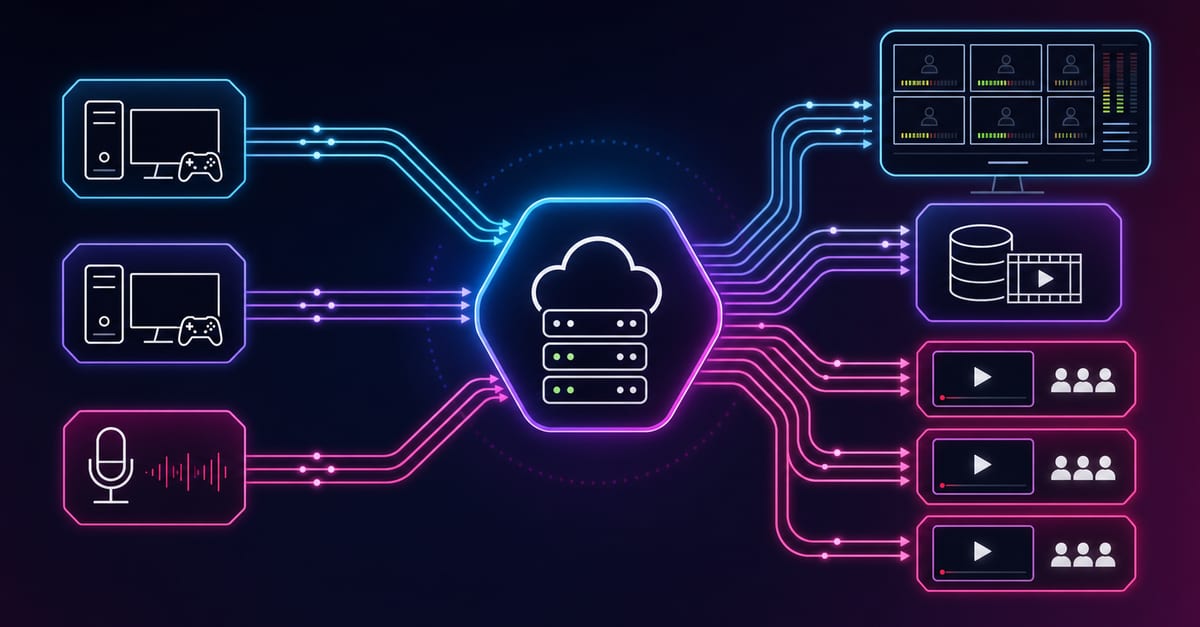
Existing contribution path remains compatible while managed fan-out distributes to social, owned player, and private endpoints. This pattern is practical for teams that need immediate reliability gains without a full replatform.
Architecture B Product-led live plus replay
Live sessions run with controlled playback and fast replay publishing. Combine Player and embed with Paywall and access when monetization and access policy are required.
Architecture C API-first operational control
Event creation, profile assignment, and incident actions are controlled via backend automation with Video platform API. This reduces manual error and speeds incident response.
Troubleshooting quick wins
- If quality drops with stable CPU, inspect uplink and retransmission behavior first.
- If latency spikes suddenly, compare keyframe cadence and packager queue depth.
- If audio artifacts appear, verify consistent sample rate and test lower AAC bitrate.
- If reconnect loops happen, rotate stream credentials and verify endpoint policy before go-live.
- If operators switch profiles ad-hoc, enforce versioned profile templates and runbooks.
Next step
Choose one event class and implement a single approved profile this week. Measure startup time, dropped frames, and RTT stability. Then add a fallback profile and validate failover in rehearsal. For deeper implementation paths, continue with video stream architecture, RTMP behavior, and video uploader workflows.