Obs Stream
More live video workflow notes and product updates.

OBS stream workflows are easy to start and hard to run reliably at scale. Most teams can go live in minutes, but production quality depends on repeatable encoder settings, stable ingest transport, predictable failover, and clear monitoring. This guide is for teams that need a working operating model, not random preset lists. It covers architecture choices, concrete bitrate and GOP targets, low-latency constraints, and rollout controls. For managed ingest and destination routing, start with Ingest & route. For owned playback and embedding, use Player & embed. For API orchestration and automation, use Video platform API. Before full production rollout, run a Test and QA pass with Generate test videos and streaming quality check and video preview. Before full production rollout, run a Test and QA pass with a test app for end-to-end validation.
What it means definitions and thresholds
An OBS stream is a live pipeline where OBS Studio captures scenes and sends encoded output to an ingest endpoint. In practice, stream quality is controlled by a small set of variables:
- Encoder rate control and bitrate targets.
- GOP keyframe cadence and frame rate.
- Transport protocol behavior under packet loss and RTT drift.
- Player startup policy and ABR switching thresholds.
Useful thresholds for production:
- 1080p30: 4.5 to 6 Mbps baseline for mixed scenes.
- 720p30: 2.5 to 3.5 Mbps baseline for constrained networks.
- GOP: 1 to 2 seconds, aligned with segment cadence.
- Packet loss sustained above 1.5 percent is an incident trigger.
If your target includes low-latency delivery, combine this with low latency streaming and transport checks from SRT statistics.
Decision guide
Use this order to decide your OBS production setup:
- Choose workflow type: social-first, owned-player-first, or dual distribution.
- Select ingest protocol by reliability target: SRT for unstable links, RTMP for broad compatibility.
- Define one primary profile and one incident fallback profile.
- Set destination-level priorities so not all outputs are treated equally.
- Define automation level: manual operation versus API-managed lifecycle.
Teams with frequent events should avoid manual destination setup. Create stream profiles and route rules via Video platform API, then manage distribution through Ingest & route.
A useful implementation pattern is to split decisions into two layers. Layer one is technical policy that engineering owns, including bitrate envelopes, GOP limits, fallback triggers, and destination compatibility rules. Layer two is event policy that production owns, including which destinations are active, which profile class is selected, and what degradation behavior is acceptable if network quality drops. This separation reduces conflict during incidents because each team knows exactly which levers it can change without risking system-wide regressions.
Use the bitrate calculator to size the workload, or build your own licence with Callaba Self-Hosted if the workflow needs more flexibility and infrastructure control. Managed launch is also available through AWS Marketplace.
- Capture and OBS encode: 80 to 220 ms.
- Ingest transport: 100 to 350 ms depending on path quality.
- Packaging and publish: 100 to 500 ms.
- Player startup and steady buffer: 1.2 to 3.2 seconds.
When latency grows, isolate cause by stage. If ingest RTT rises while encode output is stable, network is likely root cause. If RTT is stable but startup worsens, inspect packaging and player buffer policy.
Practical recipes at least 3 recipes
Recipe 1 OBS to social plus owned backup
- OBS output: 1080p30, 5.5 Mbps, 128 kbps audio.
- Primary ingest: SRT.
- Outputs: YouTube and Twitch plus one owned web player.
- Failover: backup input route active during live windows.
This pattern keeps reach while preserving continuity if a social endpoint degrades.
Recipe 2 OBS low-latency webinar pipeline
- OBS output: 720p30, 3.2 Mbps.
- GOP: 1 second.
- Player startup buffer: 1.5 to 2.0 seconds.
- Access control: gated playback for invited users.
Use Calls & webinars for session-centric scenarios and Paywall & access for controlled event access.
Recipe 3 OBS always-on channel operations
- Primary profile: 1080p30 at 4.8 Mbps.
- Incident profile: 720p30 at 3.0 Mbps.
- Auto-switch: trigger on packet loss and late packet thresholds.
- Scheduled source logic: playlist or live source priority.
For persistent channels and scheduled behavior, combine OBS contribution with 24/7 streaming channels.
Practical configuration targets
Concrete starting defaults for OBS production:
- Rate control: CBR-like for live consistency.
- Bitrate: 5 to 6 Mbps for 1080p30, 3 to 4 Mbps for 720p30.
- Keyframe interval: 1 to 2 seconds.
- Preset policy: keep one documented profile per event class.
- Audio: 96 to 128 kbps AAC, avoid unnecessary variability.
Scene and source management controls
- Cap scene complexity where possible to reduce encoder spikes.
- Avoid frequent dynamic source changes during critical moments.
- Keep overlays optimized and preloaded before event start.
- Use deterministic naming and profile IDs for every production scene set.
For architecture context and platform mapping, review common streaming architectures and video api explained.
Encoder and network guardrails
To prevent quality oscillation under real load, add hard guardrails:
- Do not exceed 75 percent sustained encoder CPU on production hosts.
- Keep upload headroom at least 30 percent above top bitrate target.
- Alert if keyframe interval drifts from policy for more than 60 seconds.
- Alert if packet loss remains above 1.5 percent for two consecutive minutes.
Guardrails are practical because they prevent unstable “almost working” states that are hard to diagnose during live events.
Limitations and trade-offs
OBS provides flexibility, but production trade-offs remain:
- Local workstation variability affects output stability.
- Complex scenes increase encoding load and quality risk.
- Manual operations do not scale for high event volume.
- One-size encoder settings underperform across different content types.
A robust design accepts these limits and compensates with profiles, fallback logic, and automation.
Another trade-off is change velocity. Rapid profile changes may improve one event but hurt consistency across teams. Keeping a controlled release cadence for stream profiles often produces better long-term outcomes than frequent ad hoc tuning.
Common mistakes and fixes
- Mistake: chasing max quality with no network headroom.
Fix: keep conservative bitrate margins and test under impairment. - Mistake: no backup ingest route.
Fix: run primary plus backup with tested failover behavior. - Mistake: changing many parameters during incidents.
Fix: use predefined rollback profiles. - Mistake: no destination-level prioritization.
Fix: define critical outputs and degrade non-critical outputs first.
Operational anti-patterns
- No event checklist before going live.
- No metric ownership after event completion.
- Random profile cloning without versioning.
- Ignoring packet behavior while only watching encoder output bitrate.
Rollout checklist
- Create two profiles: normal and incident fallback.
- Validate transport with packet loss simulation at 0.5, 1.0, and 2.0 percent.
- Verify destination publish success and per-output alerting.
- Test failover cutover and recovery timing.
- Run one shadow event with full telemetry.
- Run one public canary event with rollback readiness.
- Review metrics and lock profile version after successful rollout.
Acceptance criteria before full rollout
- At least two canary events complete without priority-one incident.
- Startup p50 and p95 remain within defined target envelope.
- Rebuffer ratio remains below threshold in all primary regions.
- Failover test passes with measured cutover under agreed SLA.
Governance checklist
- Assign stream profile owner and backup owner.
- Require change request for bitrate and GOP changes.
- Store profile version in event metadata for later incident analysis.
- Set monthly quality review across engineering and operations.
Example architectures
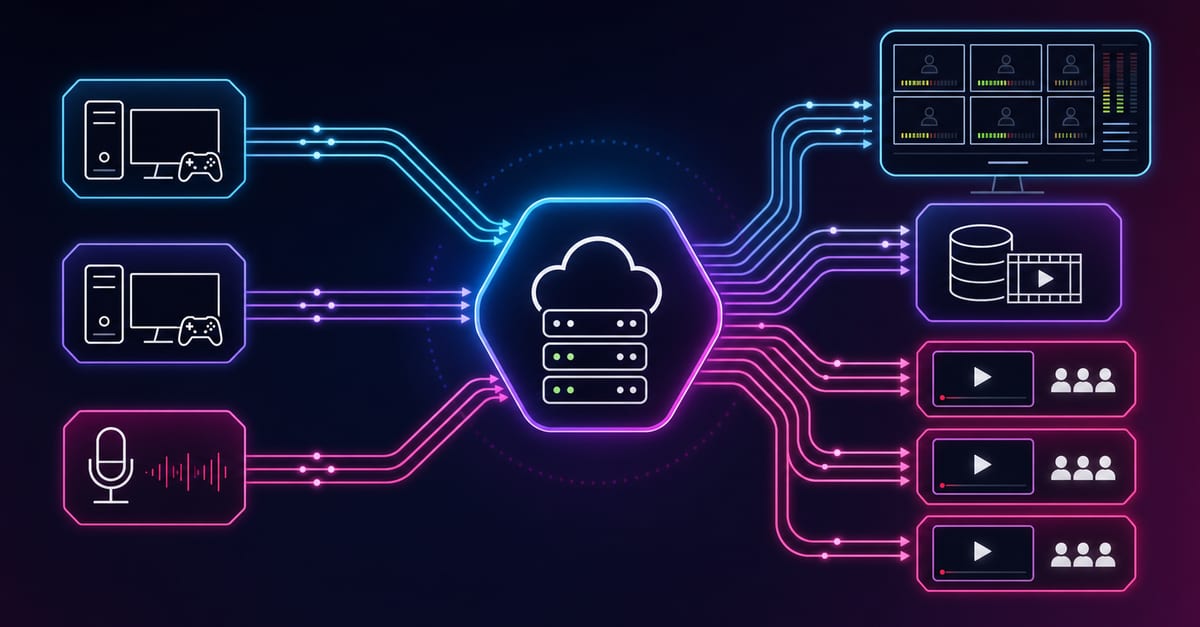
Architecture A OBS contribution to managed routing
OBS publishes one contribution stream to centralized routing. Outputs are created and controlled independently for social and owned destinations. This reduces operator overhead and isolates destination failures.
Architecture B OBS plus private event playback
Primary feed is public, private mirror is gated for registered users. Entitlement checks and playback controls are separated from social distribution.
Architecture C API orchestrated event factory
Event scheduler creates outputs, applies profile IDs, starts and stops streams, and exports post-event metrics. This is effective for agencies and platforms running many recurring broadcasts.
Troubleshooting quick wins
- If one destination fails, verify destination credentials and endpoint health first.
- If all destinations degrade, inspect contribution RTT and packet loss immediately.
- If startup time grows, check packaging delay and player startup buffer policy.
- If quality drops during motion peaks, review bitrate headroom and scene complexity.
- If failover causes long gap, lower detection threshold and keep backup warm.
Runbook-ready diagnostic checks
- Check input timestamp continuity and clock drift.
- Compare expected versus observed output bitrate every 30 seconds.
- Inspect destination reject logs for protocol mismatch or expired credentials.
- Confirm player manifest freshness and segment availability.
- Verify ABR downswitch behavior during synthetic bandwidth reduction.
These checks are intentionally short and deterministic so they can be executed quickly by on-call engineers during active events.
Incident triage sequence
- Input and encode health.
- Transport health and packet behavior.
- Destination output status.
- Player startup and ABR transitions.
- Rollback profile activation if SLA threshold is crossed.
Next step
Begin with one reproducible OBS profile and one fallback profile, then scale destination count only after stable telemetry in canary events. For structured operations, combine Ingest & route, Player & embed, and Video platform API in one managed workflow.
Hands-on implementation example
Scenario: a media team runs daily live shows via OBS and sends output to three platforms. They currently have inconsistent bitrate settings per operator, no backup route, and frequent mid-show quality drops. Goal: stabilize delivery, reduce incident count by 50 percent, and keep startup below 3 seconds on owned playback.
- Profile standardization: define one 1080p30 profile at 5.2 Mbps and one incident profile at 720p30 3.0 Mbps.
- Routing upgrade: send OBS contribution to Ingest & route and enable destination-level control.
- Playback control: publish owned stream via Player & embed with conservative startup buffer and ABR.
- Automation: apply profile IDs and output lifecycle through Video platform API at event start and end.
- Monitoring: track RTT and packet behavior in SRT statistics and map alerts to fallback triggers.
- Failover drills: simulate 20 second primary input outage and validate cutover under 4 seconds.
- Post-event review: compare startup, rebuffer, and per-destination publish outcomes versus baseline.
Measured results after two weeks:
- Publishing incidents per event: from 7 to 3.
- Median startup on owned player: from 4.0 s to 2.7 s.
- Rebuffer ratio: from 3.4 percent to 1.8 percent.
- Operator manual interventions: down 46 percent.
Week-three optimization plan:
- Add content-type presets for interview versus high-motion segments.
- Introduce destination priority rules so non-critical outputs degrade first during stress.
- Track profile drift and block unapproved parameter changes.
- Add monthly audit of rollback readiness and failover timing.
Expanded implementation sequence used in month one:
- Create profile registry with immutable IDs and change history.
- Bind each event type to approved profile set through scheduler metadata.
- Attach destination-specific retry policy by channel criticality.
- Publish one internal dashboard for input, transport, output, and playback metrics.
- Define incident severity rules tied to measurable thresholds.
- Run weekly reliability review with product and operations.
Measured quarter-level impact after process stabilization:
- Higher event success rate without increasing operator headcount.
- Lower support escalations due to consistent startup and playback quality.
- Faster recovery from network events because failover behavior is rehearsed.
- Better planning accuracy for bandwidth and infrastructure cost.
The practical insight is that OBS success at scale is mostly an operations discipline problem. When teams codify profiles, automate lifecycle actions, and enforce telemetry-driven decisions, stream quality becomes predictable instead of fragile.
Final takeaway: OBS can be production reliable when configuration, routing, and monitoring are treated as one system. The biggest gains come from disciplined profiles and operational automation, not from chasing isolated encoder tweaks.