media server logo
即時影片控制平面

從 ingest 到復原、路由、錄製與交付,控制即時影片工作流程。

Callaba 為廣播、OTT、AV 與製作團隊提供一個面向關鍵直播活動的控制平面,可運行在雲端、AWS 或自託管環境。

監控 contribution、從故障中復原、路由輸出、錄製素材,並圍繞直播工作流程自動化重複工作。

面向廣播、OTT、AV 與直播製作團隊Ingest、監控、failover、路由、錄製與交付雲端、AWS Marketplace、自託管或私有雲
為什麼是現在

即時影片已經從單一機房,轉向分散式運維。

Contribution 可能來自場館、編碼器、雲端應用、遠端團隊和合作夥伴。操作員需要一個共享介面來監控訊號、從故障中復原、路由輸出、錄製素材,並自動化重複工作。

類別角色這就是 Callaba 的角色:分散式即時影片運維的控制平面。
訊號路徑

Contribution 來源無處不在

場館、編碼器、雲端應用、遠端團隊與合作夥伴都會進入同一個直播工作流程。

復原

故障處理是運維問題

團隊需要備份路徑、檔案 fallback、路由狀態與播放證明,才能在觀眾察覺前處理問題。

自動化

API 需要操作員上下文

自動化應該延伸直播工作流程,而不是在旁邊再創造一個孤立工具。

WORKFLOW 控制平面

把 live event path 當成一個 workflow 控制

Callaba 不是一組分散的影片功能,而是覆蓋 ingest、復原、路由、錄製、交付與自動化的運維路徑基礎設施。

01

Ingest

把 SRT contribution feeds 帶到穩定的 cloud entry point,給 venue、encoder、OBS 席位或 remote production teams 使用。

02

Monitor

使用瀏覽器 Multiview、live stream stats 與 playback proof,在問題到達觀眾前先發現。

03

Recover

當 live contribution 不穩定時,在 main、backup 與準備好的 file fallback 之間切換。

04

Route

將同一個受控 source 送往 SRT、RTMP、browser playback、NDI workflow 或 downstream production tools。

05

Record

擷取 live assets 並送往 archive 或 VOD,不需要建立第二套 operations stack。

06

Automate

用 API 建立 internal panels、event provisioning、monitoring workflows 與可重複 launch routines。

SRT contributionBrowser multiviewFailover switcherSRT to NDICloud routingRecordingAPIAWS MarketplaceSelf-hosted / private cloud
SRT GATEWAY HUB

Start with the gateway layer before a device-specific setup

Use the SRT gateway hub when the job is to receive, route, convert, monitor, or recover live feeds. Then move into vendor guides for the source hardware or workflow you actually have.

NEWS & GUIDES

Latest from Callaba

Recent field guides, integration notes, and practical live video workflows.

View all news
CALLABA 8.4 新功能

Multiview + failover。現在就在你的瀏覽器。

Callaba 8.4 將 monitoring 與 recovery 變成 operator workflow:browser-based SRT Multiview、route state、manual 或 automatic failover,以及 live contribution 中斷時的 file fallback。

Live demo available開啟真實 Multiview 看板,查看 live SRT feeds 與 failover context。觀看 browser demo
Multiview

從瀏覽器監控 SRT sources

把 live inputs 放在 tile board 上,檢查 stream metadata、監控音訊,並和 remote operators 共用同一個 board。

Failover

讓 main、backup 與 fallback 保持可見

在同一個 monitoring workflow 中使用 manual 或 automatic failover,並保留 route visibility。

Fallback 檔案

當 live contribution 中斷時避免 dead air

當 main stream 失敗且沒有 backup feed 時,切換到準備好的 cloud file。

LIVE WORKFLOW OBSERVABILITY

觀眾輸出與操作員訊號保持連接

Live teams 需要同時看到兩邊:觀眾能看什麼,以及操作員能信任 delivery path 的哪些訊號。

一個 session。Browser playback、live telemetry、active streams 與 SRT health 在同一個 product story 中。

客戶證明

營運控制會反映在成本、觸及與上線速度

最強的證明不是某個 feature 有用,而是整個 live workflow 變得更容易 end-to-end 操作。

★★★★★
Verified AWS customer
Reviewed on Dec 14, 2025Corporate events, webinars, monetization, and global live distribution

我們自動化 live events,並將基礎設施成本降低 30-40%。

當 playback、recording、distribution 與 monitoring 集中到一個系統後,latency 降低、reach 成長 22%、productivity 提升 33%。

Low latencyInstant recordingCDNDRMCollaboration
Reported impact+33% productivity
Reported impact+22% reach
Reported impact30-40% lower infrastructure costs
★★★★★
Verified AWS customer
Browser monitoring for field-to-studio SRT feeds
Monitor field-to-studio SRT feeds in a browser.

Good embed SRT player

We use Callaba web player to monitor SRT streams we send from the field to the studio. It helps that branding can be removed.

Bill Harding輔助購買訊號
★★★★★
Review provided by G2
Viewer-ready playback without building a player
Viewer-ready playback without building a player.

Callaba review from a solution architect

I can watch my SRT streams in the browser with an unlimited number of viewers. It helped when we needed a simple viewer-facing playback surface.

Mark R., solution architect輔助購買訊號
操作員與工程師

一個 control plane,兩種控制方式

Live show 需要 hands-on control,周邊平台需要 automation。Callaba 讓兩個團隊使用同一套 workflow boundaries。

For live operators

不用在多個工具間切換,也能操作活動

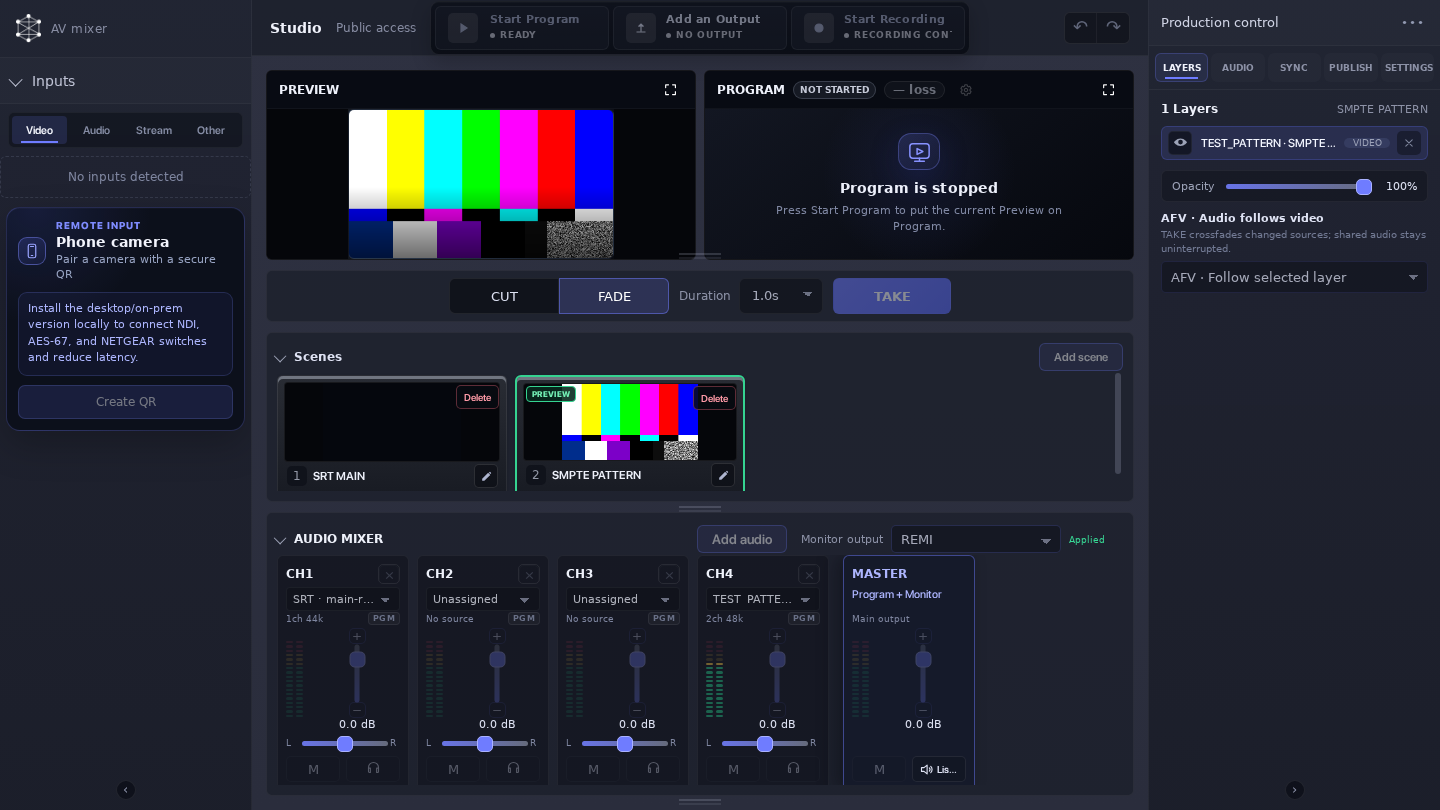
Callaba 讓 production teams 在一個地方查看 contribution health、確認 playback、切換 recovery paths 並 route outputs。

Browser multiviewFailover and file fallbackRouting, recording, and playback proof
See live operations
For developers

自動化不該手動的部分

Engineering teams 可以透過 API 延伸同一個 ingest、routing、recording、playback 與 storage model,用於 internal panels 與 event automation。

Same workflow model as UIFits internal tools and panelsAPI examples for repeatable control
Read API docs

Operate live in the UI. Automate the repeatable parts over API. Keep one workflow model.

為不能丟失直播路徑的團隊構建

為運行高價值直播時刻的團隊構建

Callaba 面向那些故障、延遲或手工拼接會迅速變得昂貴的團隊。

體育和直播活動

保持節目路徑可復原

監控現場訊號、切換備份路徑、錄製節目,並把輸出路由給合作夥伴。

廣播和 OTT 團隊

從 contribution 到交付統一控制

用同一個模型管理 contribution、播放證明、歸檔、API 自動化和私有部署。

AV 整合商

為客戶部署可重複的工作流程

反覆啟動即時影片工作流程,而不必為每個專案重建技術棧。

工程團隊

圍繞同一控制平面構建面板

用 API-first 控制進行 provisioning、路由、錄製、儲存、監控和內部工具建設。

MISSION-CRITICAL LIVE WORKFLOWS

從工作流程壓力點開始

當直播運維變成分散式,薄弱環節通常不是某個 codec 或伺服器,而是監控、復原、路由、錄製、交付和自動化之間的交接。

Contribution monitoring

在瀏覽器監控 SRT feeds

讓操作員與遠端 stakeholders 共用 contribution feeds、playback proof 與 stream health 視圖。

Cloud routing

一個 source -> 多個 outputs

保留一個 contribution boundary,然後 route 到 social platforms、partners 與 backup outputs。

Production handoff

將 SRT 接入 NDI 與 studio workflows

將 remote contribution 帶入 operator-led production,結合 SRT ingest、NDI handoff 與 runtime monitoring。

Archive and storage

不需要第二套 operations stack 也能 recording

從同一個 control plane 擷取 streams,並將 assets 移往 S3、archive、replay 或 VOD。

產品介面

基礎設施是 modular,workflow 保持 connected。

從 playback、routing、continuous channels、Video API 或直接 operator control 開始。每個 surface 都用同一個 engine 包裝你最先需要控制的 live workflow 部分。

End-to-end live delivery and access control

Ingest, route, secure, and deliver live and VOD — via UI or API. Cloud on AWS or on-prem.
Live multistreaming platform
01Delivery
Delivery

Live multistreaming platform

Bring one live feed into Callaba and fan it out to social platforms, web players, partner endpoints, or backup routes. Keep ingest, protocol conversion, destination logic, recordings, and failover in one cloud or self-hosted product. Use the API later when these operator workflows need automation.
Live video transcoding software
02Processing
Processing

Live video transcoding software

Normalize live feeds for the destinations and viewers your workflow serves. Callaba software can convert protocols and, where the selected profile supports it, adjust codec, resolution, bitrate, frame rate, audio, and output variants in cloud or self-hosted deployments. It works with feeds from cameras, OBS, vMix, and hardware encoders; it is not a hardware encoder. API control is available as a secondary automation layer.
24/7 live streaming channels and playout
03Always on
Always on

24/7 live streaming channels and playout

Operate a continuous channel for news, radio-style feeds, cameras, digital signage, or branded programming. Mix live and scheduled sources, keep playback stable, record the output, and prepare fallback paths before the channel runs unattended.
Live video workflows with recording and API control
06Developer
Developer

Live video workflows with recording and API control

Run a complete video workflow in one product: receive live feeds, publish them to players and destinations, record the same event without stopping delivery, and reuse the archive for replay or VOD. Add API control after the operator workflow is proven, using the same modules for automation and product integration.
Browser video conferencing and webinar rooms
07Realtime
Realtime

Browser video conferencing and webinar rooms

Run video calls, moderated webinars, support rooms, and interactive broadcasts directly in the browser. Separate active speakers from viewers, control who can join, record important sessions, and extend the same room into a larger live or replay workflow.
CONTROL PLANE + API

先在 UI 操作 workflow,再透過 API 自動化

操作員使用的同一套 module boundaries,也提供給 engineering teams 做 provisioning、monitoring、routing、recording 與 internal control panels。

下一步

準備從一個平面控制分散式即時影片運維了嗎?

打開即時控制示範,在 AWS 上啟動 Callaba,或洽談自託管和私有雲部署。