How To Setup OBS
More live video workflow notes and product updates.

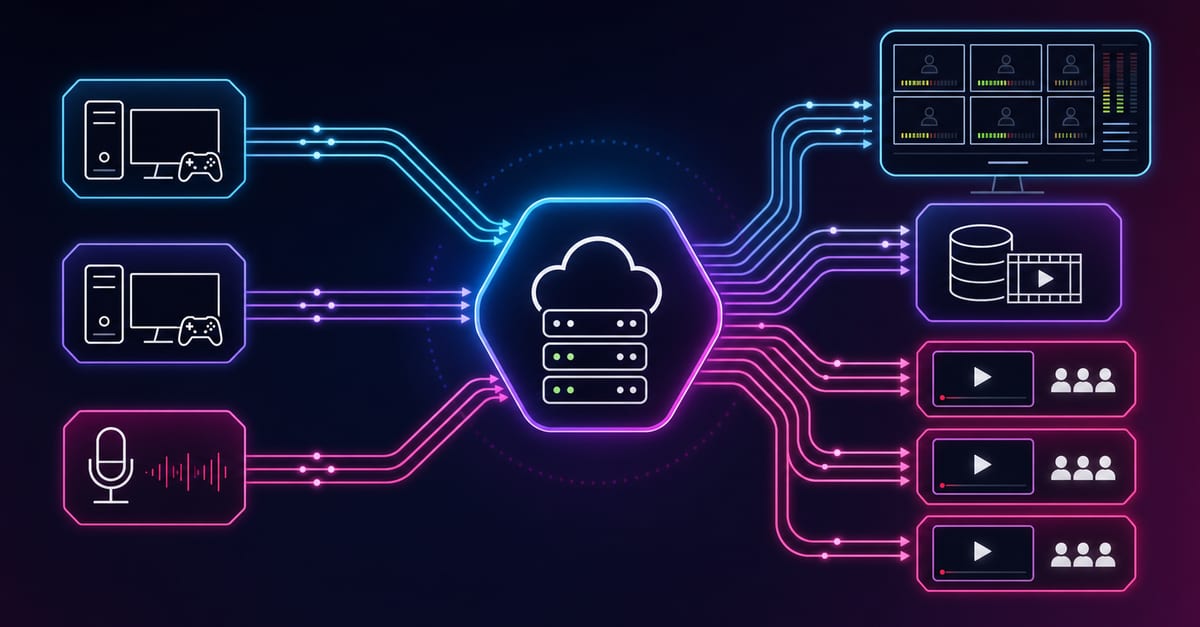
This guide is for people who want OBS working fast and stable, not just installed. If your goal is to stream or record without audio problems, black screen issues, and random dropped frames, use a structured setup flow. Below is a practical 30-minute playbook: install, baseline settings, scenes, audio, output, test, and recovery rules. For this workflow, teams usually combine Player & embed, Ingest & route, and Paywall & access.
30-Minute OBS Setup Playbook
- Minutes 1-5: install and run auto-configuration wizard.
- Minutes 6-10: create scene skeleton and source naming convention.
- Minutes 11-15: audio input, gain, and monitoring pass.
- Minutes 16-20: output settings and destination configuration.
- Minutes 21-25: private rehearsal with real speaking and transitions.
- Minutes 26-30: fix detected issues, lock baseline profile.
Follow this order. Most setup failures happen when users jump directly to “best settings” videos and skip baseline validation.
Step 1: Install And Baseline
- Install OBS from official source.
- Launch Auto-Configuration Wizard.
- Select your main use case: streaming, recording, or both.
- Accept baseline recommendation, then test with real workload.
Wizard settings are not final. They are safe defaults for your first stable run.
Step 2: Build Scene Architecture
Use minimal structure before adding complexity:
- Scene A: Ready/Starting.
- Scene B: Main delivery.
- Scene C: Fallback/Recovery.
Name sources clearly (`Cam_Main`, `Mic_Primary`, `Screen_Desktop`) and lock layout once finalized. Unnamed and unlocked sources are frequent operator error points.
Step 3: Audio Setup First, Not Last
Audio quality determines perceived professionalism more than small visual changes. Configure with discipline:
- Choose one primary microphone path.
- Disable unused audio devices in OBS audio settings.
- Set gain for real speaking intensity, not whisper-level tests.
- Check monitoring to avoid echo loops.
If audio fails, viewer drop-off is immediate even when video is clean.
Step 4: Video Sources And Capture Stability
- Verify camera permissions at OS level.
- Match source resolution to realistic hardware limits.
- Avoid unnecessary duplicate capture sources.
- Test scene transitions for frame spikes.
For screen capture issues, validate source type and permission model before codec tuning.
Step 5: Output Profile Strategy
Choose stability over aggressive quality at launch:
- Set conservative baseline profile.
- Create one fallback profile one step lower in load.
- Do not tune multiple output variables at once.
Single-variable tuning makes improvements measurable and reversible.
Step 6: Connect Destination Correctly
- Use account-connect or stream key mode consistently.
- Verify destination before every stream.
- Run private/unlisted preview test.
Destination mistakes are usually workflow issues, not OBS bugs.
OBS Setup For Recording Workflows
- Set recording format compatible with your editing pipeline.
- Use dedicated storage path with free space margin.
- Validate track routing if separate audio tracks are needed.
- Run 2-3 minute sample record and review playback.
Short validation clips save full-session failures.
Use the bitrate calculator to size the workload, or build your own licence with Callaba Self-Hosted if the workflow needs more flexibility and infrastructure control. Managed launch is also available through AWS Marketplace.
Fast Troubleshooting Tree
Audio issue
- Check active device path.
- Check gain/clipping.
- Check duplicate capture sources.
Video issue
- Check source permissions.
- Check source visibility/layer order.
- Switch to recovery scene if needed.
Transport issue
- Lower output aggressiveness one rung.
- Reduce background network load.
- Validate recovery on viewer side.
Team Setup Standardization
For channels with multiple operators, standardization matters more than individual preferences:
- Shared naming rules for scenes and sources.
- Versioned profile templates.
- Change log for every major adjustment.
- Weekly fallback rehearsal.
Standardization shortens onboarding and incident response time.
Weekly OBS Maintenance
- Validate destination mapping in all active profiles.
- Run short rehearsal with full chain.
- Clean obsolete sources and broken paths.
- Review one incident and convert lesson to runbook rule.
Maintenance keeps setup quality from degrading silently.
OBS KPI Pack For Operations
- First-attempt successful stream starts.
- Dropped/skipped frame incident frequency.
- Time-to-recovery during live faults.
- Checklist compliance rate pre-stream.
These metrics reveal process weaknesses earlier than anecdotal feedback.
Training Drills For Operators
- Launch from clean profile in under 5 minutes.
- Recover from audio fault in under 2 minutes.
- Switch to fallback scene without dead-air panic.
- Document incident with actionable root cause note.
Timed drills turn knowledge into reliable performance.
30-60-90 Improvement Model
30 days: stabilize baseline and enforce checklist. 60 days: optimize scene flow and audio quality using data. 90 days: automate routine checks and finalize team playbook.
This staged approach avoids “configuration churn” and supports predictable quality growth.
Pricing And Deployment Path
If OBS is one component in your broader streaming architecture, align setup with deployment model early. For infrastructure control and compliance-focused operations, review self-hosted streaming solution. For managed launch and procurement speed, compare the AWS Marketplace listing.
FAQ
How do I setup OBS for beginners quickly?
Run wizard, build 3-scene structure, configure audio first, set conservative output, and run private rehearsal.
Should I optimize recording and streaming at the same time?
Start with your primary use case, then tune secondary mode after baseline stability is confirmed.
Why does OBS show dropped frames?
Usually transport instability or output profile too aggressive for current conditions.
How many scenes are enough at start?
Three scenes are enough for most beginners: starting, main, fallback.
Can one OBS profile handle everything?
It can, but separate scenario profiles reduce mistakes and speed recovery.
How often should I revisit setup?
Before major streams and at least weekly for active channels.
Next Step
Run a full 10-minute rehearsal with your current OBS setup and capture one concrete improvement. Apply it before the next live session and repeat this cycle weekly.
Scenario Playbooks
Scenario 1: Daily creator streams
Goal is low-friction reliability. Keep scene stack minimal, protect audio clarity, and avoid visual overengineering. Run one short test before each stream and freeze changes in final pre-live window.
- Best for: recurring solo sessions and community interaction streams.
- Primary risk: accidental layout or audio path changes.
- Mitigation: locked sources + checklist discipline.
Scenario 2: Education/webinar streams
Goal is intelligibility and continuity. Slides or screen content must remain readable, and transitions should be predictable. Treat speech quality as top priority KPI.
- Best for: training, explainers, internal broadcasts.
- Primary risk: unreadable text and inconsistent voice levels.
- Mitigation: presentation rehearsal + audio peak checks.
Scenario 3: Launch/event streams
Goal is resilience in high-stakes windows. Rehearse twice, assign clear technical owner, and preapprove fallback actions. Avoid any untested changes on event day.
- Best for: product launches, sponsor streams, high-attention events.
- Primary risk: panic retuning during live pressure.
- Mitigation: strict incident thresholds and recovery script.
Incident Playbook: What To Do Under Pressure
- Classify incident type (audio, video, network, destination mismatch).
- Assign one person to execute technical changes.
- Apply one fallback action only.
- Confirm viewer-side recovery (not just OBS dashboard recovery).
- Document timeline and root cause after stabilization.
Single-owner control prevents conflicting edits and shortens recovery time.
Audio Stability Playbook
- Set speaking-level test using real voice intensity.
- Keep headroom for excited speech moments.
- Use one primary microphone route and one backup route.
- Avoid stacking too many filters before baseline is stable.
Most “mystery audio issues” come from duplicate paths or aggressive filtering.
Video And Scene Stability Playbook
- Keep critical scenes simple and predictable.
- Verify source order and visibility before launch.
- Use recovery scene for troubleshooting windows.
- Avoid editing scene graph live unless absolutely necessary.
Operational simplicity improves both quality and confidence during incidents.
Network Resilience Rules
- Prefer wired connectivity where feasible.
- Pause heavy background sync tasks before stream.
- Keep fallback profile with lower throughput demand.
- Correlate frame drop spikes with network timeline events.
This prevents misdiagnosing network issues as encoder failures.
Weekly Audit Framework
Run a lightweight weekly audit for active channels:
- Profile integrity: destinations, output modes, and source paths.
- Fallback readiness: tested this week or overdue.
- Incident review: repeated pattern or one-off anomaly.
- Runbook freshness: updates applied after recent streams.
Weekly audits keep setup quality from drifting over time.
Training Framework For Teams
Training should be operational, not theoretical. Define measurable tasks:
- Launch from clean profile within time target.
- Recover from audio disruption within recovery target.
- Execute fallback scene transition without dead air.
- Write clear post-incident summary with one improvement action.
Teams with timed drills recover faster and make fewer repeat mistakes.
Handoff Protocol For Long Streams
- State current technical status and known risks.
- Confirm active scenes and audio routes.
- Confirm fallback triggers and owner on duty.
- Confirm next segment transition timing.
Structured handoffs prevent context loss and operator confusion.
OBS Governance Rules
- No high-impact config changes in final pre-live window.
- No undocumented “temporary” profiles.
- No emergency fixes without post-stream documentation.
- No team stream without explicit owner assignment.
Simple governance rules dramatically reduce operational noise.
KPI Dashboard For OBS Operations
- First-attempt launch success rate.
- Dropped/skipped frame incidents per 10 streams.
- Median incident recovery time.
- Checklist completion rate.
These KPIs connect technical execution with audience-facing outcomes.
30-60-90 Setup Evolution Plan
30 days: stabilize baseline and enforce checklists. 60 days: tune quality for your stream formats with controlled tests. 90 days: automate routine validation and finalize team playbook templates.
Progressive evolution is safer than one-shot redesigns.
Field Notes: What Actually Improves Stability
- Smaller number of well-tested scenes.
- Conservative output profile during early growth phase.
- Consistent preflight checks before every stream.
- Clear ownership during incidents and handoffs.
These basics outperform advanced tweaks when reliability matters.
Final Practical Recap
To setup OBS well, think in operations, not only settings: baseline first, test realistically, document changes, and iterate with discipline. This is how setups stay reliable as content and audience scale.
Execution Cadence For Active Channels
Use a simple recurring cadence to keep OBS setups healthy:
- Start of week: validate profile integrity and destination mappings.
- Midweek: run short rehearsal with real sources and transitions.
- Before priority streams: test fallback profile and assign incident owner.
- After each stream: record one technical lesson in runbook.
Operational cadence prevents quality regression between events and reduces setup fatigue.
Quick Compliance Note For Teams
If your organization has internal policy requirements, include OBS setup checkpoints in standard operating procedures: change logs, owner approvals, and evidence of rehearsal for high-impact events. This reduces coordination risk and speeds post-incident reviews.
Advanced FAQ
Should I update OBS right before an important stream?
No. Update in a controlled window, then run rehearsal. Last-minute updates create avoidable risk.
How do I know if my scene layout is too complex?
If operators repeatedly choose wrong scenes or recovery takes too long, simplify scene graph and reduce unnecessary branches.
What is the best first optimization after baseline setup?
Usually audio consistency and opening-scene reliability. These deliver the fastest viewer-facing improvement.
How often should fallback profiles be tested?
At least weekly for active channels and before major events.
Can I run one profile for recording and streaming?
You can, but dedicated profiles per workflow often reduce operational mistakes and improve predictability.
For long-term stability, keep your OBS workflow boring on purpose: same checklist, same naming standards, same rehearsal pattern, and explicit owner accountability. Consistency reduces operator stress and protects stream quality when audience size and session complexity increase.
Document each fix immediately after stream close to prevent repeated incidents in future sessions.