Obs
More live video workflow notes and product updates.

Use the bitrate calculator to size the workload, or build your own licence with Callaba Self-Hosted if the workflow needs more flexibility and infrastructure control. Managed launch is also available through AWS Marketplace.
What it means (definitions and thresholds)
Clear definitions keep everyone aligned during planning and testing. Below are the production-oriented thresholds and short definitions I use when I design OBS + SRT workflows.
- Glass-to-glass latency: time from camera shutter to rendered frame at the viewer. Measured in milliseconds (ms). Target ranges used in this document:
- Ultra-low: <500 ms — requires controlled network (private links or extremely optimized WAN) and WebRTC-grade pipelines. OBS alone rarely achieves <500 ms to large audiences without specialized infrastructure.
- Low-latency: 500–2,000 ms — realistic with OBS + SRT for contribution and low-latency packaging (LL-HLS/CMAF) and tuned players.
- Near-live: 2–10 s — common for HLS and DASH without special low-latency configuration.
- Contribution link (OBS → ingest): the link from your encoder (OBS) to the ingest point. For reliable live ops use SRT with an explicit latency setting; typical values are 120–600 ms depending on network quality.
- GOP / keyframe interval: set in seconds. Typical production target is 2 seconds (e.g., keyframe interval = 2). For ultra-low setups you can try 1 second, but that increases bitrate and decoder work.
- Player buffer (target play latency): client-side buffer you request for playout, typically 200–1,000 ms depending on player and audience tolerance.
- Part size (for LL-HLS/CMAF): 200–500 ms parts; smaller parts reduce end-to-end latency but add overhead and require CDN/player support.
- Packet loss thresholds: tolerate up to 0.5% without FEC; above 0.5–1% consider FEC or increased SRT latency.
Decision guide
Choose the right tool for the job. OBS is a great program feed and production encoder; SRT is a robust contribution protocol. Use this quick decision guide to choose whether an OBS+SRT approach fits your event and what else you may need.
- Audience size:
- <10k viewers: OBS → SRT → single-region origin is fine for many events.
- 10k–100k: use global CDN packaging and multiple origin edges; ensure your origin scales horizontally.
- >100k: assume multi-region ingest, transcoding and CDN footprint; test concurrency.
- Latency requirement:
- <500 ms (interactive): WebRTC or specialized ultra-low stacks. OBS can feed a WebRTC compositing path but isn't a direct WebRTC encoder target for two-way low-latency calls.
- 500 ms–2 s (low-latency broadcast): OBS + SRT for contribution plus LL-HLS/CMAF or low-latency DASH for distribution is suitable.
- >2 s: conventional HLS/DASH or RTMP-based pipelines are acceptable.
- Network conditions:
- Controlled network (LAN / dedicated fiber): use lower SRT latency (120 ms) and more aggressive encoding.
- Public Internet: start with SRT latency 250–450 ms, enable FEC and monitor packet loss.
- Redundancy requirement:
- Single region: add dual-encoder redundancy (hot-standby OBS or hardware encoder) to separate ingest endpoints.
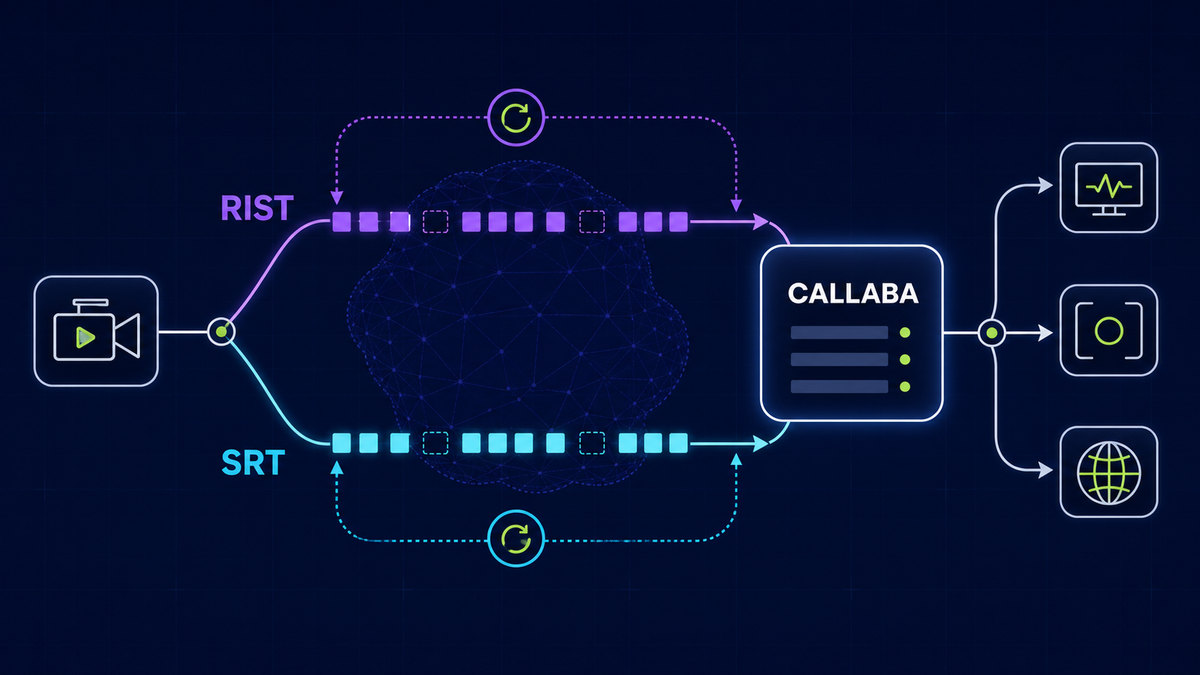
- Cross-region: send parallel SRT streams to two ingest regions for automatic failover at origin.
Latency budget / architecture budget
Budgeting latency to components makes trade-offs explicit. Below are practical budgets I use for two target classes. Add monitoring on every hop so you can measure actual values.
- Target A — Low-latency production (glass-to-glass 800–1,200 ms)
- OBS encoder: 150–300 ms (hardware NVENC) or 300–600 ms (x264 on CPU)
- SRT transport (latency param): 200–300 ms
- Transcoder / packager: 100–200 ms
- CDN edge + propagation: 50–200 ms
- Player decode + buffer: 100–200 ms
- Sum: 800–1,200 ms
- Target B — Tight low-latency (glass-to-glass 400–700 ms) — requires controlled network
- OBS encoder (hardware, tuned): 50–150 ms
- SRT transport: 120–200 ms
- Packager/transcoder: 50–120 ms
- CDN edge + propagation: 20–80 ms
- Player buffer: 100–150 ms
- Sum: 340–700 ms
Notes:
- Make budgets conservative on first deployments — measure and then tighten parameters.
- Latency is additive — improving one component has limited total benefit if others remain large.
Practical recipes (at least 3)
Each recipe is a tested, repeatable configuration of OBS + SRT and the upstream stack. Replace bitrate and resolution targets to match your event.
Recipe 1 — Single OBS to Callaba SRT ingest (Production-ready, target 800–1,200 ms)
- OBS setup (Output → Advanced):
- Encoder: NVIDIA NVENC H.264 (if available) or x264 with CPU preset "veryfast" or equivalent.
- Rate control: CBR
- Bitrate (video):
- 720p30: 2,500–4,000 kbps
- 1080p30: 3,500–6,000 kbps
- 1080p60: 6,000–9,000 kbps
- Keyframe interval: 2 seconds
- Profile: high (or main if compatibility required)
- Tune / preset: NVENC preset "performance" or x264 "zerolatency" if needed
- Audio: AAC, 48 kHz, 128 kbps
- SRT settings (OBS SRT output / plugin or OBS build with SRT):
- Mode: Caller (OBS initiates to ingest address)
- Latency: 200–300 ms (start here on public Internet)
- MTU / PMTU: 1350–1400 bytes
- Socket buffers: sndbuf/rcvbuf ≈ 4,194,304 bytes (4 MB)
- Enable encryption (passphrase) for production ingest
- Server side (Callaba ingest): accept SRT on dedicated port, package to LL-HLS or low-latency CMAF parts of 200–300 ms.
- Player: request a 400–800 ms buffer target; measure real user glass-to-glass during rehearsal.
Recipe 2 — Ultra-reliable contribution with redundancy (target 900–1,500 ms, geo-redundant)
- Run two encoders (primary and hot-standby). Options:
- Two OBS instances on separate machines, or one OBS + a hardware encoder.
- Each encoder sends an SRT stream to a distinct ingest region (e.g., us-east and eu-west). SRT latency 300–450 ms if over public Internet.
- Origin configuration: automatic origin failover — switch ingest source to standby on health-check failure. Ensure transcoding state is stateless or mirrored so audio/video continuity is acceptable on failover.
- Use RTMP as a fallback channel in case SRT connectivity fails, with an automated switch in your origin (RTMP fallback typically increases latency by 1–3s but preserves continuity).
Recipe 3 — Contribution for remote production and local playout (target 500–1,000 ms)
- OBS sends SRT to a regional Callaba edge close to the venue (latency param 150–250 ms).
- Edge performs a light transcode (one-pass, CBR) and forwards back to a central production facility over private SRT links (latency 120 ms) for mixing/countdown graphics.
- This splits responsibility: encoder to regional edge for packet recovery; regional edge to central for low-latency return.
- After production, the program is packaged into multi-bitrate LL-HLS and served via CDN.
Practical configuration targets
Concrete targets you can apply immediately in OBS and on ingest. Where multiple options exist I provide recommended ranges.
- Encoder targets (OBS):
- Keyframe interval: 2 seconds (1 second only for special low-latency controlled setups)
- Rate control: CBR
- Profile: high or main
- DETAILED presets:
- x264: preset = veryfast or faster; tune = zerolatency; threads = auto
- NVENC: preset = performance; Look-ahead = off; Max B-frames = 0–2
- Audio: AAC 48 kHz, 128 kbps
- SRT targets:
- Latency parameter: 120–600 ms depending on network quality (120–250 ms for controlled networks, 250–600 ms for standard internet)
- Socket buffers: 4,194,304 bytes (4 MB) or higher if you see jitter
- PMTU: 1,350 bytes recommended over the public internet to avoid fragmentation
- FEC: enable when packet loss > 0.5%; target 10–20% overhead to begin with and tune upward if loss persists
- Packaging / CDN:
- Part size: 200–400 ms for LL-HLS/CMAF
- Segment duration (if not using parts): keep to 2 s max for low-latency setups
- Player target buffer: 200–1,000 ms (match CDN and manifest to expected consumer bandwidth)
Limitations and trade-offs
Low latency always has trade-offs. Explicitly consider these before you lock parameters.
- Bandwidth vs quality: lowering latency often requires smaller buffers and more bitrate spikes — increase bitrate or accept reduced visual quality.
- Reliability vs latency: adding FEC and larger SRT latency improves reliability at the cost of added delay.
- Encoder CPU vs latency: CPU encoders (x264) can increase encoder latency; prefer hardware encoders where available for tighter budgets.
- Caching/edge behavior: CDNs add variability; use regional edges and test from representative client locations.
- Player support: LL-HLS/CMAF and low-latency DASH require compatible players — older clients will fall back to higher latency playouts.
Common mistakes and fixes
These are mistakes I see repeatedly in production and immediately fix during rehearsals.
- Mismatched keyframe intervals: Fix — set encoder keyframe interval consistent with packager expectations (2 seconds typical).
- Wrong SRT direction or mode: Fix — ensure OBS is configured as Caller when dialing a server-Listener ingest endpoint, and double-check firewall rules and ports.
- Using Wi‑Fi for contribution: Fix — use wired gigabit Ethernet. If unavoidable, restrict bitrate to 50–70% of measured stable throughput.
- No socket buffer tuning: Fix — increase sndbuf/rcvbuf to 4 MB on both encoder and ingest side when jitter is visible.
- Ignoring packet loss: Fix — if persistent packet loss > 0.5%, enable FEC and increase SRT latency in 50–100 ms steps until stable behavior is observed.
- CPU overload in OBS: Fix — switch to hardware encoder (NVENC / QSV), lower CPU preset, or reduce resolution/bitrate.
- No monitoring: Fix — enable ingest metrics (RTT, packet loss, jitter) and set alerts. Measure glass-to-glass with timestamps in test vectors.
Rollout checklist
Use this checklist for going from rehearsal to production. Mark each item with a responsible engineer and a pass/fail in rehearsals.
- Network
- Verify path MTU and packet loss (run iperf/gst-launch) — acceptable packet loss < 0.5% on contribution paths.
- Ensure wired redundancy and distinct upstream paths for redundant encoders.
- Encoder (OBS)
- Set keyframe interval = 2s; set CBR; verify bitrate caps on NIC and switch.
- Validate CPU/GPU utilization under load for planned bitrate/resolution.
- SRT and ingest
- Verify SRT parity (FEC) and latency settings; run end-to-end SRT health tests for 30+ minutes.
- Confirm firewall and NAT traversal for chosen SRT ports.
- Packaging / CDN
- Validate LL-HLS/CMAF parts size (200–300 ms) and confirm CDN supports low-latency delivery mode.
- Exercise CDN failover and origin scaling before go-live.
- Monitoring & telemetry
- Enable ingest metrics (RTT, jitter, packet loss), origin CPU/Disk/I/O, and player-side latency logs.
- Fallback plan
- Prepare RTMP fallback stream (lower priority) and procedure to switch origin to fallback if SRT fails.
Example architectures
Three text diagrams show typical production topologies. Replace the origin block with your managed origin or Callaba-hosted ingest/transcoder as appropriate.
Architecture A — Simple production flow (single region)
Camera -> OBS (SRT) -> Callaba Ingest (SRT Listener) -> Transcoder/Packager -> CDN (LL-HLS) -> Player
Used for small-to-medium events where origin scaling and a single region is acceptable.
Architecture B — Geo-redundant ingest and failover
Camera -> OBS (Primary SRT -> Ingest A) & OBS backup (Secondary SRT -> Ingest B)
Ingest A/B -> Origin cluster with automatic failover -> Multi-region CDN -> Player
Primary concern: automated switching at origin and identical packaging pipelines in both regions to avoid client inconsistency.
Architecture C — Remote production with regional edge stitching
Remote venue OBS -> Regional Edge (SRT) -> Private SRT -> Central Production (mix/graphics) -> Origin -> CDN -> Player
Regional edge reduces packet loss and jitter from messy last-mile connections and provides local recovery before forwarding to central production.
Troubleshooting quick wins
When latency or quality deteriorates in rehearsal, these fixes typically restore service fast.
- Increase SRT latency by 100–200 ms: immediate reduction in packet loss and reordering for public internet links.
- Reduce encoder bitrate by 20%: if bursts of packet loss correlate with bitrate peaks, throttling stabilizes stream while you diagnose.
- Switch OBS to hardware encoder: offload CPU and reduce encoder latency and dropped frames.
- Force keyframe (OBS): for video freeze or corruption, issue a manual keyframe (OBS > Controls > Start/Stop/Keyframe) and observe packing/decoder recovery.
- Check server-side logs for SRT RTT and packet loss: if RTT jumps or loss spikes, suspect upstream ISP congestion.
- Test from a wired laptop at the venue: if wired is healthy and production machine on wired shows problems, check NIC drivers, duplex settings, and cable quality.
Next step
If you want a quick path to production, pick one of the recipes above and run a 30-minute rehearsal that includes the full chain: OBS > SRT ingest > packaging > CDN > representative player. Instrument the rehearsal: capture encoder CPU/GPU, SRT metrics (RTT, jitter, packet loss), origin/transcoder CPU, and edge CDN latency.
Useful internal resources and next actions:
- Read our product page for ingestion and streaming features: https://callaba.io/products/streaming
- Review encoder and hardware options: https://callaba.io/products/encoders
- Check pricing and capacity tiers to map to expected audience size: https://callaba.io/pricing
- Detailed SRT implementation notes and recommended server settings: https://callaba.io/docs/srt
- OBS quickstart and recommended export settings: https://callaba.io/docs/obs-quickstart
- Field-tested best practices: https://callaba.io/docs/best-practices
If you want help mapping your exact event to a production architecture, schedule a short workshop with our engineering team from the product page or request configuration templates in the docs. Start with a rehearsal using Recipe 1 and the provided configuration targets — measure everything, iterate, and only then tighten latency budgets.
Call to action: configure OBS with the recommended encoder settings, send a short SRT stream to an ingest endpoint (see https://callaba.io/docs/srt), and run the checklist. If you prefer we can provision an ingest endpoint and a test CDN path for a rehearsal — see https://callaba.io/products/streaming and https://callaba.io/pricing for details.